Table of Content
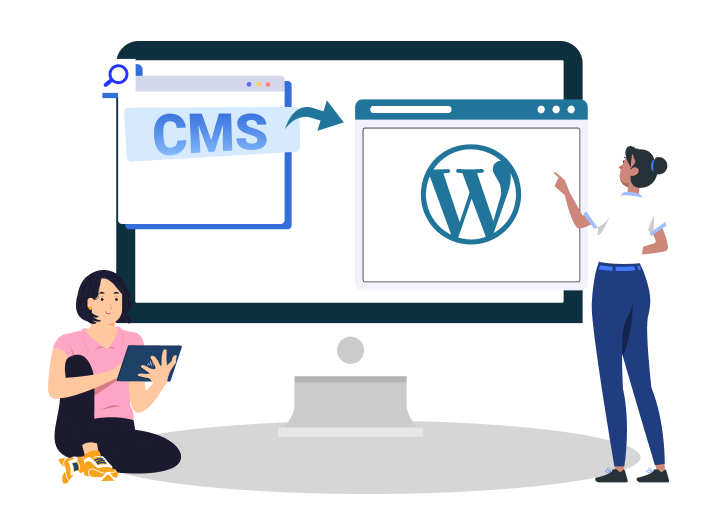
CMS to WordPress migration gives businesses easy content management, quick navigation, and an impressive user interface. Since WordPress boasts a large plugin and theme ecosystem, it is greatly preferred by brands that want to grow in the competitive market.
Businesses often worry about SEO loss, site downtime, broken URLs, and plugin issues while migrating their CMS. Expert migration services handle these concerns with technicality and strategy.
Craft CMS to WordPress migration is a viable option only when you follow the correct migration process, which requires a thorough, structured migration plan.
This guide explains how to migrate your Craft CMS to WordPress without worrying about losing important data, site structure, and SEO data. It also provides information on how WordPress offers better features and usability.
This blog prepares CTOs, marketing teams, agencies, and SaaS companies for a secure migration process by ensuring SEO consistency, smooth WordPress setup, and explaining how your site can run efficiently in the long run.
What is Craft CMS to WordPress Migration?
Craft CMS to WordPress Migration is the professional process of transferring your website data to the WordPress platform.
The data includes:
- SEO settings
- Custom fields
- Metadata
- Website content, including graphics, images, and videos
- Webpage structure
A full-fledged website migration involves exporting media files, URL mapping, website structure preservation, custom field mapping, and SEO Metadata preservation.
Why Businesses Migrate Craft CMS to WordPress
Businesses in 2026 are hurriedly shifting their Craft CMS websites to WordPress for a number of reasons. Easy usage, customizable themes and templates, user-friendly interface, and responsive website functionality remain the top reasons why people migrate to WordPress.
Easier Content Management for Marketing Teams
Marketing is an integral part of a business workflow. WordPress offers a user-friendly dashboard that is easy to use, making marketing a swift task for the team.
A WordPress CMS is not only easily manageable, but it also reduces dependency on developers by offering customizable integrations and advanced analytics. Marketing teams can easily use these tools to quickly create marketing campaigns.
Larger Plugin & Integration Ecosystem
Compared to Craft CMS, WordPress offers more flexibility when it comes to plugin integration. WordPress has a large plugin repository that allows people with no technical knowledge to add features and edit themes as per usage.
WordPress also provides SEO plugins to help your website rank higher on the search engine results page. You can also leverage its E-commerce tools, CRM integrations, and multilingual plugins.
The automation tools provided by WordPress add an extra layer of ease for businesses. It can automate most of the manual tasks like post scheduling, publishing, etc.
Lower Development & Maintenance Costs
WordPress is a renowned platform; hence, you can find a large developer community online. Your team can seek help at different stages in case they are stuck.
It reduces ongoing maintenance effort and cost, as you can hire reliable WordPress developers pretty easily on the internet.
Better Scalability for Content-Driven Websites
Whether you run a blogging website or a fully-functional enterprise site, WordPress offers powerful and intuitive content editing and publishing features that help businesses create and organize content on their website.
Touched with the advanced WooCommerce capabilities, businesses can transform their website for secure transactions and easy catalog management.
Improved SEO & Marketing Flexibility
SEO and digital marketing are at the core of WordPress, making it super effortless for e-commerce businesses to reach a wider audience and leave long-lasting impressions.
Tools like landing page builders help in creating conversion-ready webpages without worrying about technical aspects. You can also integrate analytics tools, conduct testing on different products, and use other customer engagement tools for maximum conversions and improved user experience.
Who Should Migrate from Craft CMS to WordPress?
Now comes the important question: Is WordPress suitable for everyone? Who should ideally migrate from Craft CMS to WordPress?
WordPress has various features and benefits that fit well in a spectrum of business sizes and categories. The platform is ideal for:
- SaaS companies
- Enterprise brands
- Publishers
- Agencies
- eCommerce businesses
- Growing startups
- Content-heavy websites
Common Migration Triggers
Migrating to WordPress becomes crucial in multiple scenarios. Migration is unavoidable when your existing Craft CMS platform limits your business growth, and content management requires a lot of effort and time.
Here are the major situations that require switching to WordPress from your current CMS platform.
- Difficulty in content scaling: When your CMS makes it difficult to scale and modify content in real-time.
- High development dependency: You need a WordPress CMS if your current one is highly dependent on tech specialists and developers for development and custom requirements.
- Expensive maintenance: If you are spending a significant amount on website maintenance very frequently, you should switch to WordPress for seamless maintenance.
- SEO limitations: Not getting the expected rankings? WordPress offers advanced SEO tools for higher rankings and greater online traffic.
Key Challenges When Migrating Craft CMS to WordPress
Migration is a complicated task that requires working on different fronts to ensure complete functionality and high-end performance. From maintaining the search engine rankings to ensuring safe data transfer, it needs complete concentration and attention to detail.
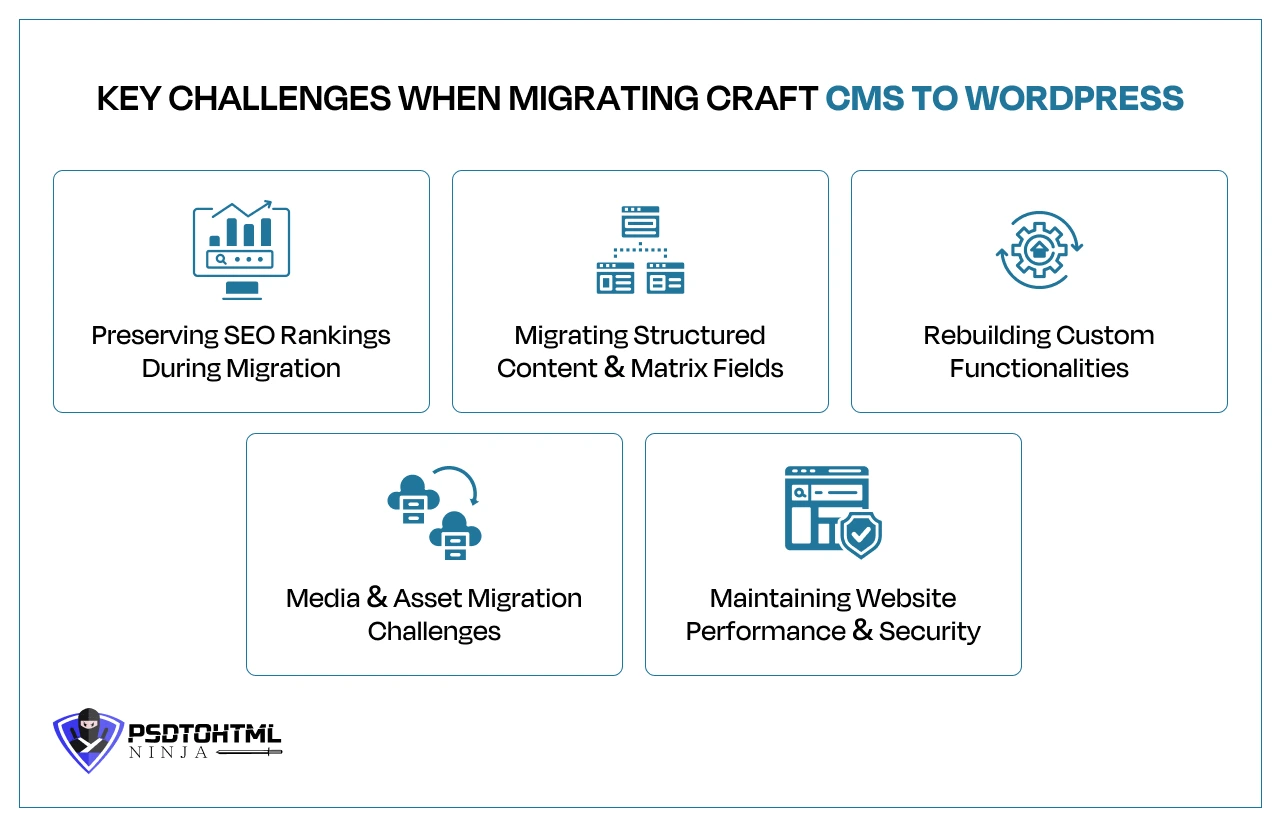
In order to ensure your website is transferred to WordPress, certain challenges need to be addressed.
Preserving SEO Rankings During Migration
Migration requires transferring all website data to a new CMS. During this process, content, essential data like Metadata, customer information, website structure, and SEO structure can be lost.
Preserving your website's SEO rankings becomes important. Here is what you should ensure while migrating to WordPress:
- URL changes: Keep the URL structure consistent for all the webpages.
- Redirects: Set up 301 redirects so the web crawlers know where the correct webpage is.
- Metadata migration: All the Metadata, including meta tags, meta descriptions, etc., should be safely transferred to the new setup.
- Schema markup: Structured data and schema markup should be maintained for enhanced search engine visibility, rich snippets, and improved click-through rates.
- Indexing issues: Monitor indexing after migration to ensure search engines can properly crawl and index the new website without duplicate content or crawl errors.
Migrating Structured Content
This part is the most challenging aspect of the Craft CMS to WordPress migration. Transferring structured content and matrix fields requires the use of complicated content models and architecture.
While migrating your CMS, carefully map these features to WordPress with extreme precision. You can also use advanced tools to create similar functionalities. However, hiring a reliable migration expert like PSDtoHTMLNinja is recommended for error-free CMS migration.
Rebuilding Custom Functionalities
Most websites use custom features and functionalities that cannot be directly migrated from Craft CMS to WordPress. While WordPress offers a plethora of plugins, using certain features requires rebuilding.
Create a list of functionalities that need to be rebuilt, analyze their usage, and seek the help of a trained developer to ensure a smooth user experience and optimum performance.
Media & Asset Migration Challenges
Transferring media files from Craft CMS to WordPress is not a cakewalk. The images should be properly labeled, all the image alt text should be migrated in the correct format, and CDN handling should be done with precision.
Maintaining Website Performance & Security
Maintaining the website performance and ensuring that it remains consistent throughout its life is a huge challenge. When you migrate to WordPress, make sure to set up the Core Web Vitals for better user experience and interactivity, caching of webpages for fast loading speed, and overall performance optimization.
Technical Architecture of Craft CMS to WordPress Migration
When it comes to migrating from Craft CMS to WordPress, having a solid grasp of the technical architecture of both platforms is crucial. Thoughtful planning is key to ensuring that your data stays accurate, your SEO remains intact, your functionality carries over, and your users enjoy a smooth experience.
Here are some important technical aspects to keep in mind during the migration:
Understanding Craft CMS Database Structure
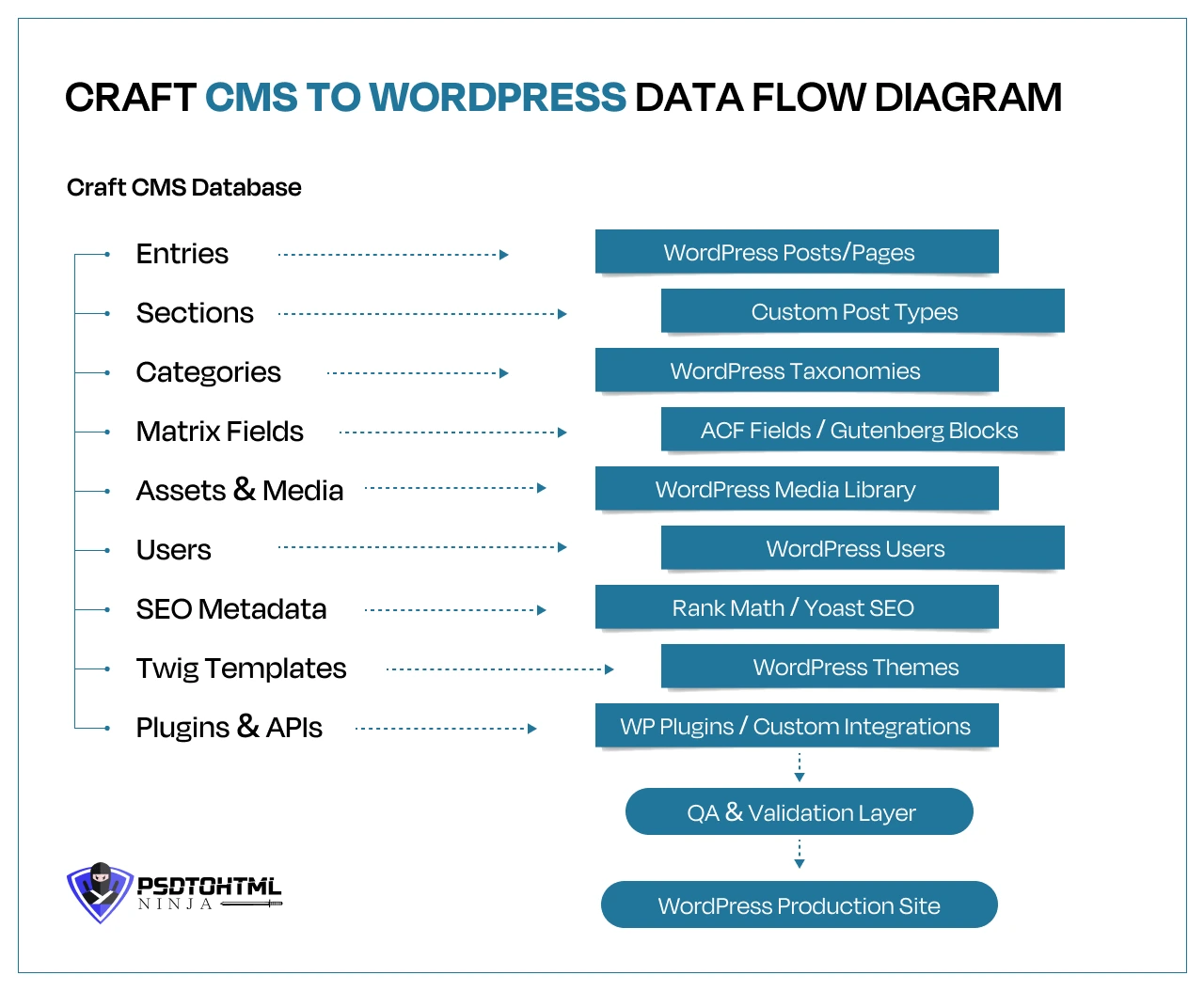
It is crucial to take a good look at the Craft CMS database structure. Craft organizes content through sections, entries, categories, assets, users, and custom fields, often linking them through intricate relationships.
Grasping how this data is set up is key for developers to devise a solid migration strategy, ensuring that no vital information slips through the cracks during migration.
Mapping Craft Entries to WordPress Post Types
Careful mapping of Craft CMS entries to their WordPress counterparts is essential. Standard content typically transitions smoothly as pages or posts, but custom sections often require more effort, needing to be recreated as custom post types and taxonomies.
This thoughtful mapping keeps content relationships intact, along with navigation structures and content management workflows.
Migrating Matrix Fields to ACF or Gutenberg Blocks
Matrix fields are among the standout features of Craft CMS, offering flexible content layouts. Since WordPress doesn’t have a direct match for these fields, they are usually recreated using Advanced Custom Fields or Gutenberg blocks.
This method not only preserves content flexibility but also enhances the editing experience for content managers.
Migrating Twig Templates to WordPress Themes
Craft CMS is built on Twig templating, while WordPress operates with PHP-based themes and block templates.
When you are migrating, it is essential to convert those Twig templates into themes that are compatible with WordPress, all while keeping the website's design, functionality, responsiveness, and performance intact.
Handling Custom Plugins & Third-Party Integrations
A lot of Craft CMS websites rely on custom plugins and various external integrations. Each plugin needs to be assessed to see if there's a WordPress equivalent available or if you will need to develop something custom.
Pay special attention to systems like CRMs, payment gateways, analytics platforms, and marketing automation tools.
Recommended Migration Workflow Architecture
A well-structured migration workflow usually involves steps like content auditing, database mapping, setting up a staging environment, migrating content, developing themes, testing integrations, validating SEO, ensuring quality assurance, and finally deploying the site.
A strategic approach reduces risks and makes the transition from Craft CMS to WordPress much smoother.
Pre-Migration Planning Checklist
Before moving to the core migration process, the website backup should be created, the URL structure of the webpages should be scanned, and the export of data should be carefully done.
Here is a complete pre-migration checklist you should be aware of:
- Full website backup
- Crawl all existing URLs
- Export metadata
- Audit existing content
- Identify custom fields
- Benchmark current SEO rankings
- Analytics backup
- Redirect planning
- Staging environment setup
- Plugin replacement planning
Expert Tip:
Never perform migration directly on the live website.
Step-by-Step Process to Migrate Craft CMS to WordPress
Now comes the important part of this guide: what does Craft CMS to WordPress Migration look like? Let us go through the process step-by-step.
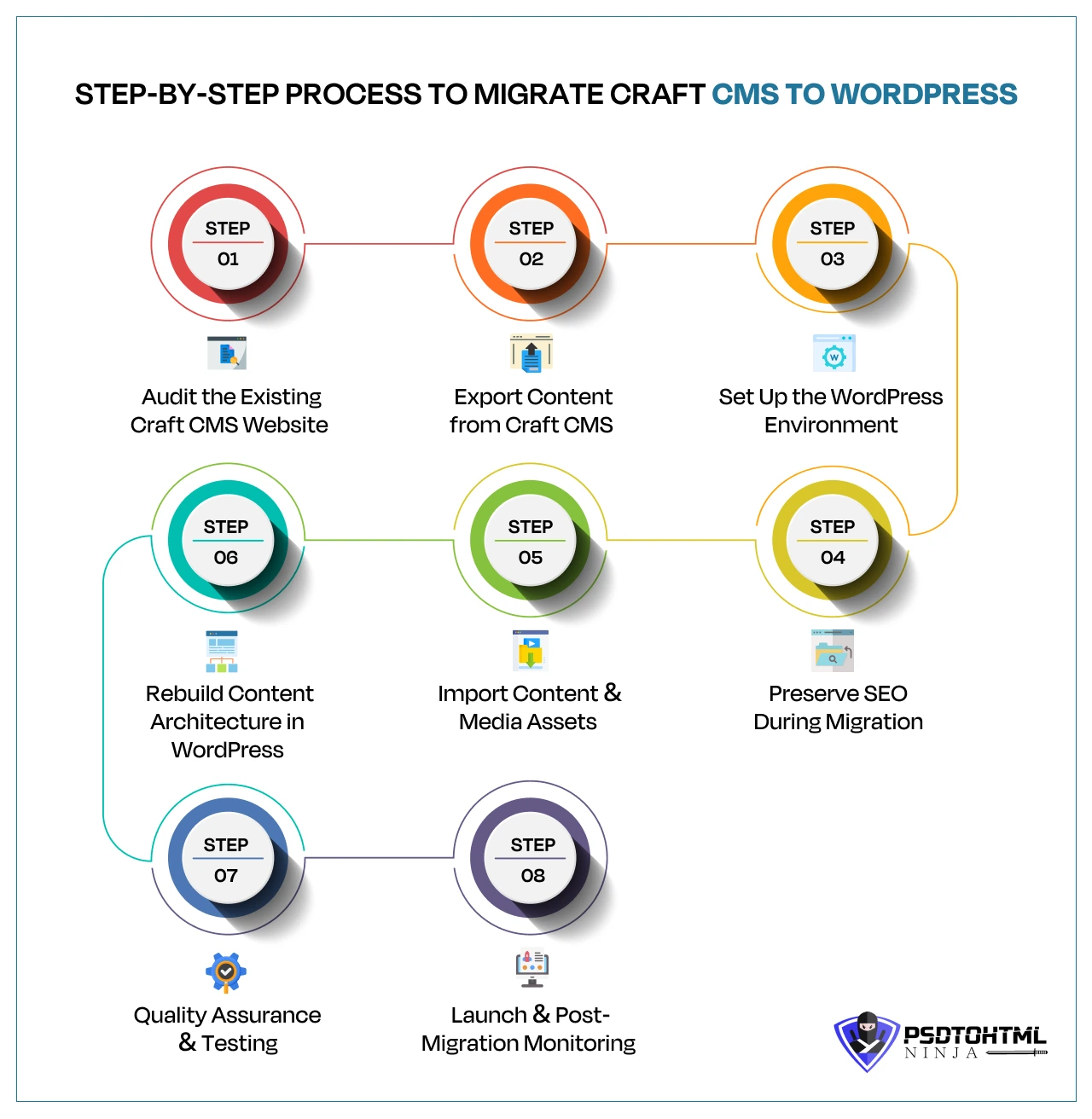
Step 1: Audit the Existing Craft CMS Website
The first step.involves checking your existing Craft CMS website. This includes a complete website audit to help you determine what needs to be exported.
You should check the content inventory, field structure, templates, plugins, integrations, etc. Make sure the required data is backed up so it remains safe throughout the migration process.
Step 2: Export Content from Craft CMS
The next step involves exporting content from Craft CMS and creating a secure backup. This can include content and database exports, API exports, JSON/XML exports, and custom migration scripts.
All the data should be securely placed so nothing is lost, and your migration goes smoothly.
Step 3: Set Up the WordPress Environment
Open your WordPress, log in to the account, or create a new one. This step includes:
- Hosting selection: Select a professional and reliable hosting provider that guarantees superior performance, strong backups, and security features.
- Staging setup: A staging environment will help you test the website before it goes live.
- Security configuration: All the important security measures like SSL certificates, firewalls, malware protection, and backup systems should be properly set up.
- Plugin stack preparation: All the required plugins for SEO, security, caching, backups, etc. should be installed and implemented.
Step 4: Rebuild Content Architecture in WordPress
It is essential to reconstruct the content structure within WordPress to ensure consistency and enhance content management capabilities.
This is done through:
- Custom Post Types: Develop custom post types to categorize specialized content such as portfolios, services, case studies, testimonials, or products.
- Taxonomies: Establish categories, tags, and custom taxonomies to enhance website organization, navigation, and content discoverability.
- ACF Setup: Implement Advanced Custom Fields to create adaptable and scalable content fields for improved content management and customization.
- Gutenberg Blocks: Redesign page layouts and reusable content sections utilizing Gutenberg blocks for a contemporary and user-friendly editing experience.
Step 5: Import Content & Media Assets
Now that all the setup is completed, we need to start importing content and media assets to our WordPress website.
- Media migration: This includes transferring media files like images, videos, PDFs, and other related files to the WordPress library.
- Image optimization: Images should be compressed as per the correct standards to ensure faster loading speed of the website.
- Content formatting cleanup: Analyze the imported content to ensure font and structure consistency. Check for broken layouts, missing elements, and inconsistent styling.
Step 6: Preserve SEO During Migration
This step is extremely crucial as SEO is the backbone of any website. Preserving the SEO during CMS migration involves taking the right steps to maintain the site’s online ranking.
This is done by:
- 301 redirects: As part of 301 redirects, the URLs are checked and changed to new WordPress URLs to avoid broken pages and SEO loss.
- Metadata migration: Meta description, meta title, image alt text, and other tags should be properly migrated to WordPress.
- Canonical tags: Canonical tags are configured to avoid duplicate content entries.
- XML sitemap setup: Updated sitemaps should be generated and submitted to search engines; this helps the web crawlers to index the website faster.
- Robots.txt: The robots.txt files should be reviewed to ensure important pages are crawlable while restricting unnecessary sections.
- Schema markup: Enabling schema markup helps implement structured and better search engine understanding.
- Internal links: All the backlinks and internal links should be well-structured, consistent, and linked to the correct source for better SEO performance.
- Broken link fixes: Review the webpages of your WordPress website and fix broken links, if any.
Step 7: Quality Assurance & Testing
Now that your Craft CMS to WordPress Migration is almost done, it is time to do the final checks before launching the website. The following tests should be run:
- Mobile responsiveness: The migrated website should be optimized for mobile usage.
- Form testing: Forms on your website should work properly without errors.
- Page speed checks: Each page of your website should load quickly, including the images and heavy media files.
- Browser compatibility: Make sure your website is cross-browser compatible, which means it should perform optimally on different browsers.
- Crawl testing: Crawl testing will help you identify indexing issues, duplicate content, and missing pages.
Step 8: Launch & Post-Migration Monitoring
Finally, the WordPress website migrated from Craft CMS has been launched at this stage. To keep it running, monitor the performance as part of the post-migration maintenance:
- Indexing monitoring: Make sure the webpages are indexed well post-migration.
- Ranking checks: Your website should rank well on the search engine result pages.
- Traffic tracking: Use the analytics and SEO tools to test the online traffic flow.
- Error monitoring: Keep an eye on the overall performance and immediately fix errors that occur.
SEO Preservation Checklist for Craft CMS Migration
Search Engine Optimization is a key component of your website. The success of your business and audience traction heavily depend on the SEO structure. It directly affects your online visibility, organic traffic, and lead generation.
However, during the migration process, even a minor change can affect your website’s SEO performance if not done correctly. To help you avoid issues like less traffic, high user drop rates, broken links, and low search engine rankings, we have created an SEO checklist for Craft CMS migration.
Follow these best practices to stay on top of your SEO game:
- Preserve URL structure
- Implement 301 redirects
- Migrate title tags & meta descriptions
- Preserve canonical tags
- Update XML sitemap
- Fix broken links
- Preserve structured data
- Maintain image alt attributes
- Monitor Google Search Console
- Benchmark rankings before & after migration
Craft CMS vs WordPress: Key Differences
| Feature | Craft CMS | WordPress |
|---|---|---|
| Ease of Use | User-friendly to some extent, but requires technical expertise | Beginner-friendly and minimal learning curve |
| SEO Flexibility | SEO through plugins | Custom SEO features and plugin usage |
| Plugin Ecosystem | Smaller plugin ecosystem | Extensive plugin ecosystem with 60,000+ plugins |
| Developer Dependency | Technical knowledge required, dependency on developers | Low developer dependency, custom themes available |
| Maintenance Cost | High maintenance due to technical requirements | Low maintenance |
| Scalability | Highly scalable | Highly scalable |
| Marketing Features | Requires custom development for additional features | In-built marketing tools are available |
| Community Support | Small community | Large community |
Growth-oriented businesses often prefer WordPress as they need a website that evolves with them. WordPress is capable of handling bulky customer data, product catalogues, and other information.
Its pre-built and customizable themes make WordPress a top choice for brands that want quick results. Apart from that, the platform offers easy customization for additional features. Overall, WordPress remains a top choice for rapidly growing brands.
Best Tools for Craft CMS to WordPress Migration
A successful CMS migration is all about careful planning, having the right tools, and following a structured approach to transferring your data.
Whether you are moving a small business website or a large enterprise platform, using dependable migration tools can help you keep your content intact, maintain your SEO rankings, minimize downtime, and make your workflows smoother.
From importing content and managing custom fields to handling redirects and optimizing performance, the right set of tools can make your transition from Craft CMS to WordPress quicker, safer, and a whole lot more efficient.
Use the tools mentioned below to tackle migration challenges:
- WP All Import: WP All Import is perfect for transferring large amounts of content, custom fields, users, categories, and media files into your WordPress site. It automates data migration, which means less manual work for your team.
- Advanced Custom Fields (ACF): This tool is designed for recreating custom content structures and field groups from Craft CMS right in WordPress. This is especially handy for sites that have intricate content needs.
- Rank Math / Yoast SEO: Both these plugins help you manage everything from meta titles and descriptions to schema markup and XML sitemaps, ensuring your SEO settings are in tip-top shape after migration.
- Screaming Frog: This website crawling tool is invaluable for auditing URLs, metadata, internal links, redirects, and broken pages both before and after migration, helping you maintain SEO consistency.
- Redirection Plugin: The Redirection Plugin makes it easy to create and manage 301 redirects, which is crucial for keeping your search rankings intact and making sure visitors land on the right pages.
- Duplicator: This handy tool creates full backups of your website and migration packages, making it a breeze to move or restore your WordPress sites whenever you need to.
- WP Migrate: It simplifies the process of transferring databases, media files, themes, and plugins between your development, staging, and production environments with ease.
- Cloudflare: This service boosts your website's speed, security, and reliability by offering CDN services, caching, DDoS protection, and performance optimization.
- Git-based deployment workflows: These workflows provide improved version control, enhance team collaboration, track code changes, and ensure safer deployment of website updates throughout your migration project.
Common Mistakes to Avoid During CMS Migration
Migrating from Craft CMS to WordPress is a complicated task. Everything should be perfectly aligned to ensure a smooth and streamlined migration. A small mistake can negatively affect the website's performance, along with the user experience.
Understanding the most common CMS migration mistakes can help ensure a smoother transition and protect your website's performance.
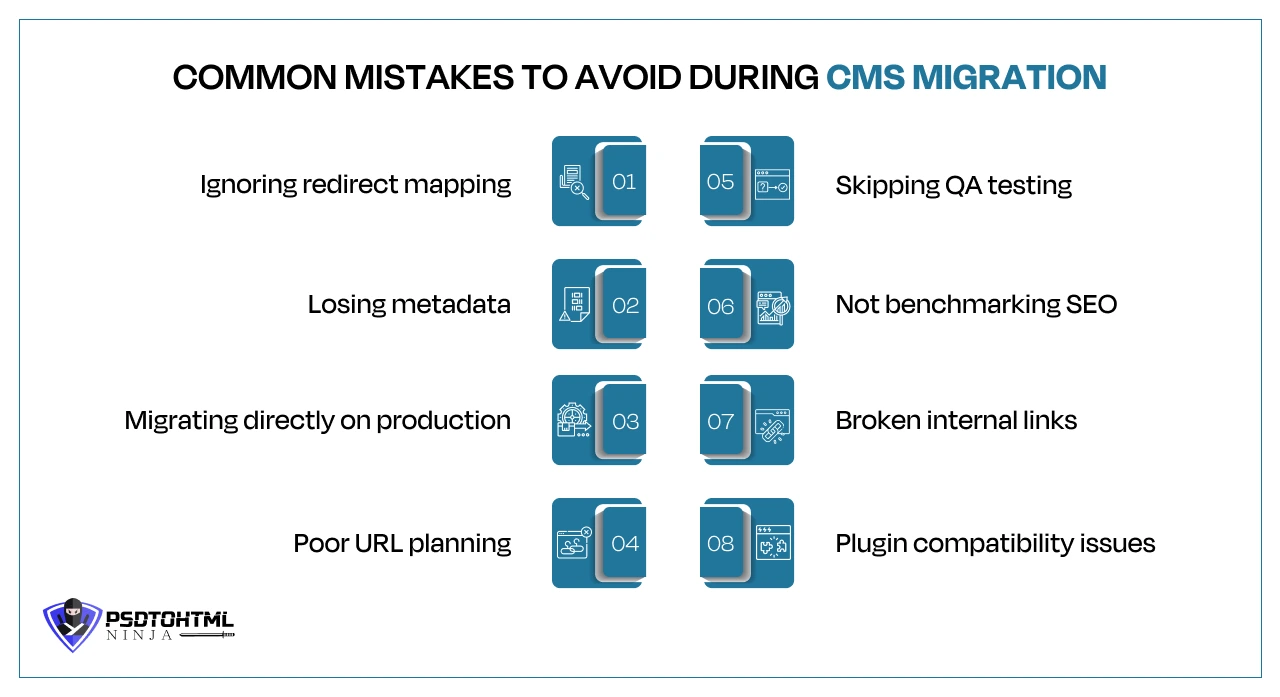
We have compiled a list of the common mistakes you can avoid while migrating your CMS:
- Ignoring redirect mapping: If you neglect to set up proper 301 redirects, you could end up with broken pages and a significant loss in SEO value. It’s crucial to ensure that every old URL is correctly mapped to its new WordPress counterpart.
- Losing metadata: Meta titles, descriptions, canonical tags, and other essential SEO elements of your website are important for smooth performance. If these are not migrated accurately, a significant drop in search visibility and click-through rates can occur.
- Migrating directly to production: Carrying out migration tasks on a live site can lead to downtime and errors that users might encounter. Always opt for a staging environment to test everything before going live.
- Poor URL planning: Changing your URL structure without a solid plan can confuse both users and search engines. It’s best to keep your URLs consistent whenever you can.
- Skipping QA testing: Comprehensive quality assurance testing is vital. It helps catch content issues, formatting errors, missing media, and functionality problems before your site goes live.
- Not benchmarking SEO: Setting up SEO benchmarks before migration is essential. This way, you can track performance changes and quickly spot any issues that arise post-migration.
- Broken internal links: Internal links can easily break during migration if URL changes aren’t updated properly. Regular audits are a great way to find and fix these problems.
- Plugin compatibility issues: Not all WordPress plugins play nicely together. Testing for compatibility in advance can help you avoid conflicts, security risks, and performance hiccups.
Factors That Affect Craft CMS to WordPress Migration Cost
The cost of migrating from Craft CMS to WordPress can vary based on a mix of technical and business factors. A simple migration can cost decently, but the price increases with project complexity, website size, backup size, website security, custom features, and more.
Here is a list of the most important factors affecting the Crafr CMS to WordPress migration cost:
- Website size: The total number of webpages, blogs, forms, comments, product catalogues, etc., impacts the overall migration cost.
- Content complexity: Custom content types, intricate structures, dynamic elements, or advanced field setups require extra effort to replicate that functionality in WordPress, elevating the migration pricing.
- Custom functionality: Any custom modules, membership areas, booking systems, calculators, forms, or specific business workflows may need to be rebuilt using WordPress plugins or through custom development, leading to extra costs.
- Multilingual setup: For websites that cater to multiple languages, migrating involves not just transferring translated content but also ensuring that language-specific URLs are preserved and configuring multilingual plugins like WPML or Polylang.
- SEO migration scope: To maintain your SEO rankings, it is crucial to migrate metadata, schema markup, XML sitemaps, canonical tags, and set up proper 301 redirects. The larger your SEO footprint, the more effort will be required for a successful migration.
- Integrations: Third-party integrations like payment gateways, multi-currency setups, plugins, etc., involve extra coding and customizing the website structure. This extra effort adds to the overall migration cost.
- Redesign requirements: In case you want to redesign certain aspects of your website, like the background, layout, menu, search icons, etc., you would need to pay some extra charges.
When it comes to enterprise websites, they include extensive content libraries, intricate workflows, heightened security needs, and a host of integrations. Because of this complexity, migrating from Craft CMS to WordPress for enterprise projects demands careful planning, thorough testing, and customized migration strategies.
How Long Does a Craft CMS to WordPress Migration Take?
The complete timeline for migrating Craft CMS to WordPress depends on the size of your website and the effort required to move all the content to the new site. Factors like the custom features, UI/UX design changes, and other additional requirements elongate the migration timeline.
The migration cycle is different for distinct types of websites:
- Small business websites (2-4 weeks): A site with a few pages and straightforward content, the migration can usually be done pretty quickly. This typically includes moving over the content, setting up the theme, ensuring SEO is preserved, and running some quality tests.
- Enterprise websites (2-6 months): For larger sites, various user roles, custom workflows, and lots of integrations, the migration process is a bit more complex. It needs extra time for planning, mapping out data, testing, and getting approvals from stakeholders.
- Multilingual websites (1-3 months): Sites that cater to multiple languages require more effort and time. It includes managing language-specific URLs, ensuring proper content setup, localization settings, and configuring multilingual plugins to create a smooth experience for users.
- Highly customized platforms (3-6+ months): Websites with custom modules, membership systems, booking engines, eCommerce features, APIs, or other business-specific applications require a significant amount of redevelopment within WordPress, stretching out the migration timeline.
Post-Migration Optimization Best Practices
After the CMS migration, your website still requires some work and monitoring. This ensures a well-maintained website, consistent traffic flow, impressive user experience, and optimized performance.
Here is the post-migration checklist to follow for an optimized website performance:
- Core Web Vitals optimization
- Image compression
- caching
- CDN setup
- database optimization
- security hardening
- schema validation
- speed testing
Why Choose Professional Craft CMS for WordPress Migration Services
Can you manually migrate your Craft CMS to WordPress? You certainly can, but that leaves a lot of room for errors. One small mistake and all the website data will be lost. You will be left with a non-functional and hollow website.
This is where a professionally-designed Craft CMS to WordPress migration service can help! Hire a migration company that understands your business requirements and suggests the service accordingly.
A well-known and certified agency follows a structured migration roadmap, which includes a project manager who keeps you informed of project development.
Keep the following points in mind while selecting a migration company for your next project:
- Zero downtime migration: Websites may stop working during migration for a number of reasons. However, a professional will ensure zero downtime, which means your online traffic will not be affected. This is achieved by conducting migration during low-traffic hours.
- SEO-safe migration: A certified migration expert follows the best SEO practices to keep your website’s visibility consistent during and after migration.
- Enterprise migration expertise: Hire an agency with experience in enterprise migration. Enterprise websites are heavy and complex; a professional with such experience will effortlessly handle distinct migration complexities.
- Scalable WordPress architecture: Hire someone who can edit and work on a scalable WordPress architecture for future business growth. Your CMS should be able to grow with your expanding customer base.
- QA testing: The agency you hire should provide QA testing services where they maintain the quality of your migrated WordPress website. This includes SEO checks, performance optimization, mobile compatibility, etc.
- Post-launch support: Hire a company that also provides post-launch support. Your website may start acting up after its launch. Having professional assistance in such cases helps reduce website downtime and traffic drop.
- Dedicated migration specialists: A team of dedicated migration experts ensures a quality end-to-end migration process. From creating a migration plan to execution, customization, and testing, all stages are handled with expertise by migration specialists.
Apart from these points, businesses should focus on the agency’s years of experience. Checking its online reviews and analyzing the portfolio also helps in making the right choice.
Frequently Asked Questions (FAQ)
1. Is it difficult to migrate Craft CMS to WordPress?
A manual migration can be challenging and complex. But hiring an expert migration agency can lessen the burden for you. They handle the entire migration process so you can focus on other important business decisions.
2. Will I lose SEO rankings after migration?
No. When you hire experts for WordPress migration, they secure your SEO rankings by following the right practices.
3. Can custom fields and matrix fields be migrated?
Absolutely, every content and data type can be migrated as long as you have the required assistance. Migrating custom fields requires additional coding, which can lead to extra migration charges.
4. How long does Craft CMS migration take?
The migration process takes a few weeks to months, depending on your website size and project complexity.
5. What is the average migration cost?
The actual migration cost is quoted after a developer or migration expert analyzes your project requirements and expectations. Contact our team for a fair price quote.
6. Can you migrate multilingual websites?
Yes, we have the required expertise to migrate multilingual websites to WordPress. You can bring any CMS or website, and our team will create a structured roadmap for smooth migration.
7. Should I redesign my website during migration?
If the layout, navigation, or any other feature of your existing website seems off, you can always get it redesigned during the migration process.
8. Which is better for SEO: Craft CMS or WordPress?
If you own a business that is growing rapidly and requires frequent upgrades, then switching to WordPress is the wisest option for you.
9. How do you prevent downtime during migration?
Our team conducts the last phase of migration and deployment during the low traffic hours, minimizing downtime. We also set up 301 redirects to keep the search engine informed about the URL changes.
10. Can existing integrations be preserved?
Yes, most of your existing integrations can be preserved if they fit well within the WordPress ecosystem. If not, our trained developers can recreate them.
Final Thoughts
Craft CMS to WordPress migration is a complicated service requiring technical expertise, a careful migration plan, SEO checks, and highly secure data transfer.
Such complicated tasks can only be handled via strategic migration planning that involves creating a roadmap, identifying custom feature requirements, and keeping the performance metrics in check.
Compared to manual CMS migration, a professional WordPress migration service guarantees SEO preservation and long-term website scalability. Are you looking for an expert migration agency to handle your end-to-end migration?
Consult PSDtoHTMLNinja for guaranteed results. Our dedicated developers ensure SEO preservation through URL mapping, 301 redirects, and complete metadata transfer.
With 14 years of experience, we bring expertise and reliability to the table. Contact our experts now and get a free service quote!

Jayveer Ker serves as the Business Development Manager at PSDtoHTMLNinja.com, specializing in assisting organizations with overcoming web development hurdles. His insightful and informative posts deliver practical solutions and valuable insights.
Couldn't find what you were looking for?
Let us know how we can help!

Related Blog Posts