Table of Content
WordPress is easy to use and offers a huge collection of themes and plugins, but when it comes to handling high-performance and complex sites, it may not give the desired results. This is where you can count on Drupal. It offers security, flexibility, and performance you need to create a robust digital presence, making it a perfect alternative to WordPress.
In this detailed guide, we will learn the process of a successful WordPress to Drupal migration and also explore some benefits of shifting to Drupal. We have also mentioned some tools that can help you with this process. But let’s first understand the reasons for migrating WordPress to Drupal.
Why Migrate Your WordPress Site to Drupal?
The decision to opt for a WordPress to Drupal migration is greatly influenced by the impressive advantages of Drupal to create complex, scalable, and content-rich websites.
- Enhanced permission control and user roles.
- Highly flexible custom content views and content types.
- A highly adaptable taxonomy system to easily handle a huge amount of content.
- Offers features to create multilingual websites without using any third-party tools.
- The templates are easier to use and more robust.
- A well-known platform offering enterprise-grade security along with a dedicated security team.
- Supports advanced caching options to boost performance while lowering server load.
- A perfect option for a decoupled or headless approach, it can be used as a high-performance backend content repository to feed data to different frontends.
- More SEO-friendly compared to WordPress and offers built-in SEO features.
Now that we have explored the benefits that you can enjoy with this migration, let’s have a look at the considerations and planning for a successful WordPress to Drupal migration.

Things to Consider For A WordPress to Drupal Migration
A successful migration starts with strategic planning and careful consideration. Here are some crucial things that you need to consider before getting started with the process:
1. Perform a website audit to understand your website's complexity and size. A large website with complex design and content will take more resources and time to migrate.
2. Ensure that the existing plugins or tools are compatible with the Drupal version you want to use, or have similar alternatives.
3. Due to its resource usage and complexity, Drupal requires a robust hosting solution to function smoothly. So, choose one that is optimized for Drupal.
4. Understand your team’s technical skillset, and for a complex website, prefer to hire a Drupal developer with unwavering expertise.
5. Create a perfect SEO preservation plan and preserve your existing URL structures as much as possible.
Keep these important things in mind, and you can avoid frustration related to data loss or other technical issues. Now let’s start with the 7-Step easy process for migrating WordPress to Drupal.
Read this: Step-by-Step Guide to PSD to Drupal Conversion
WordPress to Drupal Migration: The Process
Step 1. Preparation and Planning
Perfect planning and preparation are the keys to a successful WordPress to Drupal Migration. Some important points to consider here are:
- Assess your current WordPress site to decide which content you need and what can be avoided.
- Backup your entire WordPress site, including settings, databases, and content.
- Select the best theme as well as modules for your Drupal site.
- Get familiar with the interface of Drupal and understand its features and available elements.
Step 2. Exporting WordPress Content
Once you have everything prepared and backed up, you can start exporting content from your WordPress site.
- Visit Tools and click on the Export option.
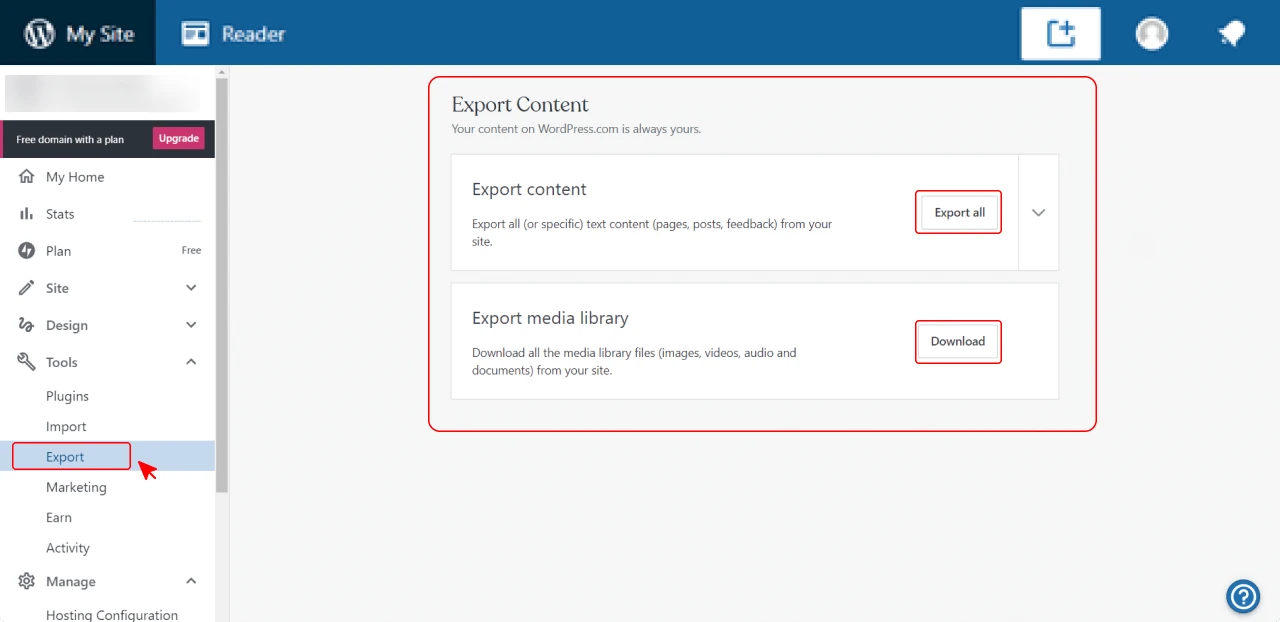
- Now choose the “All Content” option.
- Tap on the Download Export File button.
This will download the content as an XML file.
Apart from this method, you can also use the WordPress Migrate module to transfer the database from WordPress to Drupal without downloading an export file.
Step 3. Setting Up A New Drupal Website
Installing and configuring your new Drupal site is a straightforward process.
- Choose a reliable hosting provider and install Drupal. Some service providers offer one-click Drupal installation.
- After installation, configure the basic settings to make the platform ready for the migration process.
Step 4. Installing Required WordPress Migration Modules
With your new Drupal site running, you now need to install some required tools for the process. To import your XML file, you will need the WordPress Migrate module. It has multiple dependencies, and to work correctly, it requires other modules to be enabled. For a successful import, you will need the following modules:
Step 5. Configuring Basic Elements
Before you can start importing the content, you need to configure some basic elements in Drupal. Assign appropriate taxonomies such as categories and tags, map your WordPress users to new Drupal roles, and create menus.
Step 6. Importing Content
For this, you can use the WordPress Migrate module.
- Click on the Admin option and then tap on Structure.
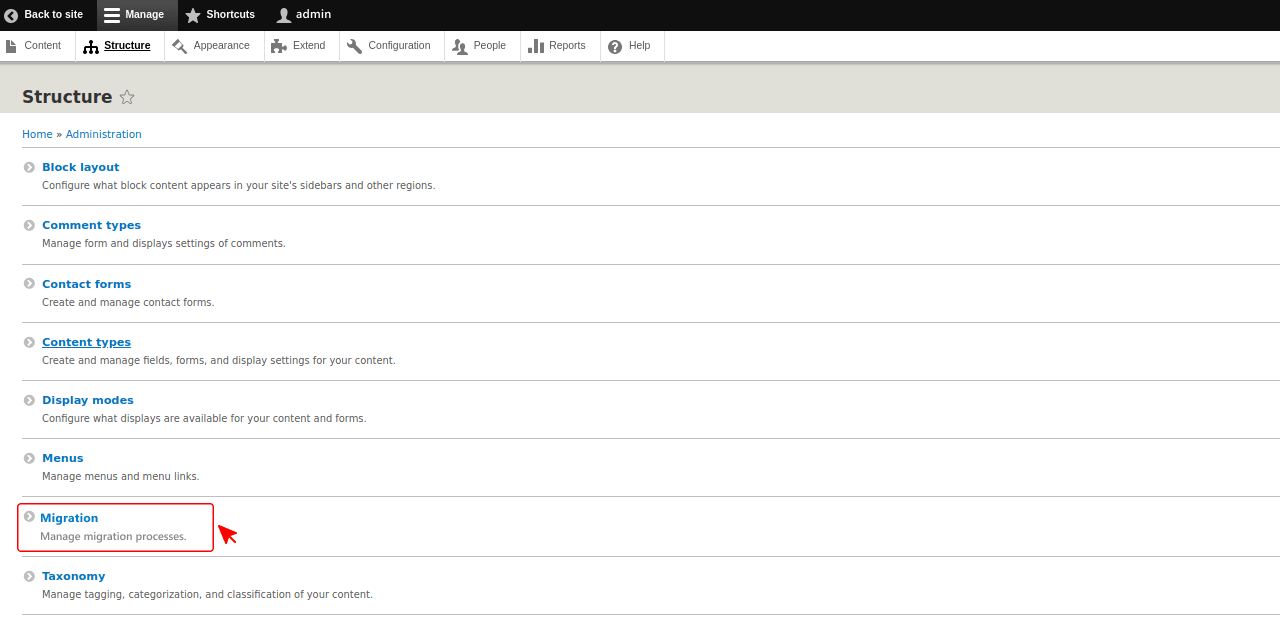
- Choose the Migrations option.
- Now, click on the Add migration group option.
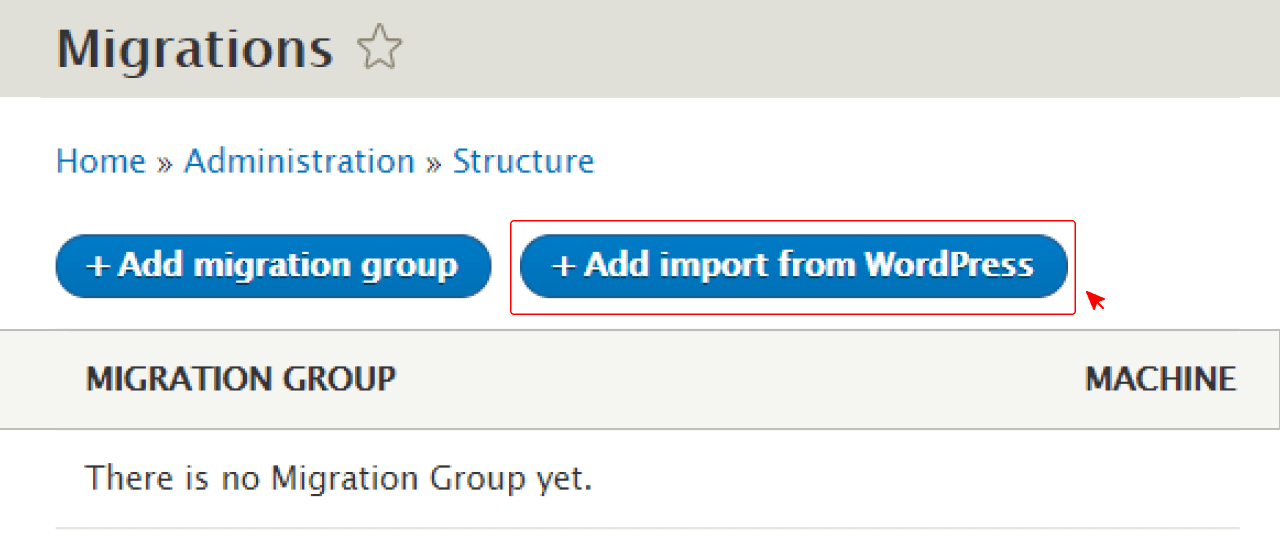
Configure the database source by entering your database name, user name, host, and password.
Manually upload the imported XML file, and you can click on the Add import from WordPress option.
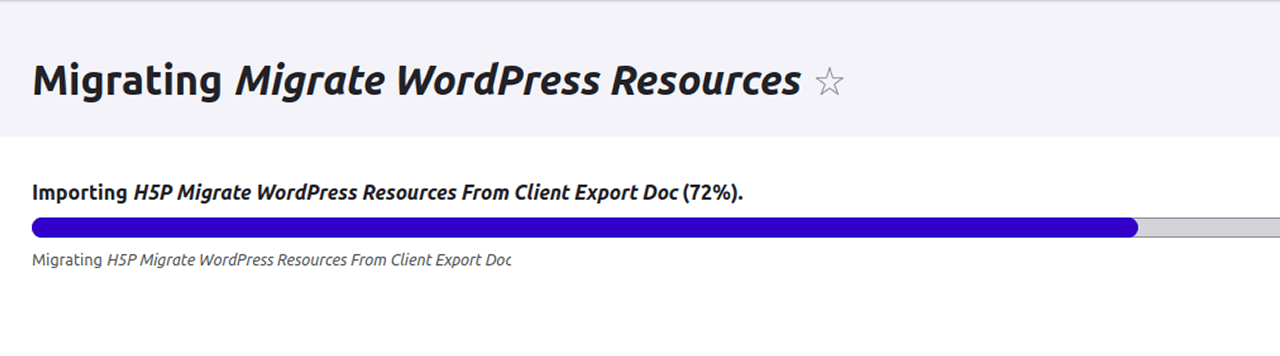
Run the migration, and the module will automatically detect the content and create a migration process for each task.
Step 7. Test and Launch
Once you are done importing the content to Drupal, test it thoroughly for missing content, functionality issues, and broken links. Make sure that your new site works well on different devices and browsers. After a final check, you can launch your new site. You may also need to update the DNA configurations to point the domain to the new server.
Now, let us know the tools and modules you will require for this migration.
Tools & Modules You’ll Need
While these are some useful tools and modules you can use for migration, there are more such tools available to use for different purposes.
Know more: How to Migrate From Magento To WordPress
Common Challenges and How to Avoid Them
The fundamental difference in the data structure and architecture of these two CMS can make the migration process complex. To help you with this, we have listed some common challenges you may face along with solutions. Have a look.
1. Module Compatibility
It is common to face issues with custom modules during the migration. These modules generally need replacements or updates to function correctly with the latest Drupal versions. If not taken care of, it can cause broken functionalities.
Solution: Properly check migration logs to find out warnings and errors. You can use tools like Migrate Plus to get detailed logs. Don’t forget to test your new modules before enabling them.
2. Errors in Data Mapping
Incorrect data mapping is a major reason behind migration errors. If not done properly, it can lead to data corruption or loss.
Solution: Always validate your data mapping methods. You can also use migration modules that support custom mapping. Once you are done with the migration, test every content body thoroughly.
3. Theme Structure Compatibility Issues
Drupal and WordPress have different theme architectures, and this can make it challenging to recreate your website's appearance. Incompatible themes can affect both the look and the user experience.
Solution: Test custom modules and themes in a staging environment first, then migrate to production. Redesign your theme, considering the strengths of Drupal, instead of investing your time in creating an exact replication.
4. Learning Curve
The admin interface of Drupal may feel complex and unfamiliar. It has extensive customization options and a complex architecture. Besides, users may need to develop technical skills such as CSS, PHP, and HTML.
Solution: Spend time on documentation and tutorials to learn more about the platform’s capabilities and layout. You can also take help from the Drupal community.
5. URL Mapping and SEO
Failing to consider differences in redirects, metadata handling, and URL structures can greatly affect your SEO rankings. Existing URLs may not work properly and may lead to 404 errors.
Solution: Carefully migrate your SEO settings like schema markup, XML sitemap, and meta tags. Use third-party tools to scan the new website for any broken links and fix them with redirects.
All these challenges may look daunting, but with the right resources and a proactive approach, you can make them easily manageable, ensuring a smooth and error-free migration. Now let’s give a comparison between your two websites, i.e., the Old WordPress Website and the New Drupal Website.
Comparison Table: WordPress Vs Drupal ( Before & After Migration)

Conclusion
Migrating to Drupal from WordPress is not just a technical task; it is a strategic upgrade for your existing digital platform. By choosing Drupal, you are investing in a solid foundation that can scale with your business, offering maximum security and handling complex content. If your current CMS is feeling cramped and outdated, Drupal can provide you with the room to grow with confidence.
By carefully following the steps mentioned above, from preparation to importing and testing, you can shift your digital presence to a more capable and robust platform that is ready to meet future challenges. Migrating from WordPress to Drupal may seem complex, but with the right guidance, it's a smooth transition. If you’re looking for expert assistance, PSDtoHTMLNinja is a reliable Drupal Development Company with a proven track record in handling complex CMS migrations.
FAQs
1. Is Drupal Challenging to Use as Compared to WordPress?
Yes, the learning curve of Drupal is challenging, but this platform offers more control and customization than WordPress, making it an excellent choice for every business.
2. Is It Possible to Migrate All My Plugins to Drupal From WordPress?
No, you need to install new Drupal modules or plugins with similar features and functionality. Plugins are platform-specific.
3. How Long Does the Migration Process Take?
It depends on the website’s design complexity and size, the migration method, and other specific requirements. A simple website may take a few hours, but some projects may take several weeks.
4. Will The Migration Process Affect My Site’s SEO Ranking?
Not if the process is carried out correctly using appropriate modules and methods. Besides, you also need to implement 301 redirects for all URLs that you are changing.
5. Is It Possible to Migrate All Content From WordPress to Drupal?
Most of WordPress's content, like categories, posts, tags, pages, media files, etc., can be transferred to Drupal. However, you may need to rebuild custom themes and plugins in Drupal.
6. Should I Hire An Expert For This?
If you have a basic website, then you can follow these steps to complete the migration. However, for a large business website with custom fields and complex designs, it is advisable to hire an expert with proven experience in Drupal migration.

Prince Jadiya holds the position of Chief Marketing Officer at Psdtohtmlninja.com, where he assists organizations in overcoming web development obstacles. He is also known for him informative and engaging blog posts.
Couldn't find what you were looking for?
Let us know how we can help!

Related Blog Posts