Table of Content
So, you’ve been running your site on Joomla for a while. Maybe it served you well in the early days - clean structure, modules, extensions, all that. But now things feel a bit clunky. Maybe you’ve run into limitations. Or updates are giving you more trouble than they’re worth. And maybe you’ve noticed more and more people talking about WordPress.
You’re not alone.
A lot of folks who started with Joomla eventually find themselves eyeing WordPress. Not because Joomla is broken or bad. It’s just that WordPress has become easier to manage, more flexible, and honestly, a bit more future-proof for most website owners.
If you’re thinking of migrating Joomla to a WordPress site, the good news is it’s doable. And no, you don’t have to rebuild everything from scratch or lose years of content in the process.
In this guide, we’re going to walk you through the whole migration without the confusing stuff. Whether you're doing it yourself or just want to understand what your developer is about to do, we’ll break it down into real, simple steps that anyone can follow.
Let’s get into it.
Joomla vs WordPress: Overview
WordPress and Joomla have both been around for a while. More than a decade, actually. And during that time, they’ve each built a loyal user base and added tons of features. But when you zoom out and look at the numbers, one of them clearly pulled ahead.
Let’s start with WordPress.
It came out in 2003, originally just for blogging. Back then it was pretty straightforward. You’d write a post, hit publish, and that was that. But it didn’t stay just a blogging tool for long. Today, WordPress runs more than 43 percent of all websites on the internet. And if you look only at sites using a CMS, WordPress takes up over 62 percent of the market. That’s not just huge; it’s unmatched.
Joomla showed up a bit later, in 2005. It gained traction fast and became the second most used CMS after WordPress. Right now, it powers around 3 percent of websites online and holds just over 5 percent of the CMS market. Still decent, but nowhere near what it once was.
Now here’s the thing. Joomla’s market share has been slowly dipping since around 2010. Not in a dramatic way, just a steady slide. In fact, 2017 was the first time its total website usage started to drop. You can see that shift clearly if you look at Google Trends data. Back in the early 2000s, Joomla was neck and neck with WordPress. But once WordPress hit its stride, Joomla never quite caught back up.
Even with that said, Joomla isn’t dead. It still has some strengths, and depending on what you need, it might actually be a good fit. But in terms of growth, updates, and what most people are using today, WordPress is the one that’s clearly moving forward.
Why Migrate from Joomla to WordPress
If you’re still running your site on Joomla, you’ve probably had this thought at some point: should I switch to WordPress? You’re not alone. A lot of site owners, bloggers, businesses, and even developers have made the move.
Here’s why it keeps happening.
1. WordPress is Easier to Use
This one comes up a lot. Joomla is powerful, but not always friendly. The admin panel can feel overwhelming, especially if you’re not used to how it’s laid out. WordPress just feels more intuitive. Menus make more sense. Editing content is quicker. And if someone else on your team needs to jump in and make changes, they can usually figure it out without needing a walkthrough.
2. Way More Themes and Plugins
With WordPress, you get access to thousands of free and premium themes. Same goes for plugins. Want to add a contact form, an SEO tool, a gallery, a membership section, or even a full-blown online store? Chances are, there’s a plugin for it. And most of the time, you can install it in a few clicks without hiring anyone.
Joomla has extensions too, but not nearly as many. And you might have to dig around more or pay extra for things WordPress offers for free.
3. Updates Are Smoother
Keeping a Joomla site updated can be a bit of a process. You might need to update components separately or worry about things breaking after major changes. WordPress makes this part easier. You get a notification, click update, and you’re done in most cases. And if you’re using a managed WordPress host, sometimes they even take care of updates for you.
4. Better for Content Creators
If your site is content heavy, blogs, news, tutorials, resources, WordPress is built for that. It started as a blogging platform, after all. The editor is simple. You can drag images in, create new pages fast, and schedule posts easily. Joomla can do all of that too, but WordPress just makes the whole thing feel less technical.
5. More Developers Use WordPress
If you ever need help, hire someone, or ask for support, WordPress is where most of the community is. More freelancers. More agencies. More forums, groups, and tutorials. That means faster solutions when something breaks or when you want to try something new.
6. It Keeps Evolving
WordPress isn’t standing still. New features come out all the time. The block editor (also called Gutenberg) has made page building easier. There’s full site editing. There’s better media handling. It’s constantly being worked on by developers around the world.
Joomla, while still alive, just doesn’t move at the same pace.
7. You’ll Have More Control Without More Complexity
In WordPress, you can build a simple website and grow it into something big without feeling like you’re fighting the platform. Want to add a shop later? Go for it. Need to switch up the layout? Use a builder or swap the theme. Joomla can do complex things too, but WordPress just gives you more flexibility without making things harder.
Hire Experts for Seamless Joomla to WordPress Migration
Migrating from Joomla to WordPress might sound simple, but once you get into menus, modules, database tables, and plugins, it can get tricky fast. That’s where having someone who’s done it before really helps.
At PSDtoHTMLNinja, we’ve helped site owners move their content, design elements, and functionality from Joomla to WordPress without breaking things along the way. No missing pages. No layout disasters. Just a smooth transition from one system to another. Want professionals to handle it all for you? Learn more about Website Migration Services.
You won’t need to worry about the technical stuff. We handle everything, from setting up WordPress to recreating your templates, transferring content, and making sure your site works the way you expect. If something’s unclear or you want to tweak things as we go, no problem. We keep it flexible and talk like real people.
Send us your site link and we’ll take a look. No pressure, just honest advice and a clear path forward.
Joomla to WordPress Migration: Pre-Migration Checklist
Before jumping into the actual migration, it’s smart to do a little prep. Nothing too complicated, just a few steps to make sure things go smoothly once you start moving your content.
Here’s a quick checklist we usually follow:
1. Review Your Current Joomla Site
Take a proper look at your existing site. What pages are live? What categories are still relevant? Are there old extensions you’re not using anymore? Make a simple list of the pages and features you actually want to carry over. No point in migrating stuff you don’t need.
2. Backup Everything
Even if you’re not planning to go back to Joomla, it’s always good to have a clean backup. Just in case. That includes your database, media files, and site structure. Use your host’s backup tools or a Joomla extension that can package your site into a downloadable file.
If exporting data manually, refer to the official Joomla database access documentation. This ensures you have a full safety net before migrating.
3. Check Domain and Hosting Setup
Will you be keeping the same domain? Are you switching hosts or staying with your current one? If you’re setting up WordPress on a different server, make sure you have access to both environments. Also, confirm that your hosting supports WordPress (most do, but it’s worth checking).
4. Gather All Your Logins
You’ll need access to both your Joomla dashboard and the WordPress site you’re migrating to. Also grab FTP or cPanel logins, database access, and anything else your developer or migration plugin might ask for. It saves time later.
5. Choose the Right Tools or Help
Are you using a plugin like FG Joomla to WordPress? Doing it manually? Hiring someone to do it for you? Decide upfront. If you’re using a tool, make sure it supports your Joomla version. If you're hiring someone, get them access early so they can start reviewing your site.
6. Plan for Permalinks and SEO
Think about how your Joomla URLs are structured and how you want your WordPress URLs to look. Changing the format might affect SEO. It’s not a big deal if you set up redirects properly, but it’s something worth planning before the switch.
7. Make a List of Media and Downloads
Joomla sometimes stores images and files in folders that aren’t automatically picked up during migration. Make a note of any media, PDFs, downloads, or attachments you want to bring over. You may need to move them manually or adjust links afterward.
8. Disable Caching or Maintenance Plugins
Before starting the migration, disable any Joomla plugins that cache pages or rewrite URLs. These can get in the way or cause confusion during the process.
Read this: How to Migrate from WordPress to Drupal
Step-by-Step Guide to Migrating Your Joomla to WordPress
Ready to move your site but not sure where to begin? Here’s a simple walk-through of each step you need to follow to safely migrate Joomla to WordPress without missing a beat.
Step 1. Set Up Your WordPress Site for Migration
Before anything else, get WordPress installed on your new hosting. Keep it simple. No themes, no extra plugins yet. Just a clean install ready to go. You’ll be adding everything from Joomla here, so the less clutter, the better.
Step 2. Install the FG Joomla Plugin to Get Started
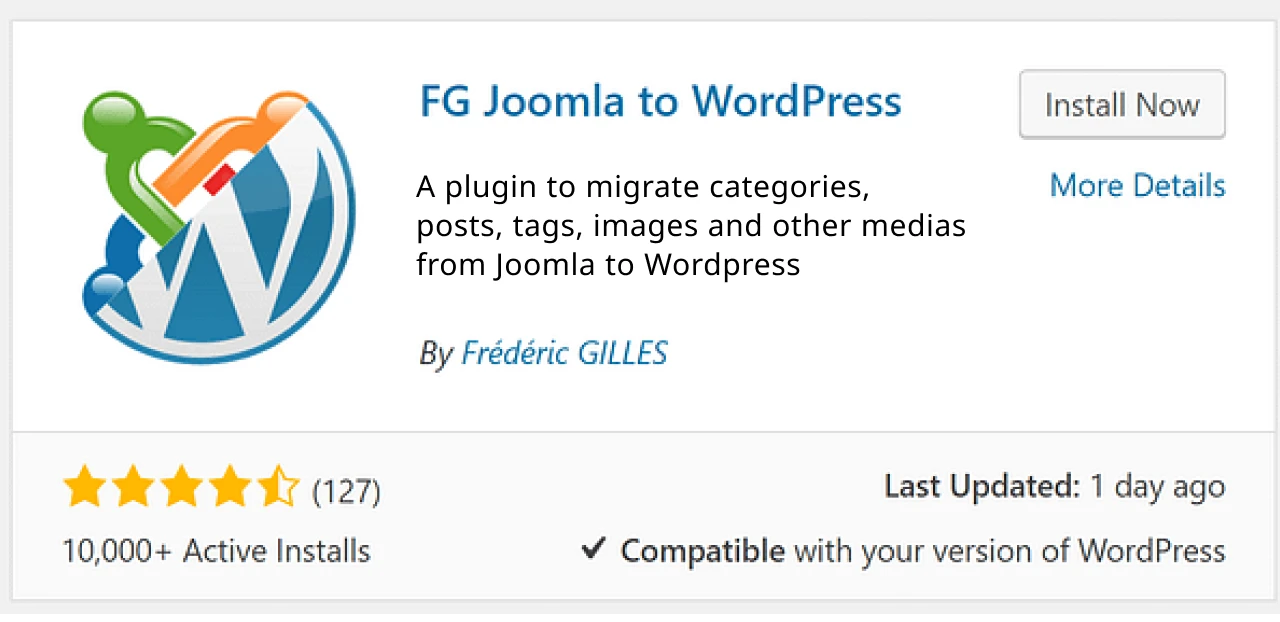
First thing, go to your WordPress dashboard and search for “FG Joomla to WordPress.” Install it and activate it. Once that’s done, you’ll spot a new importer under the Tools section. That’s where your migration kicks off.
Log in to your WordPress dashboard, go to Plugins > Add New, search for the plugin name, then click Install and Activate.
Step 3. Secure a Full Backup of Your Joomla Website
Even if you’re switching platforms, don’t skip this step. Save a complete copy of your Joomla site, such as files, database, images, everything. If anything breaks during migration, you’ll be glad you backed it up.
Step 4. Clean Your WordPress Install for a Fresh Start
Before importing, clean up the WordPress install. Trash any demo content like the “Hello World” post or default widgets. You want a fresh space to work with so that nothing overlaps or causes confusion.
Step 5. Connect Your Joomla Database to WordPress
Now the plugin needs to talk to your Joomla site. Add in your database details, such as, host, database name, username, and password. These are usually in your Joomla config file. If not, your host can help.
Step 6. Begin Importing Joomla Content into WordPress
With everything connected, hit the import button. The plugin will do its thing, copying over your posts, pages, categories, and media. For bigger sites, it might take a few minutes, so let it run without rushing it.
Step 7. Fix and Clean Up Any Broken Internal Links
After importing, some links might not work correctly, especially if they used Joomla-style URLs. The plugin usually catches these, but double-check. Use the "Modify internal links" feature to clean up anything that slipped through.
Step 8. Fine-Tune Import Settings for Accuracy
If anything looks off like missing pages, media not showing, weird formatting, then go back to the plugin settings and adjust. You might need to re-run the import with different options enabled. It’s normal. Take your time here.
Step 9. Redirect Your Domain to the New WordPress Site
Once you’re happy with how the new site looks, point your domain to the WordPress install. If you are working in a subdirectory or staging area, make sure everything loads properly at the final domain before going live.
Step 10. Choose and Customize a WordPress Theme That Fits
Pick a theme that fits your content. It doesn’t have to look exactly like your old Joomla site, but it should feel familiar to your users. Customize it as needed such as fonts, colors, layout, and start fresh with a new look.
Post Migration Checklist: Joomla to WordPress
Make sure everything is in place before announcing your new site
- Check all content is imported correctly (posts, pages, media)
- Verify all internal links are working
- Test your contact forms and email functions
- Reapply SEO settings like meta titles and descriptions
- Submit your new WordPress sitemap to Google Search Console
- Check your site speed and run optimization plugins
- Set up redirects from old Joomla URLs to avoid broken links
- Install essential plugins for security, backups, and SEO
- Review mobile responsiveness on different devices
- Replace or remove any placeholder content
- Ensure your WordPress theme is styled correctly
- Test your site in multiple browsers (Chrome, Safari, Firefox)
- Enable SSL and check HTTPS everywhere
- Review user permissions and roles
- Set up your analytics tracking (like Google Analytics)
- Double-check images are displaying properly
- Remove any unnecessary plugins or themes
- Add or update your privacy policy and terms pages
- Rebuild your menus and double-check all navigation
- Set up backups and security monitoring tools
Know more: A Guide For Successful Magento To WordPress Migration
Final Thoughts
So now you're done. You’ve shifted your site from Joomla to WordPress. This move might’ve seemed a bit overwhelming at first, but look where you are. It’s all coming together.
Don’t worry if everything doesn’t feel perfect right away. That’s just part of working on a site. One thing at a time. Maybe a plugin needs adjusting, or a menu looks off, no big deal. Take a breath, click through your new setup, and just explore.
WordPress has a way of opening up once you spend time with it. You’ll start noticing how simple things are to update. How flexible it is. And once you’ve got a handle on it, you'll wonder how you ever managed without it.
You don’t have to get it all right today. Just keep going. Tweak, test, fix little things as they come. Your new site is ready & has a lot of potential - now it’s just a matter of shaping it into what you need!
FAQs: Migrate Joomla Website to WordPress
1. Do I need technical skills to migrate?
Not necessarily. With plugins like FG Joomla to WordPress, most of the heavy lifting is handled for you.
2. Will I lose my content during migration?
No, if done properly. Always back up your site before you begin just in case.
3. Can I migrate Joomla extensions or templates?
Extensions and templates won’t carry over, but you can find or build similar ones on WordPress.
4. How long does the migration take?
It depends on your site size. Small sites may take an hour or two, while larger ones can take longer.

Jayveer Ker serves as the Business Development Manager at PSDtoHTMLNinja.com, specializing in assisting organizations with overcoming web development hurdles. His insightful and informative posts deliver practical solutions and valuable insights.
Couldn't find what you were looking for?
Let us know how we can help!

Related Blog Posts