Table of Content
If you are planning to transfer Wix to Shopify, then data loss must be your biggest concern. Don't worry, this guide will help you through the migration process to ensure complete data and SEO preservation.
Now comes the bigger question: why does switching from Wix to Shopify matter for growing businesses? The short answer is that Shopify offers exciting features that help businesses grow and conquer the digital world.
However, migrating from one platform to another often comes with risks such as data loss, loss of SEO structure, and performance issues.
This is why we prepared this guide to help you avoid errors and ensure a smooth migration process. The blog takes you through the complete process of migrating from Wix to Shopify, exporting Wix data, and finally setting up the Shopify store.

Why Businesses Are Migrating From Wix to Shopify
The global e-commerce market is expected to reach $155.9 trillion by 2033. Brands desire a platform that keeps their business at the top of the market by gathering online users and turning them into buyers.
Transferring from Wix to Shopify helps businesses achieve these goals. Let us have a look at the top reasons that compel businesses to migrate to Shopify.
Better E-commerce Features
Compared to Wix, Shopify offers more enhanced E-commerce features. These features include custom checkout, multiple currencies, abandoned cart recovery, and online and offline inventory management. Due to its endless e-commerce benefits, Shopify is a perfect choice for businesses that want to grow.
More Apps and Integrations
Shopify provides easy integration of different plugins, APIs, and third-party apps. Wix, on the other hand, is not very flexible when it comes to apps and integrations. This is why Shopify websites are more reliable for advanced analytics and marketing.
The Shopify App Store is full of countless apps that add advanced functionalities without worrying about complicated coding and development.
Improved Scalability
As businesses expand, their e-commerce platform should be able to handle the rising traffic, product listings, and customer orders. Shopify offers just that by providing better scalability than Wix, making it a great choice for small businesses, growing brands, and even large enterprises.
With options like Shopify Plus and other advanced solutions, companies can effortlessly scale their operations without the stress of performance hiccups. This makes the switch from Wix to Shopify a smart move for those looking to grow in the long run.
Advanced Inventory Management
For online retailers, efficient inventory management is key. Shopify steps up with robust inventory management features, such as real-time stock updates, automated tracking, and support for multiple locations.
These tools help minimize manual errors and ensure that businesses can keep accurate tabs on product availability across various sales channels.
Businesses can also simultaneously manage their online and offline inventories with Shopify’s Point of Sale system.
Better Checkout Experience
Websites that offer a seamless checkout experience have higher conversion rates. With Shopify, you get access to streamlined checkout options, secure payment gateways, and customizable experiences that work together to minimize cart abandonment.
Multi-Channel Selling
Shopify makes it easy for businesses to sell their products on various platforms, from social media to marketplaces and even offline stores. This means brands can connect with a wider audience while keeping all their sales organized from one central dashboard.
Migrating to Shopify allows businesses to create a more flexible, scalable, and conversion-driven online store compared to Wix.
| Feature | Shopify | Wix |
|---|---|---|
| E-commerce Features | Offers advanced e-commerce tools | Basic features available |
| Integrations | Third-party integrations and apps | Integrations are possible only through the Wix Store |
| Scalability | Highly scalable | Limited scalability |
| Inventory Management | High-level inventory management with tracking and monitoring | Basic inventory tracking |
| Checkout Experience | Optimized and fast checkout with custom features | Basic checkout without any customization |
| Multi-channel Selling | Multi-channel selling with advanced payment options, social media integration, etc. | Basic multi-channel selling with limited advanced capabilities |
Wix vs Shopify: Which Platform Is Better for Growing Stores?
There is no exact answer to this question. The actual suitability depends on your requirements and business goals.
That being said, you can witness multiple useful benefits of switching from Wix to Shopify. Let us have a look:
Payment Speed and Quality
Businesses can reduce overhead costs by setting up Shopify payments. This nullifies the need for a third-party payment system, saving you time and money. Shopify payments have higher success rates, which means e-commerce businesses don’t have to worry about payment failure or slow transactions.
Shopify Themes
Shopify comes equipped with modern and responsive themes, which can be customized as per your preferences. These themes come with a wide range of advanced features, making multiple operations easy for the e-commerce business.
Transaction Fees
Shopify has lower transaction fees compared to the other platforms, including Wix. This advantage allows businesses to cut down on operational costs and boost their profit margins.
Shopify provides a variety of payment options, giving merchants the freedom to select the gateways that fit their needs best. With clear pricing plans and streamlined payment processing, businesses can keep a better handle on their expenses.
24/7 Customer Support
Shopify’s reliable customer support is the biggest reason behind its popularity. You can get help whenever needed with the help of community forums and dedicated support channels.
Businesses can swiftly address any problems and keep their online stores operating without errors. With support available around the clock, Shopify proves to be a trustworthy platform for both newcomers and growing enterprises.
Growth Prospects
Shopify provides excellent growth opportunities for businesses by offering tools that support expansion at every stage. Whether a brand is starting small or managing a large-scale online store, Shopify’s flexible features help businesses adapt to changing market demands.
The platform supports increasing traffic, product catalogs, and sales volumes without compromising performance.
Can You Transfer a Wix Site to Shopify?
Yes, you can transfer products, customers, pages, blog content, images, and domains from Wix to Shopify. This helps capture featured snippets.
But keep in mind that the migration process requires careful planning to prevent any data loss and to keep your website running smoothly. You have the option to either migrate your store data manually or take help from migration experts.
When you are migrating from Wix to Shopify, preserving SEO elements is essential. Components like URLs, metadata, and redirects should be preserved along with safeguarding your current search rankings.
A structured and step-by-step migration plan will help ensure that your online store continues to draw in visitors without compromising the user experience.
Once you have made the switch to Shopify, you can customize your store's design, enhance navigation, integrate advanced e-commerce features, and create a more streamlined shopping experience. With the right strategy in place, brands can transition from Wix to Shopify seamlessly and open the door to exciting growth opportunities.

What Data Can Be Migrated From Wix to Shopify?
Wix to Shopify migration is a high-end service that involves exporting multiple categories of data. The ideal migration process includes transferring 100% of your website content to a new Shopify site.
A part of it can be done through plugins and automated channels, and in-built Wix capabilities. Whatever remains can be migrated manually.
Let us have a look at how each of these elements is transferred to Shopify:
| Data Type | Transferable |
|---|---|
| Products | Yes |
| Customers | Yes |
| Orders | Yes |
| Images and Graphics | Yes |
| Blog Posts | Manual |
| Pages | Manual |
| Domain | Yes |
Pre-Migration Checklist
CMS migration involves taking proper measures, so all your data and website elements remain safe. Even the most careful and planned migration process can encounter challenges.
Here is a pre-migration checklist to keep you prepared:
Backup website
You should create a solid backup of your existing Wix website. It should include elements like:
- Website content, both written and visual
- Forms, blogs, and comments
- Graphics, images, and videos
- Custom themes and templates
- Metadata like meta descriptions, canonical tags
Export URLs
It is important to create a list of all the URLs from your existing website. This helps in avoiding 404 errors and ensures the users are directed to the correct or intended webpage. Having a list of all these URLs is essential for a smooth website performance post-migration.
Download images
Images do not always directly get migrated to a new CMS. Download all the images you want to migrate, and keep them safe in your backup. You may have some unique blog images or banners that were created for specific reasons. Saving these avoids the risk of data loss, and you do not have to redesign those images.
Here is a list of all the image types you should back up:
- Product photos
- Blog images
- Homepage banners and CTA images
- Icons and graphics
- PDFs and media files
Export products
Go to your existing Wix database and export all product-related information in a CSV file. This helps in transferring your store catalogue to the new Shopify site without losing any critical information.
Product information includes:
- Product details and descriptions
- Product prices and discounts
- Product variants in colors and sizes
- Categories
- Product images
Export customers
Customer information from your existing Wix site should be backed up before you start the migration process. One important thing to note here, maintaining customer history is important to access customer information.
Essential customer details include:
- Customer names
- Purchase history
- Cart and wishlist history
- Address and contact numbers
Record SEO metadata
Every webpage will have different SEO data; make sure you save all the metadata of each page from your Wix website. SEO metadata, canonical URLs, image metadata, etc., are some of the common SEO elements you preserve before migrating from Wix to Shopify.
Step-by-Step Guide to Transfer Wix to Shopify
Now comes the primary section of our guide that explains how you can switch from Wix to Shopify.
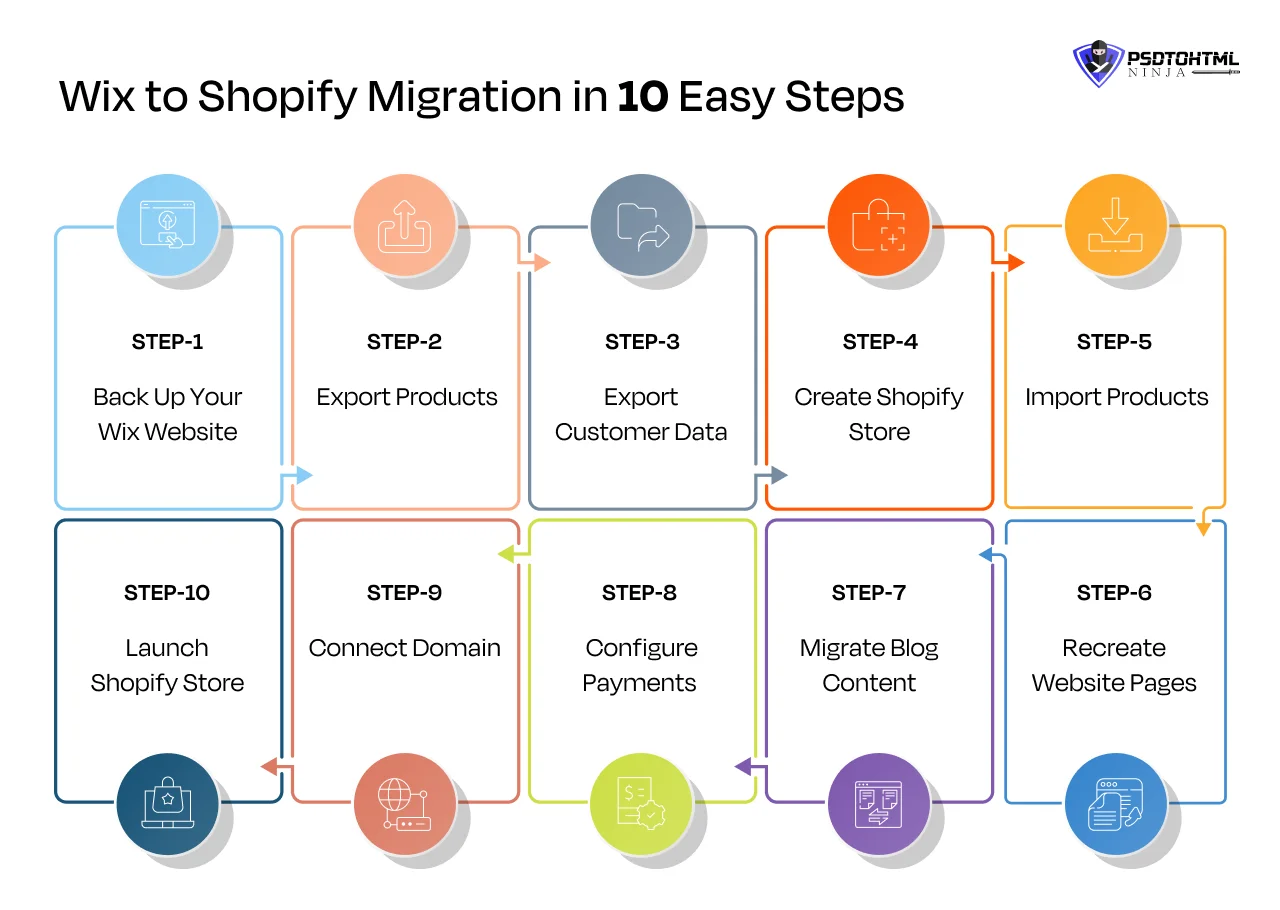
Let us look at the step-by-step breakdown of the complete migration process:
Step 1: Back Up Your Wix Website
Not backing up your data from the existing Wix website can cost you both in terms of money and time. All your essential details like Product information, customer details, orders, blogs, comments, and forms will be lost if you do not properly back up your data.
Now data can be backed up in various ways. Wix offers a Site History feature that allows you to restore a previous version of your website.
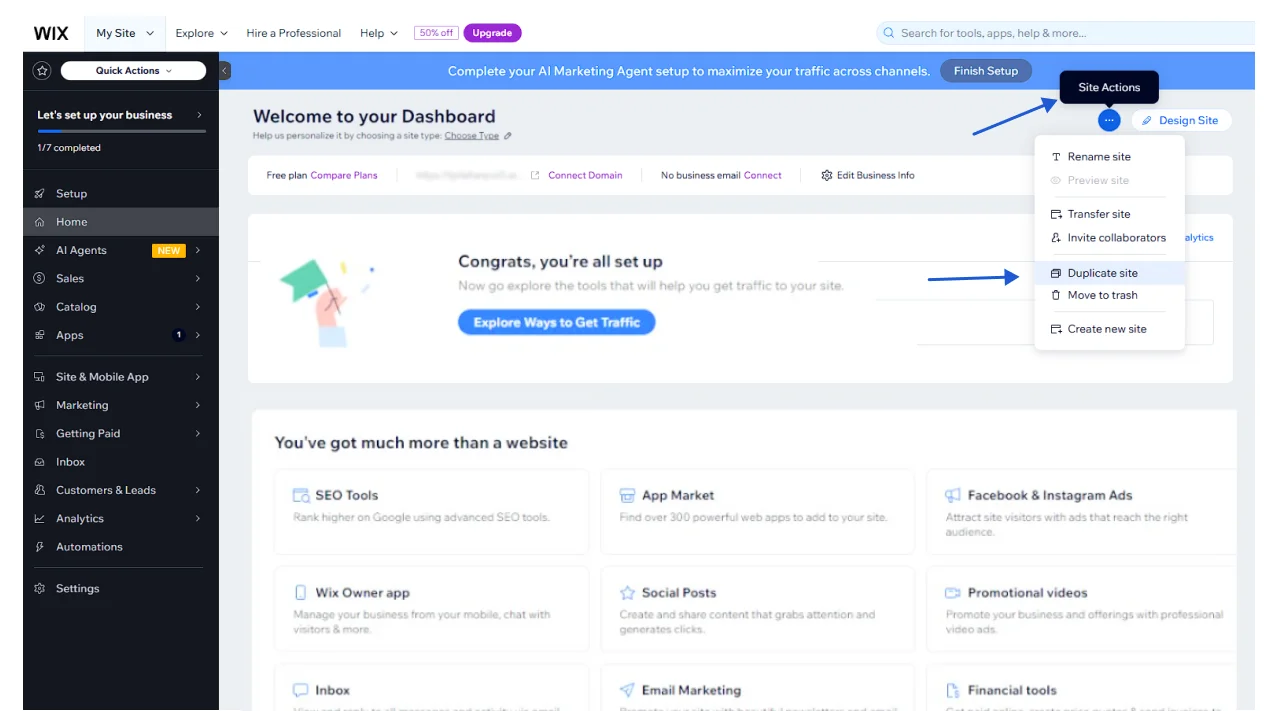
You can also conduct a manual data backup by duplicating your Wix site. However, this method will only export limited elements. Here is how to do it:
- Log in to your Wix account
- Select the website
- Go to ‘Site Actions’ > Duplicate Site
- Name the duplicate version and click on ‘Duplicate’
In case you find the Orders were not backed up, here is yet another method to do it:
- Log in to your Wix account.
- Click on Sales > Orders i
- Click Export All Orders at the top of the page.
Step 2: Export Products
Now your backup is created; it is time to export it from Wix and store it safely. Wix allows you to smoothly transfer the elements, but separately. Here is how you can export each data category from Wix in a CSV file:
Export Products from Wix
- Open your Wix website
- Log in to your Wix account.
- Click on Products in the left-hand menu.
- Click Export Products at the top of the page.
Export Contacts from Wix
- Log in to your Wix account.
- Click on Contacts in the left-hand menu.
- Click Export Contacts at the top of the page.
Export Orders from Wix
- Log in to your Wix account.
- Click on Sales, and then Orders.
- Click Export All Orders at the top of the page.
Friendly Note: Any data that was not exported with this method will have to be done manually.
Step 3: Recheck the Exported Data
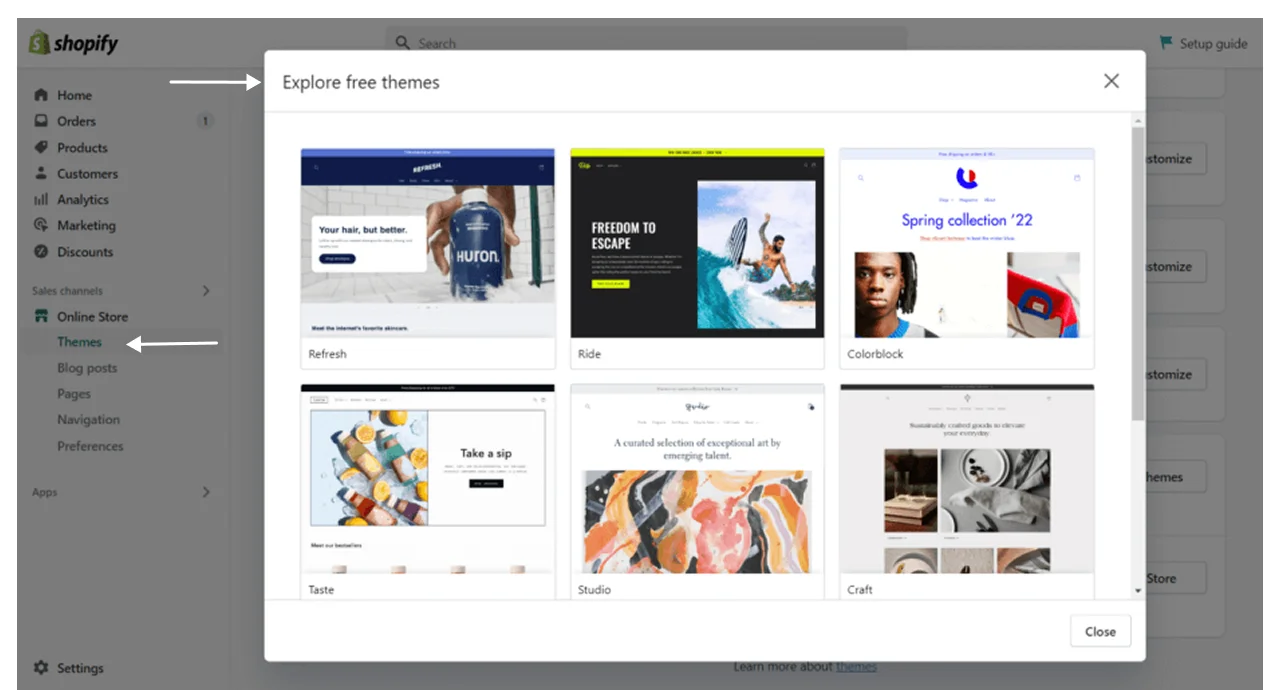
Now this is an important step. It is always ideal to double-check all the exported data to ensure nothing was missed. This helps in exporting 100% of your database so you don’t have to worry about recovering the lost data once migration begins.
Step 4: Create Shopify Store
It is time to start setting up your Shopify store. You can either buy the free-trial pack or subscribe to another plan based on your requirements.
Here is how you can set up a new store:
- Sign up for a Shopify account.
- Enter your store name and address.
- Choose your plan and enter your credit card information.
- Click Start free trial or Create a store.
- Select a theme of your choice
- Choose specific designs for each store element
Step 5: Import Products
This is where your reported data will be imported. All the product details, customer information, and everything you added to the Wix backup will be uploaded to the Shopify store.
- Go to ‘Shopify Admin > Products > Import
- Click on ‘Add File’
- Upload the Product CSV file exported from Wix
- Click on’Upload and Continue’
- Review all the fields
- Click on ‘Import Products’
Step 6: Recreate Website Pages
Shopify allows you to edit the theme, which makes it easy for you to customize the different elements so the website looks just the way you imagined it to be. The best part is that you do not even need the help of a developer to perform customization.
- Go to the Admin Panel
- Click on ‘Customize Theme’: You can select and edit different elements like font, font size, page layout, navigation bar, etc. You also get the option to add sections to your homepage.
You can either customize the theme on your own or hire a dedicated developer to perform this task with expertise.
Step 7: Migrate Blog Content
Assuming that you have already created a backup of your blog posts from Wix, you would simply need to create blog sections in Shopify before manually migrating the blog post data to your new store.
- Go to your Shopify store
- Got to the Admin Panel
- Click on Content > Blog posts > Add blog posts
- Add fields like Title, Content, Feature Images, Tags, and Metadata.
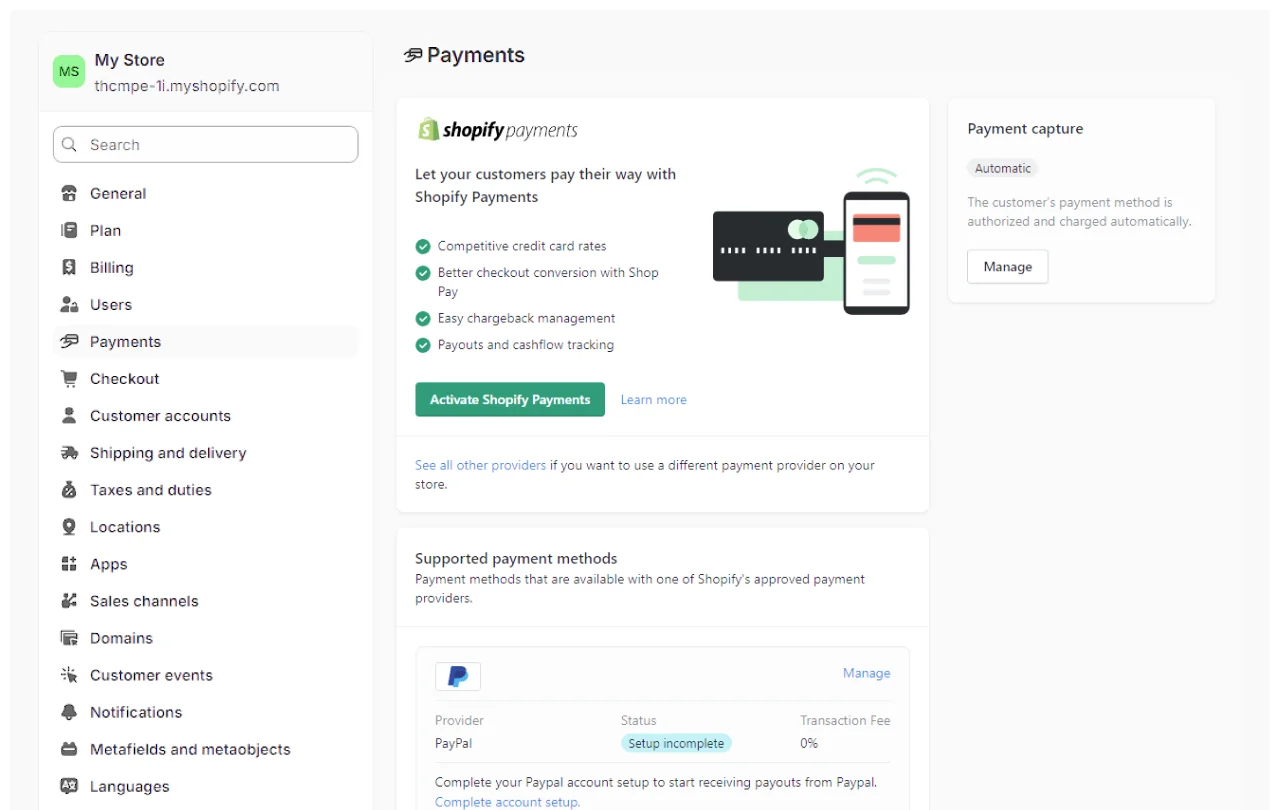
Step 8: Configure Payments
Your Shopify store is almost ready; all you need is a proper payment setup to get things going.
Shopify is flexible enough to offer multiple payment options, which means you can choose the one that best meets your requirements.
- Click on ‘Settings’ > ‘Payments’
- Go to Payment Provider > Add Payment Method
- You will see a bunch of payment provider options
- Select the payment provider and follow the instructions to set up your account
Step 9: Connect Domain
The next thing to do is to connect your domain to your new Shopify store. To connect your domain:
- Go to Shopify Admin > Settings > Domains
- Click on Existing Domain
- Enter the domain name
- Update your DNS records
- Follow the instructions to add the required details
Step 10: Launch Shopify Store
The Shopify store is now ready to go live. Review all the settings, elements, and content on your Shopify website before launching it. Check whether the SEO settings were properly migrated and the website is delivering optimal performance on different devices.
- Go to Shopify Admin
- Online Store > Preferences > Turn off the Password Protection settings
- Place test orders to ensure the store works smoothly.
SEO Migration Checklist To Be Mindful Of
Your website’s search engine ranking can easily drop if migration is not done properly. A single URL change directly impacts the overall rank of the site. Website Migration is a challenging process, and SEO remains a critical part that needs responsible handling.
To save you from the trouble, we have prepared an SEO migration checklist:
Export Existing URLs
Exporting the URLs of your Wix website helps in creating or altering the Shopify URLs accordingly, so they stay consistent. You can refer to the saved URLs and make a list of the pages whose URLs would need to be recreated after migration.
Create URL Mapping
Wix and Shopify follow different URL structures. Make sure you map URLs of each webpage so they lead to the correct destination. Mapping the URL helps in ensuring that visitors and search engine crawlers reach the correct destination after clicking on a specific URL.
Set Up 301 Redirects
301 redirects are responsible for transferring or directing users to your new Shopify URLs even if they have your old Wix website’s links. Not setting up the 301 redirects will lead to Error 404, which will lead to a traffic loss and will ultimately impact your search engine rankings.
Transfer Meta Titles
Meta titles play a crucial role in how your pages show up in search results. When you're migrating, make sure to carry over your current Wix page titles to Shopify and take a moment to enhance them for SEO. Each product, collection, and blog page must have its own unique title that focuses on relevant keywords.
Transfer Meta Descriptions
Meta descriptions give both search engines and users a quick overview of what your page is all about. Be sure to transfer all your existing meta descriptions to Shopify and tweak them as necessary. Crafting compelling descriptions can boost your click-through rates and help users grasp what each page has to offer.
Submit New Sitemap
Under any circumstances, don’t forget to submit the new sitemap to search engines. Shopify automatically creates an XML sitemap that includes all your website pages, products, collections, and blogs. Submitting this sitemap helps search engines crawl and index your new store layout more efficiently.
Verify Google Search Console
Performance monitoring of your website is necessary. Make sure to link your Shopify store so you can keep an eye on how your website is performing post-migration. Regularly check the indexing status, crawl errors, and search performance.
This proactive approach helps you spot any SEO issues early on and guarantees that your migrated pages stay visible in search results, reaching your target audience.
Fix Broken Links
Broken links directly impact the user experience and SEO performance of the website. After you have migrated, take some time to review all the internal links on your site, including those on product pages, blogs, and navigation menus.
Make sure you update any outdated Wix links and check that every link points users to the right Shopify page.
Common Wix to Shopify Migration Mistakes
No matter how perfectly you migrated from Wix to Shopify, all your hard work will be lost if you are not careful. E-commerce Development Services are complicated, and even a single mistake can cost you all the website data. Here is a list of the common mistakes people make while migrating their Wix store to Shopify:
Forgetting Redirects
Setting up the URL redirects means customers visiting your old URL are automatically redirected to the new website. This reduces the bounce rates and ensures your website’s SEO ranking and traffic remain consistent.
Missing Product Variants
While migrating the products, overlooking details like colors, materials, and categories can lead to incomplete product listings, leaving customers puzzled during their shopping experience.
So, before you launch your Shopify store, take a moment to double-check each product. Make sure all variants, pricing, inventory levels, SKUs, and descriptions have been transferred accurately.
Losing Image Alt Tags
Image Alt Texts often get ignored during migration, but they’re vital for both SEO and accessibility. As you move images from Wix to Shopify, ensure that all product images and blog visuals come with their descriptive alt text intact. Missing alt tags can hurt your search visibility and make your site less user-friendly for those who rely on screen readers.
Ignoring Internal Links
Internal links are essential for helping users navigate your site and for search engines to grasp your site’s structure. During the migration process, old Wix links found in product descriptions, blogs, and pages might break.
It is important to review and update these internal links to direct users to your new Shopify URLs. This will help avoid navigation hiccups and boost your SEO performance after the migration.
Launching Without Testing
Always test your migrated website before sending it over to the users. The major checks include SEO, mobile-compatibility tests, performance check and optimization, order placement check, etc. Launch the website to the servers only when you are fully satisfied with its performance.
How Much Does a Wix to Shopify Migration Cost?
Wix to Shopify migration price depends on countless factors like your website size, customization requirements,
Other cost factors include the type of migration you choose. For example, a DIY migration costs less than hiring a freelancer or a professional Shopify agency. However, all of them come with their sets of pros and cons. Let us see how much each of the processes costs, their advantages, and disadvantages.
DIY migration
This method includes manually transferring your Wux files to Shopify without any expert help. All the content from your Wix store is manually downloaded and imported to Shopify, which requires extreme care and precision.
Pros: It saves cost, you only pay for the domain name, hosting, and Shopify subscription.
Cons: Risk of data loss, time-taking
Total cost: Includes only Shopify subscription costs and plugin prices
Migration apps
Migration apps are used for a quick and speedy migration of a Wix store to Shopify. They automate the transfer of products, customer details, orders, and everything else without requiring any manual intervention.
Pros: Less expensive, quick
Cons: Requires manual mapping to avoid data loss
Total Cost: Cost varies based on the App pricing
Freelancer
Freelancers offer expert support for migrating from Wix to Shopify, and they do it without the hefty price tag that comes with hiring a full-service agency.
They can assist you in transferring products, customer data, pages, images, blogs, and even help set up crucial Shopify settings. For businesses that need some technical help but aren’t looking for a massive migration, freelancers are a great choice.
Pros: More budget-friendly than agencies, custom support
Cons: The quality of work can vary based on the freelancer’s experience, and they might have limited resources for more complicated migrations. Lack of communication is another concern
Total Cost: $300 to $1,500 based on the project
Shopify agency
A Shopify agency takes care of the entire process of migrating from Wix to Shopify. This includes everything from planning and transferring data to designing your store, customizing it to fit your needs, testing, setting up SEO, and providing support after the launch.
These dedicated Shopify agencies are perfect for businesses that have large inventories, intricate requirements, or those that want a highly tailored Shopify experience.
Pros: Expert management, minimized risk of mistakes, comprehensive migration assistance
Cons: Higher costs
Total Cost: $1,500 and $25,000 or more, depending on how complex the migration is, the number of products involved, any custom features, integrations, and the level of ongoing support.
DIY vs Professional Wix to Shopify Migration
| Factor | DIY | Agency |
|---|---|---|
| Cost | Lower | Higher |
| SEO Risk | Higher | Lower |
| Time | More | Less |
| Custom Design | Limited | Full |
Why Choose PSDtoHTMLNinja for Wix to Shopify Migration?
Transferring from Wix to Shopify is a critical process. Several factors should be considered while making the transfer. This includes proper URL mapping, setting up 301 redirects, creating secure backups, and more.
This is why getting the assistance of a professional and experienced Shopify migration agency like PSDtoHTMLNinja is necessary.
You need SEO-safe migrations to keep your search engine rankings consistent and online traffic flowing. Our team of Shopify developers provides the right support to keep your online store running smoothly.
We meet your expectations by employing processes like SEO-safe migrations, QA testing, and advanced theme recreation.
Interested in Custom Shopify Development Services? Feel free to schedule a call with us for a project discussion.
FAQ Section
1. How long does it take to transfer Wix to Shopify?
The actual migration timeline depends on your website size, migration complexity, customization requirements, and the number of webpages. A typical Wix to Shopify migration service generally takes about a few weeks to months.
2. Will I lose SEO when moving from Wix to Shopify?
No, SEO rankings are preserved with a well-structured and expert-guided migration service. The SEO of your Wix website is safely migrated to the new Shopify store under the watch of migration experts.
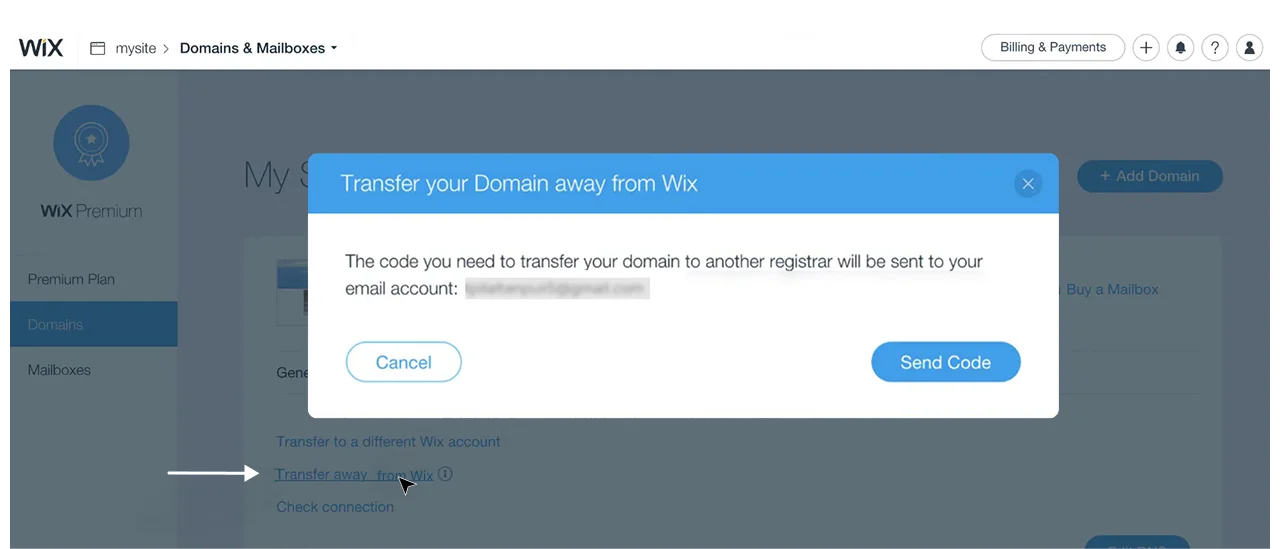
3. Can I transfer my Wix domain to Shopify?
Yes, transferring the Wix domain name to Shopify is absolutely possible. You can directly transfer it to Shopify or you can also keep it with Wix and simply connect with Shopify through the DNS settings.
4. Can I migrate Wix products to Shopify?
Yes, from product names, descriptions, images, prices, and inventory details, all product information can be easily migrated to Shopify from Wix.
5. Can I keep the same design after migration?
A Wix design cannot be directly migrated to Shopify. However, you can invest in a Shopify Theme Development service to recreate the same design on Shopify.
6. Is Shopify better than Wix for e-commerce?
Shopify is generally preferred by fast-growing e-commerce businesses with large and complicated requirements. The platform offers countless marketing and management tools that greatly benefit e-commerce brands.
7. What is the cost of Wix to Shopify migration?
A typical Wix to Shopify migration service costs from about $500 to over $10,000+. The cost can further increase based on your Customization needs and advanced feature integration.
8. How do I hire a suitable Shopify development company?
You can filter out the best migration expert by evaluating their profile through the portfolio. Reading their online reviews and testimonials also helps understand their work ethics, industry expertise, and migration quality.
9. Can you rebuild my Wix apps on Shopify?
Yes, almost all Wix apps can be replicated or recreated on Shopify with professional expertise.
10. How do you maintain the performance of my Shopify website post migration?
At PSDtoHT, our experts provide post-migration support. This solution is designed to ensure a smooth website performance after migration. This includes monitoring the website for a few hours and making fixes accordingly.

Jayveer Ker serves as the Business Development Manager at PSDtoHTMLNinja.com, specializing in assisting organizations with overcoming web development hurdles. His insightful and informative posts deliver practical solutions and valuable insights.
Couldn't find what you were looking for?
Let us know how we can help!