Table of Content
Advertising your campaign is a crucial part of digital marketing, and HTML5 banners dominate this space. If you want interactive, visually engaging ads that capture attention and motivate users to take action, it’s time to learn more about HTML5 banner ads.
Advertising in 2026 is all about clarity and user attention. Running your ads in a traditional format with blurry displays no longer works on the internet-savvy audience. They need clear graphics and an ad that smoothly loads on every screen. Do you want to change your online advertising game? Keep reading this guide to dig deeper into how to use HTML5 banners in your next ad campaign.
What Is an HTML5 Banner?

An HTML5 banner is a type of online ad built using the latest version of HTML (Hypertext Markup Language). Unlike static images or outdated Flash ads, HTML5 banners can combine animation, interactive elements, video, and text into a single lightweight file that works seamlessly across desktops, tablets, and smartphones.
Because HTML5 is supported by all modern browsers, these banners are responsive, fast-loading, and compatible with any screen size. This makes them the go-to choice for advertisers who want visually engaging campaigns that perform well on multiple devices.
Role of HTML5 Banners in Digital Marketing?

The biggest factor affecting the performance of your ad is its ability to perform on multiple and distinct devices. For example, it should quickly and smoothly load on mobile phones, laptops, and tablets alike. Banners that do not respond to changes in screen sizes fail to make an impact.
But HTML5 banners bring a sigh of relief for you. They are highly flexible and offer cross-device and browser compatibility, which means the performance and loading speed remain consistent on all devices and screen sizes.
Here is how HTML5 makes your banners effective:
- Flexible banner creation
- Quick conversion of design elements
- Smooth transition and adaptability on different devices
- Fast adaptation to popular formats and sizes
Currently, there are about 7.2 billion smartphone users in the world. Digital marketing agencies give preference to these users while creating ads. Most of the ads that are live on the internet are first viewed by smartphone and tablet users. This is why your HTML5 banner ad is so relevant in 2026.
Companies use the mobile-first approach when it comes to digital marketing and online ads. If you are not using HTML5 for this purpose, you are losing the most live and important audience.
Key Benefits of Using HTML5 Banners
HTML5 has become a necessary format for the banners. Apart from providing cross-device compatibility, it offers a multitude of other benefits. The world is changing rapidly, and HTML5 banner ads are the future of digital marketing.
- HTML5 offers a smooth display on all devices
- No plugins needed to play audio, video, and animation of HTML5 ads
- Uses a wide range of databases
- Loads with lightning speed
You can effortlessly convert HTML5 banners into a format of your choice with the assistance of PSDtoHTMLNinja.
Immersive Ads
Creativity remains a core part of any advertising campaign. But bringing that creativity to life is a tough nut to crack as it requires the right strategy and technology. With HTML5 banners, your creative advertisements look good on screen. HTML5 helps in making immersive ads backed by creative minds.
These banners are designed to support animations, interactivity, and multimedia elements that catch the user's eye. They not only boost the visual appeal but also enhance engagement and click-through rates. Thanks to their cross-platform compatibility, HTML5 ads make sure your creativity reaches audiences on any device, making your campaigns more impactful and unforgettable.
Easy to Track and Analyze
HTML5 banner ads provide ample data to your marketing team that can be used for creating personalized experiences. These banners allow you to better understand your target audience, which helps in serving them according to their preferences. For example, eCommerce companies show ads where the product is displayed to the user based on their preference. This is done by collecting user data through ads and tailoring them based on how the user interacted with previous advertisements.
An HTML5 banner ad provides insights on:
- Engagement time
- Interaction rate
- Video completion rate
- Custom event tracking
- Conversion attribution
The data helps in showing the most relevant ads to the user without making any changes to the HTML5 banner template.
Higher User Traction
40% of users abandon a web page that takes more than 3 seconds to load. Each second delay can cost your business a significant number of online audiences. HTML5 banner ads load faster, clearly displaying each design element, be it animation or a simple graphic. Better performance leads to a higher visibility rate, which increases the chances of a purchase.
The more your ad is visible, the more people will view it. This will positively improve the ad performance, increasing brand awareness. Fast-loading HTML5 banner ads with animation provide a better click-through rate (CTR), leading to great benefits.
Better User Retention
User retention is directly affected by user experience. How your ad makes the audience feel decides whether they are willing to give your brand a chance. The good news is that you can change the target audience’s perception by properly using the data obtained from HTML5 ads. You get detailed information on what the users like, which part of the ad interests them, and what grabs their attention.
By taking a close look at the data you have gathered, you can refine your advertising campaign to better match the goals and preferences of your target audience. Improving the overall user experience will naturally lead to a wider ad reach and greater audience engagement.
HTML5 Banner Ad Sizes

Choosing the correct size for your HTML5 banner ad plays a key role in its success. First, you need to determine the primary device users you are targeting to reach. In order to properly run the ad on Google’s Display Network, it is crucial to adhere to the basic requirements. Here is a breakdown of the different standard sizes you can select for your HTML5 banner ad:
Sizes for desktop and laptop
Rectangle formats:
- 300 x 250: Inline rectangle
- 336 x 280: Large rectangle
- 250 x 250: Square
- 200 x 200: Small square
- 250 x 360: Triple widescreen
- 580 x 400: Netboard
Leaderboard format:
- 728 x 90
Sizes for mobile phones:
- 120 x 600: Skyscraper
- 160 x 600: Wide skyscraper
- 300 x 600: Half-page ad
- 300 x 1050: Portrait
- 240 x 400: Vertical rectangle
- 300 x 50: Mobile banner
- 320 x 50: Mobile banner
- 320 x 100: Large mobile banner
How to Create HTML5 Banners?
Now that you have ample information on HTML5 banner ads, it is time to create one. Don’t worry, we created this step-by-step guide to take you through each step. There are mainly two ways of getting this done:
- Use a third-party program (we recommend the HTML5 banner creator by PSDtoHTMLNinja — a trusted service provider with deep expertise in HTML development).
2. By creating an ad with Google Web Designer software, but a good understanding of HTML coding is desirable.
If you are planning to build the banner yourself, you can try using the pre-designed templates. But hiring an expert is always recommended for pristine and fast-loading ads. The expert coders will convert all your preferred design elements into a perfectly coded HTML5 code that runs smoothly on distinct screen sizes and devices. Here is the entire process to further expand your understanding:
Step 1. Banner layout and Design
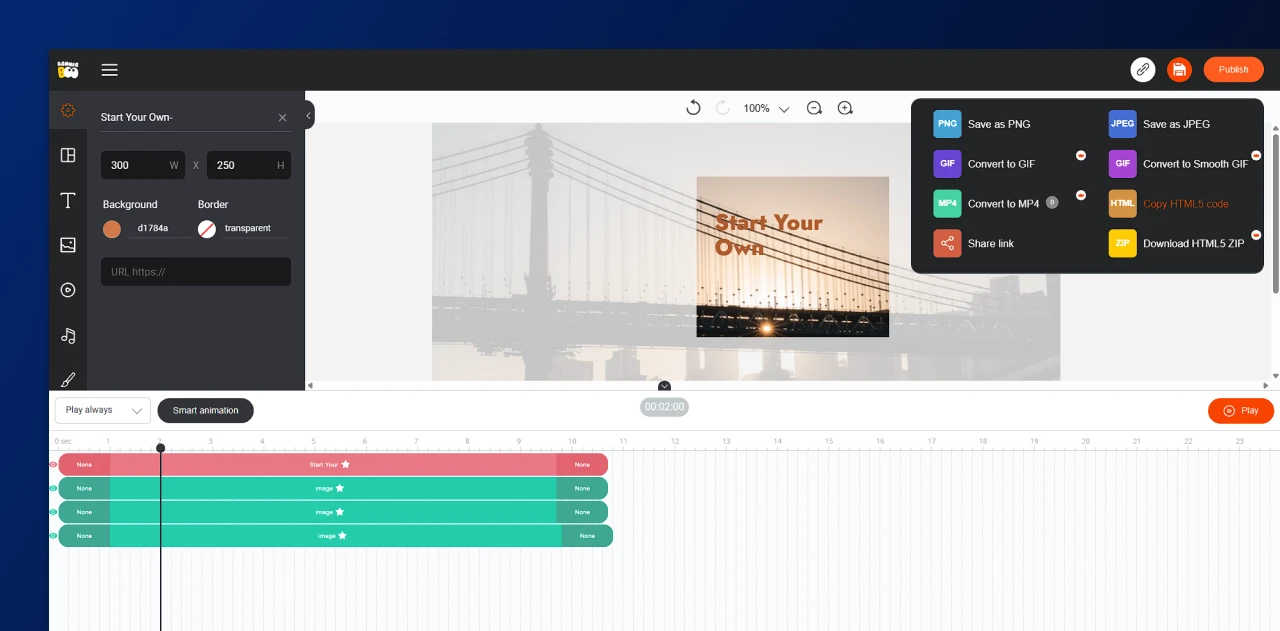
The first step is to create an attractive banner design that is based on what you want your audience to see. You can hire a professional HTML5 banner designer for this purpose or choose software for self-design.
If you are new to graphic design, you can use Google Web Designer, Canva, or Adobe Animate. You can also find pre-designed HTML5 banner templates here, which can be customized. Once the design is ready, you can export it and share it with the service provider, who will convert the design into a high-definition HTML5 banner ad.
Step 2. Analyze the Design
To perfectly match the design of your banner, you first need a clear analysis of the design. Once you have a list of all the design elements (animation, icons, graphics, font, etc.), you can lay down a clear path for your HTML5 coding process. Since the format displays ad banners on all devices, it is greatly preferred if you want to elevate your brand presence online.
Step 3. Coding
Writing the HTML5 code for your banner design is the most crucial task. This is where the actual design is shaped into a working and optimized ad that becomes visible to the users. You need an error-free and semantic code for your ad to run smoothly on the internet. This can be done in two ways:
By manually coding: Experts prefer the handcoding method since it is more reliable and customizable. PSDtoHTMLNinja has expert HTML5 and CSS developers who manually write the code for your HTML5 banner design. No use of plugins and other tools, just pure hand-written code. The biggest advantage of this method is that each pixel of your design element is converted into clean HTML code. Whether it is an animated graphic, audio, or a hover-over icon, each design component is properly layered and displayed on different screens.
With automated tools: Plugins and automated tools are used when you need the output in the minimum time. While the method can be time-saving, code generated through plugins often has errors.
Once you have the HTML5 code for your banner structure, the developers then lace it with CSS and JavaScript. This additional step ensures the animation, graphics, and other interactive elements load and perform well once the banner ad is live.
Step 4. Optimization For Web And Mobile Devices
Your banner ad will be a total failure if you do not optimize it for different devices. As mentioned in the previous section, HTML5 banner ads can be created in multiple size formats. Make sure your service provider chooses the correct specifications.
The job does not end here; they need to ensure that the ad adjusts properly when devices are switched. This is why it needs to be specifically optimized for mobile devices and web browsers. An ad that loads well on different devices gets higher visibility. Let us take an example: a user sees an ad on their laptop and they share it with a friend who opens it on their mobile phone. In both instances, the banner ad should quickly load and display all the contents based on the device.
When you review your HTML5 banner ad, make sure to check if it is optimized for cross-device compatibility.
Step 5. Testing And Fixing The Banner
Before you wrap up your HTML5 banner ad, make sure to hit that Preview button to see how it looks in real-time. This step is super important for spotting and fixing any issues with animations, transitions, text placement, and the overall design. Catching these things early on helps ensure a smooth experience for users across all devices. But it is not just about getting the design right; you also need to see how your ad performs with real audiences.
For example, does a rectangular call-to-action button get more clicks than a round one? Are viewers more drawn to soft pastel colors rather than bright reds? By keeping an eye on impression data and user interactions, you’ll uncover valuable insights into what really resonates with your target audience. These analytics empower you to make informed design choices and fine-tune future campaigns for better engagement and reach. Regular testing and analysis are essential for crafting ads that not only look great but also deliver results.
Points To Remember For HTML5 Banners
Strategizing the HTML5 banner ad process is always wise. You should have a clear idea of what works in the market and what does not. A spotless understanding of the target audience and their preference helps in this process. We have prepared a list of the basic points you should remember for the HTML5 banner strategy:
1. Keep The Banner Simple Yet Elegant
Overloading the banner with graphics and images can negatively impact the ad’s performance. Give your users minimum elements to focus on while also keeping it elegant. How can that be done? Study the brand and its aesthetics and incorporate the elements into the banner accordingly. From font style to color palette, everything in the ad should align with the brand.
Deeply focus on the visual elements of your ad. Try to analyze the following:
- Is the font too cluttered and small to read?
- Does the background image fit well with elements in the foreground?
- If the color theme matches the brand aesthetics.
2. Check The Loading Speed
Did you know that animation and graphics affect the loading speed of your banner? Do not overload it with multiple elements that can be easily avoided otherwise. The longer your ad takes to load on the screen, the lower its impact will be on the users.
Users in 2026 have countless options, which means they don’t necessarily need to wait for the ad to load. The advertising campaign will fall flat if even half of its elements fail to display on time.
3 Unique Images And Concise Text
Online ads are all about the aesthetics and visual appeal. After the loading speed of your HTML5 banner, users view how appealing it looks. The ad should tell the story without overwhelming the user, and that is the perfect way of representing your brand.
The elements chosen for the banner play a key role in influencing the user. Adding beautiful images with relatable texts in a simple manner adds value to your ad. Make sure the text (font style and size) is concise and does not appear too small or excessively large.
4. CTA Optimization

A well-crafted CTA (Call to Action) can really make a difference in how users engage with your HTML5 banner ad. Whether you choose phrases like Shop Now, Learn More, or Subscribe Today, it is crucial that the CTA is straightforward, easy to see, and prompts action. Factors like placement, size, color, and wording all influence how users respond to your ad.
You can also run A/B testing versions of your CTA to find out what resonates best with your audience. Keep in mind, the CTA is the key to turning a viewer into a customer, so it needs to be eye-catching without being pushy, and it should fit seamlessly with the overall message and design of your ad.
6. Performance On Different Devices
People will view your ad on different devices like phone, tablet, or desktop, and your HTML5 banner needs to work flawlessly on all devices and screen sizes. With responsive design, your ad keeps its layout, readability, and interactive features intact, no matter what device someone is using. If your ad isn’t compatible across different devices, even the most imaginative design can miss the mark.
That’s why it is crucial to test and fine-tune your banner’s performance on various browsers, resolutions, and orientations. This way, you ensure a smooth user experience and broaden your reach. Given that more people are consuming content on mobile, having a responsive HTML5 ad isn’t just a nice-to-have thing; it is a must for effective campaigns and a solid return on investment in today’s digital world.
Examples of Attractive HTML5 Banners
Are you looking for HTML5 banner design inspiration? Your competitors might be doing something unique, and it is always wise to keep yourself accustomed to market trends. Trendy ads with catchy designs are trusted by online users.
To inspire your next project, we have compiled some amazing and visually immersive banners. Let us have a look:
#1. Amazon – Prime Day HTML5 Banner

Amazon always displays a banner on the Prime Day Sale. They keep it pretty simple and solid, drawing all the attention to their ‘Prime Members Only’ segment. If you are looking for a simple design inspiration that focuses on the content, try using a design like this one. The solid blue background with simple white text complements the CTA written in a yellow textbox. Their major emphasis here is on the bank and cards providing these offers, the cashback, and the savings numbers. In short, the banner is delivering key details and benefits of Prime membership.
#2. Coca-Cola Summer Campaign HTML5 Banner

The HTML5 banner of Coca-Cola is yet another example of creativity in simplicity. Though they use the basic red and white color palette, they always put the Coca-Cola bottle in focus. This is a classic example of ‘let your product do the talking’. A closer look at the bottle reveals how cleverly they make the cold drink look irresistible. Food and beverage brands often use this strategy to showcase their product with a catchy CTA. They also use short text to convey the message, for instance, Summer Fun Together or Summer Fun Days.
#3. Netflix Series Promo Banner

If you want to take the creativity a step further, take a look at the Netflix banners. They play greatly with colors, keeping Red and Black as the primary theme, their design team blends multiple elements. They often use shadows and a dark layout with a short description of the series written in white. The text is also displayed in standard size, so it is easy to read.
The Play icon is always highlighted with a clear white color to draw the user’s attention to it. Here is an example of the Stranger Things series.
#4. Starbucks – Seasonal Campaign Banners
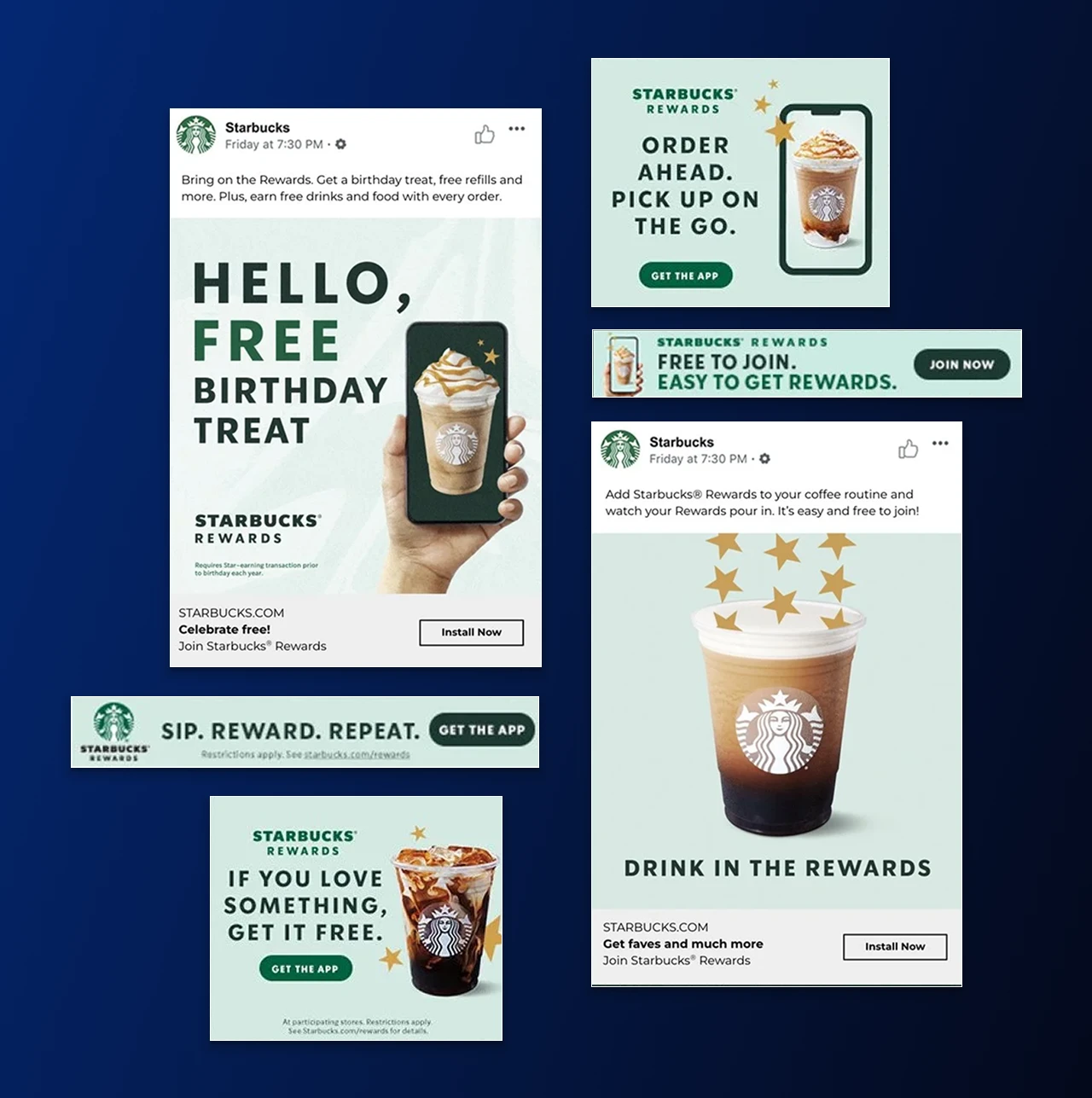
Starbucks always wins hearts with its seasonal campaign banners that are both meaningful and immersive. They do not shy away from displaying their wide range of products, especially the seasonal ones. Take the example of this particular banner, where the brand is introducing 4 Christmas special flavors. Online advertising is shaped by the products, and portraying your products in the limelight is an effective way of brand promotion.
#5. Nike – New Arrival Sportswear Banner

Nike has used animation, one of the tricky elements, in their new football show banner. Adding animation to the banner is a highly complex job, but Nike’s team did some flawless work here. The banner is embedded with a video that instantly plays when you open that particular section. They also used a rather creative promotional text that is written in a simple black font.
Overall, a high-budget banner that has the potential to immerse the user and compel them to view the newly launched football shoe range.
Key Takeaways
Banner ads are everywhere! From YouTube to a simple website or a social media page, HTML5 ad banners are scattered across the internet. If you want the online audience to interact with your brand, then HTML5 is the best and most trusted method to achieve that.
Banner ads created by HTML5 experts showcase consistent performance across devices, load with lightning speed, and influence the target audience. Your digital marketing team can use these banners to:
- Increase the online traffic
- Promote your products and services
- Attention of potential audience through banner CTA’s
Hire PSDtoHTMLNinja, a leading HTML5 banner ad development company, for your next project. We not only create interactive and immersive ads for your banner designs, but we also ensure quality and consistency. It is high time that you start using HTML5 for your banner ads. Our work includes transforming the design into a user-friendly banner ad. Consult our experts now and leverage the power of HTML5 advertising.
Frequently Asked Questions
1. What is an HTML5 banner?
An HTML5 banner is an online ad built using HTML5, CSS, and JavaScript, allowing for animations, interactive elements, and responsive layouts. Unlike static images, HTML5 banners work smoothly across devices and browsers.
2. What is the difference between HTML5 banners and HTML5 banner ads?
HTML5 banners refer to the creative format, while HTML5 banner ads are the marketing campaigns that use these banners to reach audiences on websites, apps, and ad networks.
3. Are HTML5 banners better than GIFs or static images?
Yes, HTML5 banners offer smoother animations, better interactivity, and faster load times compared to GIFs or static images. They also adapt to different screen sizes for improved engagement.
4. How do I create an HTML5 banner?
You can create an HTML5 banner using design tools like Adobe Animate, Google Web Designer, or BannerBoo. Start by setting your ad dimensions, designing visuals, adding animations, and exporting the banner in HTML5 format.
5. Can I use HTML5 banner ads on Google Ads?
Yes, Google Ads fully supports HTML5 banner ads, provided they meet the platform’s file size, dimension, and format requirements.
6. Why should I use HTML5 banners in my marketing?
HTML5 banners deliver better engagement, interactivity, and compatibility across devices. They are ideal for brands wanting eye-catching, mobile-friendly advertising.

Jayveer Ker serves as the Business Development Manager at PSDtoHTMLNinja.com, specializing in assisting organizations with overcoming web development hurdles. His insightful and informative posts deliver practical solutions and valuable insights.
Couldn't find what you were looking for?
Let us know how we can help!

Related Blog Posts