Table of Content
Migrating to HubSpot from your existing CMS is a huge milestone. It means you are moving in the positive direction that will lead your business towards success.
As tempting as it sounds, migrating to HubSpot is not an easy process. You need expert assistance and some help.
But we prepared this guide to take you through the top 3 methods to migrate your website to HubSpot.
But before we move forward, do you really need a new CMS? Or how do you know it is time to say goodbye to your current CMS?
Migrating a website becomes unavoidable for several reasons:
- Expanded business
- Low speed of the existing CMS
- Errors and problems while editing and publishing the content
- Low loading speed of the website
- Degraded image quality while loading
Fasten your seatbelt if you are still invested in migrating to HubSpot in search of a better and more efficient CMS. This guide will show the most trusted and adopted methods of switching from your current CMS to HubSpot.
Introduction of a CMS
Before delving deep into how you can switch to an advanced CMS from a HubSpot setup, let us understand a Content Management System in detail.
What is CMS
A content management system (CMS) is integrated into a website that helps in publishing, editing, and managing content uploaded on your website. This includes blog posts, guides, images, videos, and everything you see as content on the site.
Do you need a CMS?
Definitely, brands aiming to scale their brand partnerships, online portfolio, or the ones that want to educate their audience while also marketing their products and services should have a CMS-backed website.
With the help of a CMS, your team can easily update the website content, including text, images, and videos, while also embedding forms.
What do the stats say?
- Statista predicts the CMS market to $23.17 billion by the end of 2025.
- In 2025, the average Spend per Employee in the Content Management Software market is projected to reach US$6.18.
- In the global market, the US is expected to generate the most revenue, reaching US$12.46bn in 2025.
What Is HubSpot CMS?
HubSpot CMS is part of a broader HubSpot CRM environment that offers numerous advantages. HubSpot CMS leverages various built-in marketing and sales tools that keep your website content organized.
Why Choose HubSpot for Your Website?
A HubSpot CMS benefits you in multiple ways:
- It is a cloud-based platform, so no need to worry about data loss.
- It offers a drag-and-drop builder, which is perfect for people with limited tech knowledge.
- Built-in analytics and reporting tools standardize the workflow.
- A HubSpot CMS comes with fully managed hosting.
- It facilitates content team management.
- 100% complete website control.
Different Ways to Perform HubSpot Website Migration
Method 1: Manual Website Migration
A popular migration method among professionals, this involves manually transferring the website data and content to a HubSpot CMS.
The manual migration process requires the assistance of a team of dedicated web developers and migration experts. Let us see how manual migration is done:
Step 1: Conduct a Comprehensive Website Audit
A careful and thorough website analysis gives you a clear idea of the current site’s functionality and design. You can extract the pages from your website and group them based on templates.
A website usually has the following format or template:
- Homepage
- About Us
- Product and Service pages
- Contact US page
- Blog pages
- Additional landing pages
Once you run a comprehensive website audit, you will be able to create a proper roadmap for the migration process.
Step 2: Create a Page & Asset Inventory
After auditing the website pages, export the page list so you can keep a clear record of your site’s structure. This step allows you to fine-tune important SEO elements like meta descriptions, title tags, and any broken links, making sure every page is set up for optimal search visibility.
Merge duplicate pages and redirect obsolete pages to other useful and relevant webpages. At this stage, you get a chance to reformat the entire website content before migrating it to the new CMS.
Step 3: Set Up HubSpot CMS Environment
You need a HubSpot account to begin setting up your CMS environment. Creating an account is a simple process that can be done by visiting the Create a HubSpot Account page.
Once you create the account, you can set up your website’s navigation structure.
Step 4: Begin Content Migration
Depending on your website size, you can migrate the content in a bunch of ways.
#1 Migrate Blogs Using HubSpot Importer
Since a lot of CMS are created on WordPress, HubSpot offers a straightforward WordPress Connect feature to easily import a WordPress blog into HubSpot.
This feature utilizes the Open WordPress Rest API to quickly and efficiently gather the blog content for import.
Here is how it is done:
→ On your HubSpot account’s navigation bar, click on the Settings icon.

→ Navigate to Website > Blog
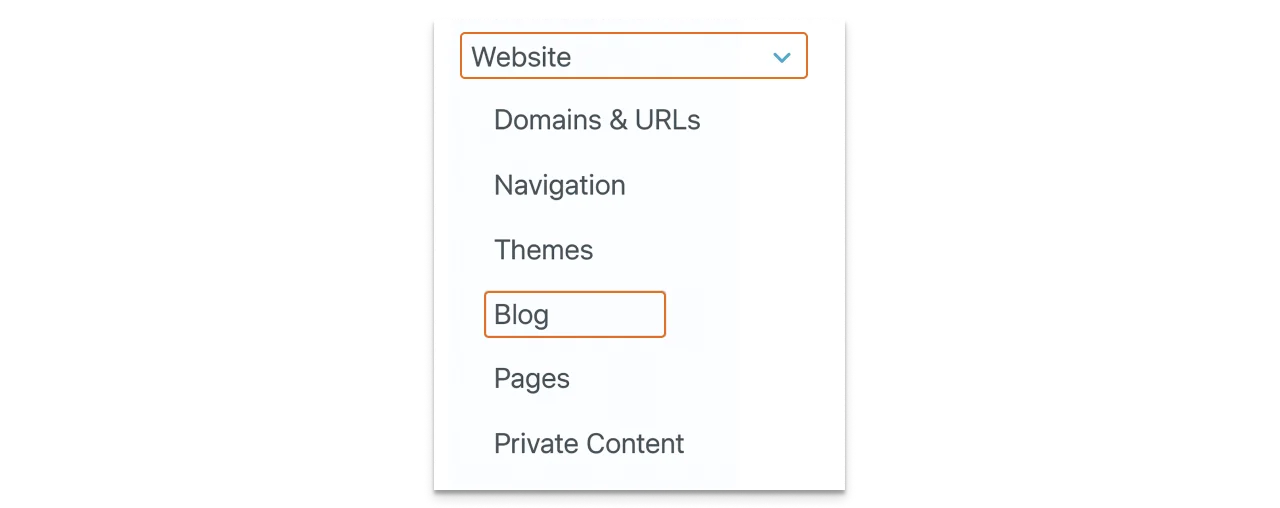
→ Click on the Import Blog option on the dropdown menu from the View Section.

→ Open the import overview page, click on the Import new blog in the top right > Start new import dropdown menu > select Blog posts.
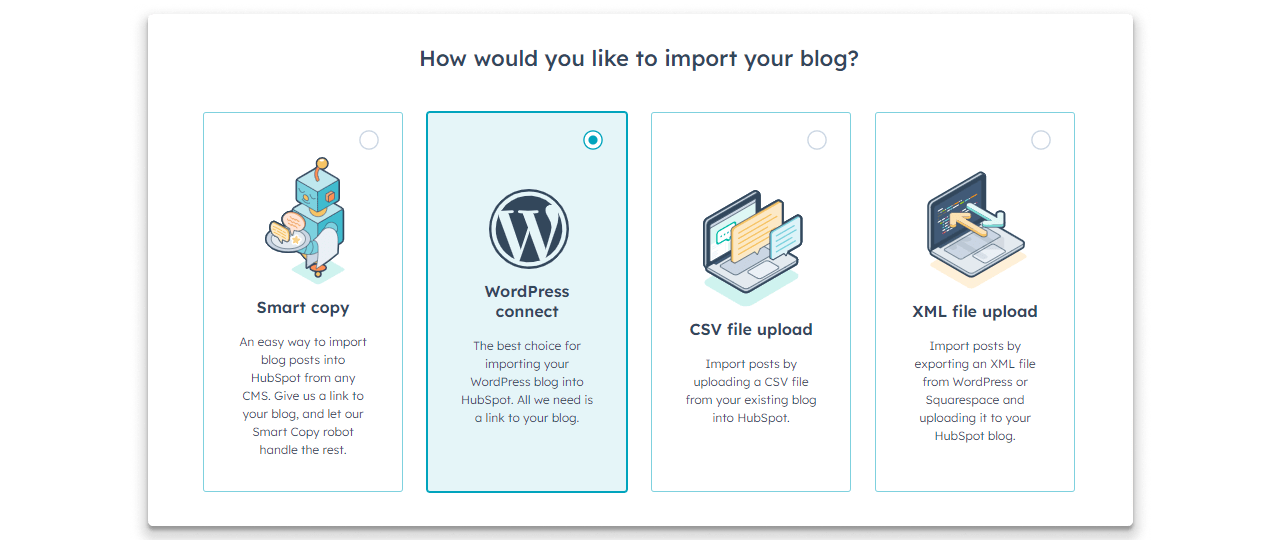
→ Select the WordPress to connect option, then click Next.
→ A new mini window will open. Enter the URL of your blog’s listing page here.
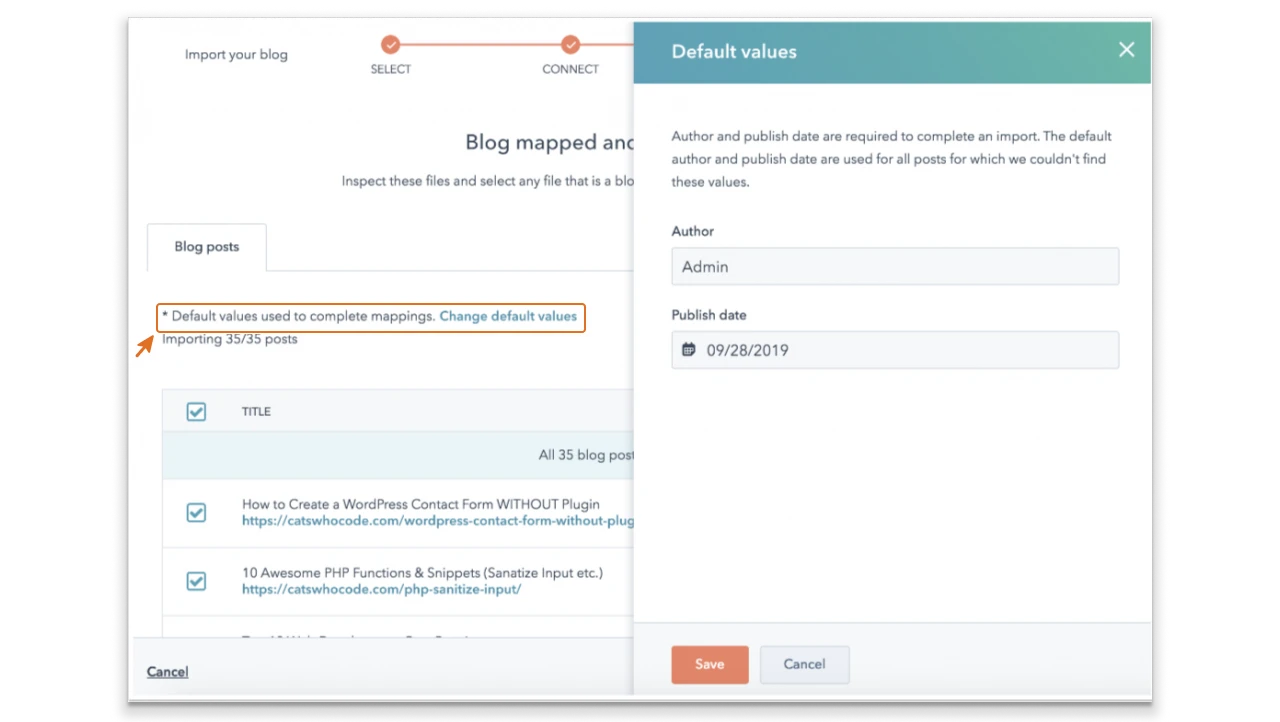
→ Once you do this, all the existing blogs in your CMS will be selected for import by default. You can uncheck the ones that you do not want to import.
→ Click on Import
→ A Publishing status dialog box will appear, choose if you want to import them as drafts or published posts.
→ Click on Save
→ Import In Progress status will be displayed
→ Once the import is complete, you’ll see the status change to Import Completed
→ In case of errors, you will see the status as Import succeeded with some errors.
→ You can click on More > View details to review and fix, and test errors.
This was a clear method of how to import your WordPress blogs to HubSpot. You can now review the imported content based on the following elements:
- Title
- SEO title
- Author
- Publish date and edit date
- Featured image and thumbnail
- Categories and tags
- Meta description
- Post body
- Embedded link text
#2 CMS2CMS and other automated tools

CMS2CMS is an automated migration wizard that lets users migrate blogs and website content from more than 20 CMS platforms.
By creating an account on CMS2CMS, you can get free migration for 10 content pages.
Here is how you migrate content pages with CMS2CMS:
- Select the source CMS
- Set the website data migration
- Automated data migration will begin
Step 5: Map URLs & Plan Redirects
Map the URL of each page for accuracy and make sure it matches the new website’s URL. Plan redirects so the website traffic and engagement are not affected.
Step 6: Implement URL Redirects & SEO Settings
Do not fear losing the online traffic from your existing CMS website. Post migrating the website, the URL is optimized, and your existing traffic is redirected to the new website address.
Adding redirects helps your users find the correct sources even if the website URL is changed.
Step 7: Perform Quality Checks & Testing
Once all the blogs and other content are migrated to a new HubSpot CMS, you will need to thoroughly test it for performance. Check all the webpages, URLs, and the overall website content for errors.
This helps in maintaining the functionality of your new CMS.
Step 8: Connect Domain & Go Live
This is the final stage where your existing domain will be connected to HubSpot through DNS settings. Now that everything is in place, the website can go live without any delay.
Read this blog: How to Migrate from HubSpot to WordPress
Method 2: Consult A Certified HubSpot Agency Like PSDtoHTMLNinja
PSDtoHTMLNinja is a leading HubSpot migration company that boasts a team of trained and certified in-house HubSpot experts.
You need professional assistance for migrating your existing CMS to HubSpot because even a minor mistake can crash your website within seconds.
Hire a team of experts to migrate the website to HubSpot CMS with efficiency and precision.
Our team's core strength lies in its years of experience in handling countless CMS migration projects.
They smoothly and carefully transfer all templates, files, functionality, and content for your peace of mind. Joining hands with a top-ranked migration agency benefits you in more than one way.
Method 3: Let HubSpot Do It For You
You will be surprised to know that HubSpot also offers a professional migration service. Here is what happens when you request the service:
- You are assigned a Replatforming specialist who collaborates with you to identify the most suitable plan based on your budget and business requirements.
- They will recreate your current web content on the intuitive and user-friendly HubSpot platform.
- Their team will make further edits and code customizations so the future updates are easily carried out on your CMS.
Is this method worth trying?
Though HubSpot offers a professional migration service, there are still some downsides to it. That is why choosing a certified HubSpot agency should be preferred.
- HubSpot’s migration services are costlier compared to the specialized services presented by an agency.
- HubSpot offers limited customization options, whereas other CMS services provide better custom CMS migration.
- HubSpot migration means your team would need support adapting to this new platform. A dedicated team of migration experts can help you learn HubSpot and assist you throughout the process.
HubSpot Website Migration Checklist
1. Pre-Migration Checklist
Here are some common aspects to remember before beginning the migration process:
Create a roadmap or plan for the migration process. Make sure to include objectives and requirements that align with your brand. Do some research to clearly explain your expectations to the HubSpot migration experts you choose. Partnering with a certified HubSpot Agency can also help you identify and achieve your migration goals.
Conduct a technical audit of your current website and restructure it so the agency understands what you are looking for.
Gather the Team
CMS migration is a tough job that requires collective effort. Make sure you choose a migration service where a dedicated team of developers, coders, migration experts, and project managers are available to help you.
Content Audit
Conduct a content audit of your current CMS so you have clean content while migrating.
Content auditing is important because:
- It helps in identifying the most important pieces of content to keep them safe. The audit ensures they are not lost during migration.
- It gives you information on the obsolete content that is no longer required.
Data Assessment
The following factors are analyzed during data assessment:
- Estimated migration costs
- Clear timeline of the migration process
- Risks associated with CMS migration
Clearly discuss with your agency the anticipated downtime during migration.
Analyze Security Features
Make sure all the content and confidential data is safely stored before migration. Also, take approval from all stakeholders and follow all necessary compliance regulations before beginning the migration.
Gather the Required Tools
If you are conducting the migration process manually, you need access to some automated tools and other cutting-edge resources. On the bright side, with a certified agency like PSDtoHTMLNinja, you can simply ask them about their tool usage and relax while their team prepares for CMS migration.
2. Migration Checklist
Search for Gaps In Your Data
Before you make the leap to migrate, take a moment to thoroughly review your current website data. Look for any gaps, missing details, or outdated content that might need attention. Do not forget to check for broken links, duplicate pages, and any SEO hiccups.
By addressing these issues ahead of time, you will ensure a smoother migration and avoid carrying over any errors. A comprehensive audit not only helps maintain data integrity but also boosts your performance after the migration.
Divide the Migration Process into Tiny Steps
Breaking the migration process down into bite-sized steps makes everything easier and helps avoid mistakes. Rather than trying to move everything in one go, concentrate on specific areas like content, design, and SEO settings.
This methodical approach not only allows for thorough quality checks and faster troubleshooting but also ensures that your website transitions seamlessly into HubSpot without any delay.
Backup the Content
Before you dive into migration, make sure to back up your entire website to avoid data loss. Keep a secure copy of all your pages, images, and files. Think of a backup as your safety net; if anything goes awry, you can quickly restore your essential content.
This little precaution not only gives you peace of mind but also helps you steer clear of unnecessary downtime.
Start the Migration Process
Once you have wrapped up your audit, planning, and backups, it's time to kick off the migration process. Start transferring your content, mapping out URLs, and configuring design elements.
You can use handy automated tools like CMS2CMS for a smoother experience, or if you prefer, take the manual route for a more precise touch. With this careful execution, you can ensure a seamless transition that protects your SEO value while successfully setting up your HubSpot site.
3. Post-Migration Checklist
Test Data and Overall Website Performance
It is crucial to check whether your migrated data is properly transferred to the new HubSpot CMS. Data loss can cost your business, hence, analyzing the data is important.
You should also test the website for performance. Make sure all the pages load at optimum speed, images do not appear pixelated, and videos (if any) play well. The performance check also includes analyzing the SEO performance of the migrated website.
Functionality Optimization
Whatever gaps you find in the previous step are addressed with functionality optimization. Here is what is done:
- Optimizing the website loading speed
- Ensuring the new website performs well on different devices
- Re-checking and fixing SEO performance issues
Decommission the Old CMS
Now that your new CMS is up and running, the old CMS can be decommissioned. Ensure all the data is migrated before you shut down the old CMS.
Help the Team Learn
HubSpot can be a new platform for your team. Give them time and support to become familiar with the updated CMS.
What Does PSDtoHTMLNinja’s HubSpot Website Migration Look Like?
Our experts have laid down a proper migration plan for efficient and successful migration:
Kickoff Meeting
We begin the migration process by organizing a kickoff call with you. This helps in better understanding your objective.
Identifying Your Requirements
We create a list of your requirements and data that needs migration. This helps in keeping a track of all the necessary details. We also sign a Non-disclosure agreement for clients who want 100% confidentiality.
Assessing the Existing CMS
We assign a team and a project manager to your project. They assess the existing CMS and create a plan accordingly.
Migration Process
With all the data lists, requirement gathering, and resource allocation, the migration process begins. Our project manager keeps you updated throughout the migration to keep you aware of the developments.
Quality Checks and Fixes
In the end, we perform quality checks before finally launching the website.
When it comes to migration, the last thing you want is a chaotic website filled with broken links or missing pages. That’s why having a solid checklist is absolutely essential. It helps you avoid any nasty surprises and keeps everything running smoothly.
Think of it this way: your role is to ensure you’re prepared with the right groundwork, while the experts tackle the heavy lifting. A dependable HubSpot development agency will handle all the tricky details and design adjustments, so you can concentrate on bigger objectives like growing your brand and boosting conversions.
To get things started on the right foot, you will want to have a few key items ready. That is precisely why we have created this HubSpot website migration checklist to guide you through each step, no matter which CMS you are transitioning from.
Common Challenges in HubSpot Migration (and How to Avoid Them)
Having a thorough understanding of the HubSpot migration process keeps you ready in case a challenge arises. Our experts have compiled a list of the most common challenges encountered during HubSpot migration.
Let us have a closer look at these roadblocks:
Duplicate and Obsolete Data
- Problem: During the HubSpot migration, your old data is sometimes migrated with inaccuracies. Either some part of it is redundant, or some of it is missed in the process.
- Solution: A thorough data audit should be done as part of your pre-migration checklist. This helps in getting rid of unnecessary data, giving you a clean and useful transfer.
Tool Integration
- Problem: Integrating your existing marketing and sales tools, and third-party systems to HubSpot can be challenging.
- Solution: Create a thorough plan and prepare a list of such tools before beginning the migration. Consult your migration expert and inform them about the necessary tools you want integrated into the new CMS.
Mobile and Cross-device Compatibility
- Problem: The migrated website may not load optimally on different devices if it is not optimized for cross-device compatibility.
- Solution: Inform your migration agency beforehand that cross-device compatibility is necessary.
Related: How to Migrate HubSpot Blog to WordPress (2026 Step-by-Step Guide)
Are You Ready for HubSpot Website Migration?
HubSpot migration is popular in the market for providing a user-friendly browsing experience and an easily manageable CMS. Make sure you go through the pre and post migration checklist mentioned in this blog to ensure a smooth migration process.
HubSpot CMS is an ideal CMS platform offering numerous tools for advanced analytics and content management. It utilizes HubSpot CRM for building a high-quality CMS.
While you can always try to manually migrate to HubSpot CMS, updating the design may disrupt the website design and structure. However, PSDtoHTMLNinja will support you throughout the process. Our team will migrate your content to the new CMS with precision.
And in case you decide to preserve the current website’s appearance, experts at PSDtoHTMLNinja will build your new site keeping in mind the design accuracy, customization requirements, and timely updates.
If you’re looking for a trusted partner, explore our HubSpot Development Service to make your migration smooth, secure, and hassle-free. Feel free to schedule a call with our team today.
FAQs
How long does a HubSpot website migration take?
We can provide you with the exact timeline after our team analyzes your requirements. Our primary goal is to provide a 100% error-free migration using the high-end resources available. Schedule a consultation call with us for an estimated timeline.
Will I lose SEO rankings during migration?
No, our migration experts preserve your SEO rankings, URL, and overall website traffic so the website engagement is not affected after migrating to a new CMS.
Can I migrate from WordPress/Wix/Shopify to HubSpot?
Absolutely, we offer professional migration services that also include WordPress, Shopify, Wix to HubSpot.
What is the cost of migrating a website to HubSpot?
You can share your project details, migration requirements, and current website link for a quick analysis. Our team will evaluate the work and give you a fair price quote.
Do you offer international HubSpot migration support (USA, UK, Australia, Germany, etc.)?
Definitely, we have 13+ years of experience in serving clients across the globe. Our team works across time zones, and our experts are available to assist you whenever needed.

Jayveer Ker serves as the Business Development Manager at PSDtoHTMLNinja.com, specializing in assisting organizations with overcoming web development hurdles. His insightful and informative posts deliver practical solutions and valuable insights.
Couldn't find what you were looking for?
Let us know how we can help!

Related Blog Posts