Table of Content
Magento to Shopify migration is a strategic decision e-commerce businesses make to shine in the market.
While Magento offers great features, Shopify wins the race by presenting itself as a user-friendly, SEO-driven, and cost-effective platform.
It provides an easy-to-navigate interface along with a vast ecosystem of tools that simplify store management. These primary features make Shopify a strong choice for businesses.
That being said, migrating to Shopify requires expertise and strategic planning to ensure your website retains the SEO data and follows the industry-best methods.
In this guide, we have described the complete Magento to Shopify migration process in detail. We have covered topics like URL mapping, creating backups, making SEO strategies, and the post-migration checklist.
Why Migrate from Magento to Shopify?
Businesses often transition from Magento to Shopify for better speed, security, performance, and ease of use.
Let us look at the major reasons that influence brands to move from Magento to Shopify:
High Maintenance Costs
Magento is a self-hosted platform that requires businesses to manage hosting, servers, and infrastructure, which can become expensive over time. Magento requires constant maintenance that seems costly in the long run. Overall, the Magento platform has high maintenance costs.
Performance and Speed Challenges
Magento can handle large-scale businesses effectively, but it requires strong hosting, optimization, and ongoing technical management, which increases complexity and cost.
Security Limitations
Magento provides strong security capabilities, but since it is self-hosted, businesses are responsible for implementing patches, updates, and server-level protection.
User-Friendly Experience
Compared to Magento, Shopify provides a user-friendly experience for businesses that want to manage their store without dealing with complex technical challenges. The platform makes product uploads, cart management, and other tasks very smooth and streamlined, helping businesses manage their operations smoothly.
Faster Development
With a large repository of themes, templates, and plugins, Shopify significantly speeds up the development process. These built-in features enable faster store setup and reduce overall time to market. This is perfect for brands that want to hit the market quickly.
Magento vs Shopify: Key Differences Explained
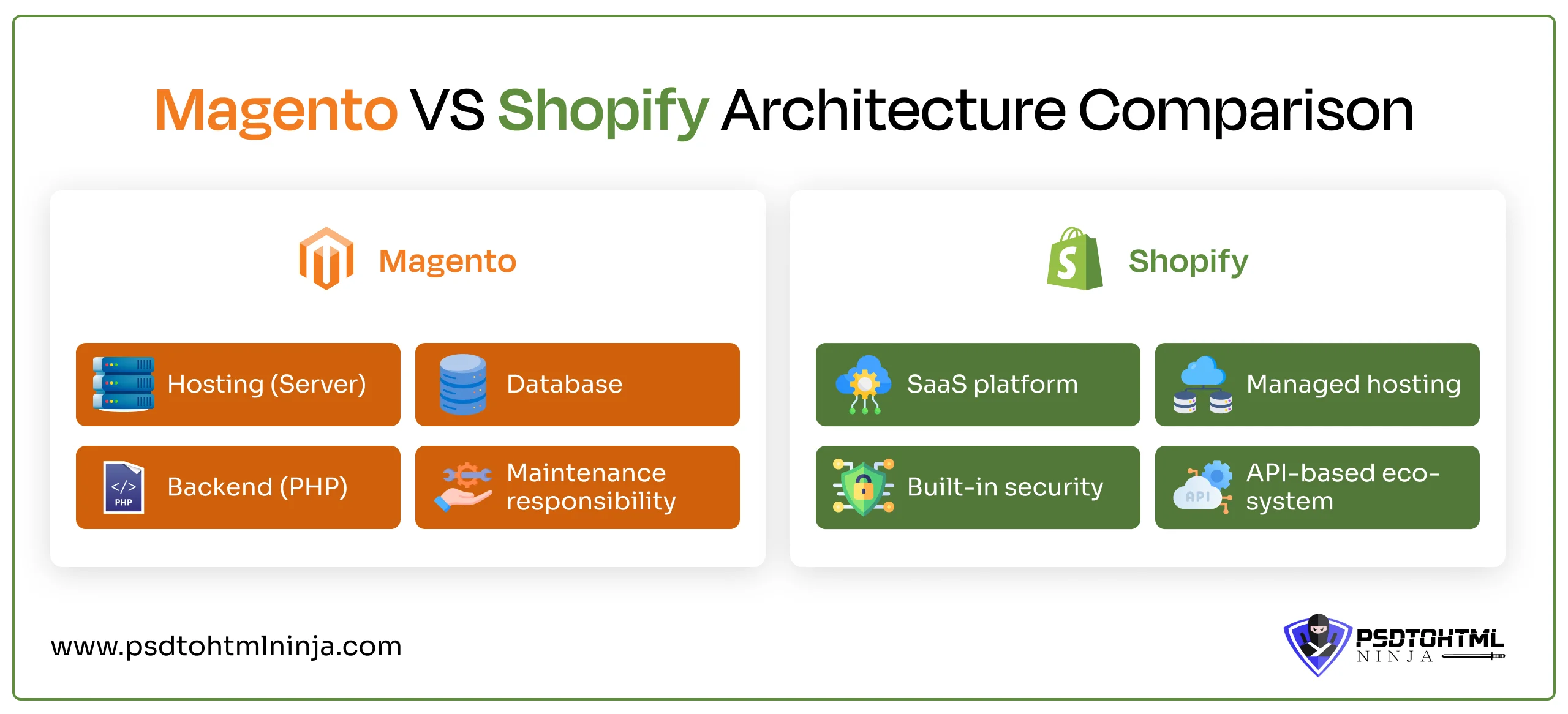
Why not Magento? Since both platforms are designed for building powerful online stores, why migrate from Magento to Shopify?
To better explain this, we have a detailed section describing the key differences between Magento and Shopify.
Hosting & Infrastructure
Magento: Magento is self-hosted, which means the business has to manage the hosting, servers, and overall infrastructure. Fully self-hosted platforms provide complete control to the owner, but it also increases complications and costs.
Shopify: Shopify is a SaaS platform that manages security patches, servers, hosting, and SSL certificates. This provides owners with some peace of mind, as they no longer need to handle technicalities and hosting of the online store. However, if you are still evaluating your platform options before making the switch, read our exhaustive breakdown of WooCommerce vs Shopify vs Magento to see how they perform side-by-side.
Customization & Flexibility
Magento: Magento is a great option for customization that allows you to customize anything you want. The open-source architecture of Magento allows you to tailor different features as per your requirements.
Shopify: Shopify is also a great choice for businesses that want complete customization options. The only downside here is that it operates in a limited ecosystem with certain limitations. For example, themes can be customized, but only within the theme framework; the checkout page code can be partially edited, but not completely.
Performance & Scalability
Magento: When it comes to Magento, its performance depends on the quality of hosting and how well it's optimized. With the right setup, it can manage large-scale operations effectively, but it does demand ongoing technical attention.
Shopify: Shopify offers quick and dependable performance right from the start since it takes care of the infrastructure itself. It automatically scales up, making it a great choice for businesses that are on the rise and want to avoid the technical hassles.
SEO Capabilities
Magento: Your Magento store can rank well on the search engine if you use its SEO capabilities properly. You get advanced SEO tools for better performance.
Shopify: Shopify includes built-in SEO features that provide a strong foundation for improving search visibility, ideal for businesses that want to generate higher traffic in less time.
Total Cost of Ownership
Magento: In the beginning, Magento remains cost-effective. But the overall cost of ownership increases as your store grows. Hosting, development, and upgrades prices increase with time.
Shopify: With Shopify, the average cost remains transparent because it follows a subscription or plan model. Additional costs are calculated for extra customization and advanced features. Overall, Shopify remains more on the cost-friendly spectrum. If you want to dive deeper into the line items that influence platform transfer pricing, check out our detailed website migration cost guide to map out your development budget accurately.
| Feature | Magento | Shopify |
|---|---|---|
| Hosting | Self-hosted | Fully-hosted |
| Customization | Easily customizable | Customization within the Shopify structure |
| Performance & Scalability | Depends on the quality of hosting. Manual updates | Automatic updates and scaling up |
| SEO Capabilities | Advanced SEO tools available | Built-in SEO features |
| Total Ownership Cost | Expensive as business grows | Moderate |
Magento to Shopify Migration Checklist
Before diving deeper into the core migration process, let us have a look at the migration checklist so you can be prepared:
- Backup Magento store: Create a secure backup of all the files you want to migrate to Shopify. This includes customer details (name, address), order details, product descriptions, images, and all other essential data.
- Audit existing URLs: Check the structure and format of the Magento store URLs. Keep this format saved because you will have to structure the Shopify store URLs accordingly.
- Export product, customer, and order data: Once finalized, export all the details from Magento. You can either do it manually or use a plugin.
- Identify custom features: Keep a list of the custom and advanced features in your Magento store. These features would need to be separately added in Shopify.
- SEO audit (meta, URLs, backlinks): Once migrated, conduct a thorough SEO audit of your Shopify store. Check all the metadata, URL structure, and backlinks to ensure all the links work smoothly and the URLs are assigned to the correct pages.
- Plan 301 redirects: Make sure you implement 301 redirects so that when a user opens your old store’s URL, they are redirected to the new one.
What Data Can Be Migrated from Magento to Shopify?
When you are making the switch from Magento to Shopify, most of your key store data can be transferred easily.
Here is a quick rundown of what you can migrate:
Products (SKUs, Variants, Images)
- Product names, descriptions, and SKUs
- Variants like size and color
- Pricing and inventory information
- Product images and galleries
Categories to Collections
- Magento categories will be transformed into Shopify collections
- Product grouping and hierarchy may need a little tweaking
Customers
- Customer names and contact information
- Email addresses
- Billing and shipping addresses
- Customer groups
Order
- Order history and IDs
- Details about customer orders
- Purchase dates and statuses
CMS Pages
- Static pages such as About Us, Contact, and FAQs
- Page content along with basic formatting
Reviews & Ratings
- Product reviews
- Customer ratings (typically migrated using apps or third-party tools)
URLs & SEO Data
- Meta titles and descriptions
- URL handles (where applicable)
- 301 redirects to keep your SEO rankings intact

How to Migrate Magento to Shopify (Step-by-Step)
We have listed down all the steps for a professional Magento to Shopify migration process. This includes all the stages that assist in secure and efficient migration.
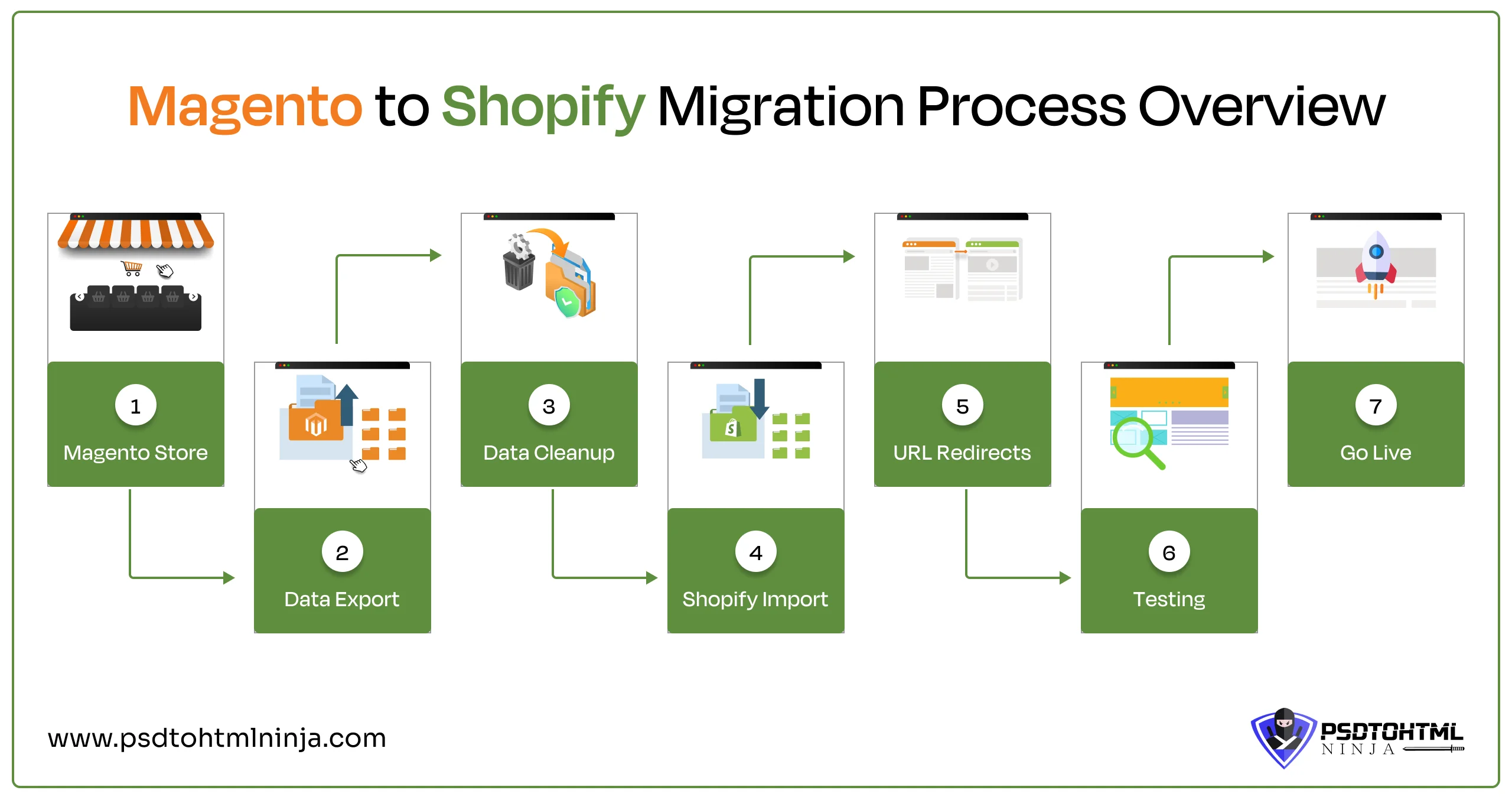
Step 1: Set Up Your Shopify Store
Create a powerful strategy and roadmap before starting the migration process. Once that is done, the Shopify store will need to be set up.
A properly structured Shopify foundation will keep you ready for migration.
- Create a Shopify account
- Add basic details
- Add essential pages
- Set Up domain
- Add the basic SEO features
For a faster and professionally structured setup, you can rely on our Shopify development services to get your store ready for migration.
Step 2: Export Data from Magento
The next step is very critical, so you have to be very careful. All the data you want to migrate to Shopify is exported from Magento at this stage. Getting this done manually by an expert is the ideal way to ensure zero data loss.
- Export the data in a CSV file
- Open the downloaded file on your computer
- Edit the file and delete duplicate entries
During export, special attention should be given to attribute mapping, configurable products, and multi-store data. Magento configurable products must be carefully mapped to Shopify variants, otherwise product relationships may break. If your store has multiple store views, ensure the data is separated and structured correctly before migration to avoid duplication or data conflicts.
Step 3: Import Data into Shopify
Now we need to import the data to Shopify. Here is how to do it:
- Click on Shopify Admin
- Go to Products > Import
- Upload the CSV file that has the data
While importing data into Shopify, it is important to consider platform limitations. Shopify CSV imports have specific formatting requirements, and each product can support a maximum of 100 variants. Additionally, Shopify APIs have rate limits, so large data imports should be processed in batches to avoid errors or failed imports.
Step 4: Set Up URL Redirects (SEO Critical)
Old Magento URLS\s need to be restructured as per the Shopify URL format to avoid broken links. Map all the URLs for different webpages, and make necessary changes.
To set up the URLs on Shopify:
- Navigation > URL Redirects
Step 5: Design & Theme Setup
- Choose a Shopify theme
- Make adjustments to the color, format, layout, etc.
- Edit elements like banners, navigation menu, and product pages.
Step 6: Install Required Apps
Now that the basic migration is done, your Shopify store will require additional apps to deliver optimum performance.
You should install apps for the following functionalities:
- Product reviews
- Marketing and analytics
- SEO enhancements
- Backup, security, and updates
Step 7: Test Store Functionality
Your migrated Shopify store would need to be tested thoroughly before launching. Run performance checks, analyze the SEO performance, page loading speed, mobile responsiveness, etc.
Step 8: Launch Your Shopify Store
Once the tests are cleared and the adjustments are made, you can launch the Shopify store on the servers.
Magento 2 to Shopify Migration: What’s Different
Magento 2 is the most advanced version of Magento. Being an open-source platform, it is highly customizable. But that's the major reason why migrating from Magento 2 to Shopify is complicated:
- Database structure differences: Magento organizes data in a way that's incredibly flexible. You’ll find that products, attributes, categories, and customer information are all intricately linked, which can make it tricky to fit everything into Shopify’s more straightforward setup.
- Handling custom modules: A lot of Magento stores depend on unique features or third-party extensions that are custom-built. Unfortunately, these functionalities often don’t have direct counterparts in Shopify, so they need to be recreated using apps or custom development.
- API-based migration considerations: Shopify APIs come with rate limits, which means there's a cap on how many requests you can make each second. For large data transfers, it's best to break them down into smaller batches. Implementing queue systems can help prevent failures or throttling.
Common Challenges in Magento to Shopify Migration
Migration is a cumbersome process involving several complications. One wrong move and you might lose data or transfer incorrect files.
It is best to know the challenges you can encounter throughout the process so you can properly deal with them:
Data Loss or Inconsistency
This is the major challenge. Data for any e-commerce business is highly important. Customer information and product details are bulky and should be migrated with care.
During the process, some data might be lost, or sometimes partial data is migrated. These inconsistencies affect the timeline and quality of your migration process.
SEO Ranking Drop
Your website's SEO ranking may suffer a drop after migration. This often happens due to incomplete or incorrect Metadata. Broken internal links and slow webpage loading speed also contribute to lower SEO rankings.
URL Structure Differences
Another common challenge is with the URL structure of your new website. Magento and Shopify follow different URL structures, so you should ensure that your new webpages have the correct links.
Also, set up 301 redirects wherever required to avoid the 401 error.
Custom Feature Limitations
Transferring custom features and extensions from Magento to Shopify is yet another challenge. It can't be done directly; that is why these extra features are rebuilt from scratch after being exported to Shopify.
Large Catalog Migration Issues
When dealing with a large number of products, variants, and images, you might run into delays, data mismatches, or even limitations with the API. To avoid any performance hiccups or issues with data integrity, it's crucial to plan ahead, use batch processing, and validate your data thoroughly.
Variant & Attribute Mapping Issues
Magento uses a highly flexible attribute-based system, whereas Shopify relies on a structured variant model with certain limitations. During migration, complex attributes such as size, color, and custom options must be accurately mapped to Shopify variants. Improper mapping can result in missing product options, broken relationships, or incorrect listings, especially in large catalogs.
How to Preserve SEO During Migration
Even a small mistake in URL mapping or redirect implementation can lead to a 30%–70% drop in organic traffic after migration, which is why careful planning, validation, and monitoring are critical.
SEO plays a crucial role in the success of your online store, and it can be significantly impacted during migration if not handled properly.
Here are the key aspects you should focus on to preserve SEO while migrating from Magento to Shopify.
After completing migration, submit your updated sitemap through Google Search Console to help search engines discover and index your new URLs faster.
URL Mapping Strategy

Start by creating a straightforward map that links your old Magento URLs to the new Shopify ones. This step is crucial for maintaining continuity and helps search engines grasp how your pages are transitioning.
Implementing 301 Redirects Next, set up 301 redirects to permanently direct both users and search engines to the new pages. This is essential for preserving your SEO value and avoiding any traffic loss due to broken links.
Preserving Meta Titles & Descriptions
Make sure to transfer all your meta titles and descriptions from the old site. This keeps your keyword relevance intact and ensures that your search visibility remains consistent.
Fixing Broken Links
Take the time to identify and update any internal links that still point to the old URLs. This not only enhances the user experience but also helps search engines in crawling your site more effectively.
Submitting Sitemap to Search Engines
After the migration, generate and submit your new sitemap. This action helps search engines quickly find and index your updated pages.
Monitoring via Google Search Console
Finally, keep an eye on your performance and any indexing issues through Google Search Console. This tool is invaluable for spotting errors early on and making sure your SEO stays on track.
Manual vs Automated Magento to Shopify Migration
Migrating an online store from Magento to Shopify can be done through two primary methods. Both have their pros and cons, and are designed for different businesses.
Automated Migration Tools
These are plugins or automated tools that are quick; they give instant results. The entire migration process is completed in a few clicks without much manual intervention.
Pros: Time-efficient, no coding or technical knowledge required, cost-effective
Cons: Not always accurate
Manual Migration
Manual Migration means your store is transferred without using any automated tools. Migration experts like PSDtoHTMLNinja perform migration methods manually, where the professionals carefully migrate each element of your store.
Pros: Expert assistance, accurate results, customization possibilities
Cons: Technical knowledge needed, more expensive than using plugins
Which Method is Better for Your Store?
Migrating online stores through the automated method is preferred only for very small websites.
However, if you want your business to be at the top of the market, then opting for the manual method is suggested.
Manually shifting your Magento store to Shopify provides data security, accurate results, and higher Customization possibilities.
Magento to Shopify Migration Cost Breakdown
Migration cost really depends on how complex your store is and how you plan to move it. Here’s a quick breakdown to give you a realistic idea.
| Migration Type | Estimated Cost | Features | Best For |
|---|---|---|---|
| DIY | $0-$500 | Manual data transfer, basic setup, free/low-cost themes, minimal apps | Small stores, tight budgets, tech-savvy users |
| Tool based | $50-$500+ | Migration apps/tools, automated data transfer, limited customization | Medium-sized stores, faster migration needs |
| Agency Cost | $1000 - 10,000+ | Full-service migration, custom design, SEO preservation, testing, support | Large stores, complex requirements |
How Long Does Magento to Shopify Migration Take?
Depending on the migration method you choose, shifting from Magento to Shopify can vary. Here is a brief rundown for different business sizes:
- Small stores: Typically take a few days to 1–2 weeks to migrate. With fewer products and minimal customization, the process is faster and easier to manage.
- Medium stores: Usually require 2–4 weeks for complete migration. This includes handling larger catalogs, app setup, and proper SEO mapping.
- Large enterprise stores: Can take 1–3 months or more, depending on complexity. Custom features, large data volumes, and integrations require careful planning and phased execution.
Magento to Shopify Migration Service (Handled by Experts at PSDtoHTMLNinja)
Are you looking for a reliable Migration partner? Your search ends here at PSDtoHTMLNinja, as we are the market leaders excelling in various migration solutions. With an experience of over 13 years, we have served clients with world-class projects.
Our team deliver 100% accuracy with a fully manual migration process. We take care of every major and minor detail of e-commerce store migration, giving you the finest results.
Choose us if you want:
- SEO-safe migration
- Custom feature handling
- Dedicated developer support
- Post-migration support
FAQs About Magento to Shopify Migration
1. Is Shopify better than Magento?
Shopify is better in terms of performance, scalability, hosting, and security. The transparent pricing based on the subscription model makes it a perfect choice for brands in search of cost-effective solutions.
2. Will I lose SEO during migration?
No, our team maintains all necessary protocols to ensure your SEO and search engine rankings remain intact. We implement 301 redirects, preserve Metadata, and do an overall hygiene check once migration is completed.
3. Can I migrate Magento to Shopify without downtime?
A minor downtime occurs during migration but our team conducts the process during low traffic hours to make sure your customers are not affected.
4. What happens to my existing URLs?
The existing URLs are structured to match the format for Shopify. Webpage URLs are checked to ensure they are linked to the correct pages. This is done to avoid broken links and 404 errors, ensuring users and search engines are directed to the correct pages.
5. Do I need a developer for migration?
It is ideal to get a professional team of migration experts, including a developer. A trained and certified team handles your data with utmost care, and delivers quality migration services. For a fully-functional online e-commerce store, and secure migration, schedule a callback with us.

Prince Jadiya holds the position of Chief Marketing Officer at Psdtohtmlninja.com, where he assists organizations in overcoming web development obstacles. He is also known for him informative and engaging blog posts.
Couldn't find what you were looking for?
Let us know how we can help!

Related Blog Posts