Table of Content
Businesses usually use Sitecore CMS for large-scale enterprise requirements, huge data handling, and advanced features. But it can be expensive and technically challenging to maintain, especially when your team has limited technical skills.
Contrarily, WordPress CMS is known for its smooth usability, scaled performance, and editable themes that also allow you to manage personalized content. You can achieve all this without worrying about technical complexity and high subscription prices.
From small businesses to mid-sized and large businesses, WordPress remains a popular name in the market. In fact, it powers about 43% of the websites on the internet.
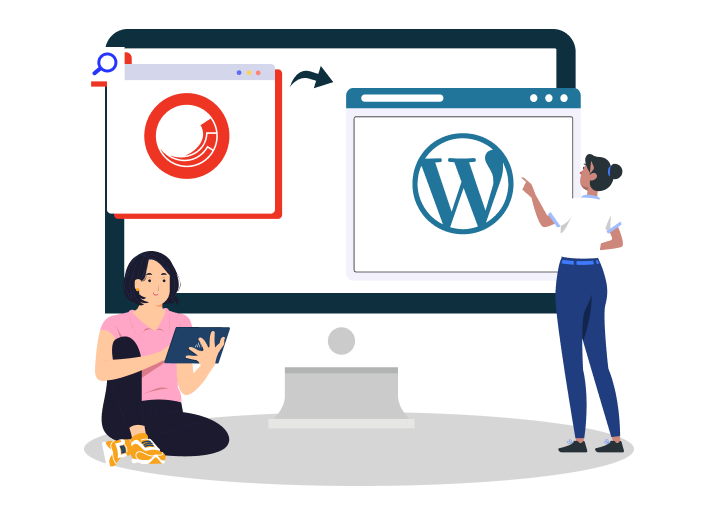
If you want to migrate from Sitecore to WordPress but can’t find the right information, then your search ends here. In this detailed guide, we will take you through the complete step-by-step process of Sitecore to WordPress migration, the challenges you might face, and more.
Main Reasons To Migrate From Sitecore to WordPress
Diversity, affordability, and customization are major reasons businesses decide to switch from Sitecore to WordPress. While Sitecore has its benefits, WordPress fits better with the needs of various business sizes at reasonable costs.
Easily Manageable
People looking for an easy-to-use content management system prefer WordPress over Sitecore. Users with no or basic technical knowledge can easily upload, manage, and edit content on a WordPress CMS. Plus, a website created on this platform is smooth and offers smooth navigation.
Scalability
WordPress complements your business growth through its extensive library of themes and templates. Apart from providing so many customizable options, numerous WordPress plugins make it easy for you to install new and advanced features.
Lower Cost
WordPress is an affordable CMS platform that also delivers a high-performing website for you. Maintaining and updating Sitecore can be expensive compared to WordPress, which offers free options and reasonably priced additional features.
Customizable
Most of the themes and features in WordPress are easily customizable so that you can edit to fit your brand's needs. When it comes to Sitecore, customizing features and website appearance becomes challenging due to complex technical requirements.
Pre-Migration Checklist For A Successful Sitecore To WordPress Migration
Before diving into the migration process, you should be fully prepared. Following a pre-migration checklist ensures the professional Sitecore to WordPress migration is completed successfully without losing data and other important information.
1. Sitecore Website Audit
- Thoroughly review the existing website to better understand which content to migrate.
- Find the additional features and third-party integrations that need to be migrated.
- Note down all the SEO rankings to ensure nothing is lost.
2. Determine Data to Migrate
- Finalize the data that needs migration and separate it from the redundant content.
- Analyze user accounts, products, customer data, etc., and find items to be moved.
- Determine features that can be manually migrated and which ones need custom services.
3. Select WordPress Hosting
- Managed Hosting: Best for simple website management with security features.
- Self-hosting: Comes at reasonable costs but requires more technical skills.
- WordPress Hosting: Powered by WordPress, it offers multiple benefits and tight security.
Mapping Your Sitecore Structure to WordPress Architecture
Sitecore and WordPress operate on different architectures. So, it is very important to map your Sitecore hierarchy to a WordPress acceptable format.
This ensures that your new webpages have the correct URL structure, leading your audience to the correct page without any confusion.
Here is what needs to be checked before migration:
- Templates → WordPress Themes / Custom Post Types
- Sitecore Items → Pages / Posts / CPTs
- Media Library → WordPress Media Library
- Sitecore URLs → WordPress Permalinks
A clearly and well-laid-out migration plan helps keep the data safe. You not only speed up the migration process by mapping the website, but also safeguard the essential features for your new WordPress website.
Choosing the Right Sitecore to WordPress Migration Approach
Migration of Sitecore to WordPress can be done in various ways. Depending on your comfort and usability requirements, you can either choose a manual method or go for automated plugins.
Let us learn more about these approaches:
1. Manual Migration
This method requires you to manually migrate the content from the Sitecore site to WordPress. You can move everything as per your preferences and choose what needs to be migrated.
The process is time-consuming and yields the best results only when you have good technical expertise.
2. Automated Migration Tools & Scripts
Using plugins is the fastest way of moving your Sitecore content to WordPress. All you need is a reliable plugin, and migration is completed in just a few clicks.
However, automated tools are not always accurate, and you may have to spend some extra time making the adjustments post-migration.
3. Hybrid Migration Strategy
A hybrid migration strategy is the best option when you have to do bulk transfers. You can use plugins for the larger part of the migration, i.e., migrating pages, product descriptions, forms, blogs, etc. Then manually add other functionalities.
It is best to hire a WordPress development company to complete the migration process for you. This gives you peace of mind, and you can focus on other essential aspects of your business.
Read this: Top WordPress Website Migration Experts: Trusted Agencies to Hire
Step-By-Step Guide: How To Migrate From Sitecore To WordPress
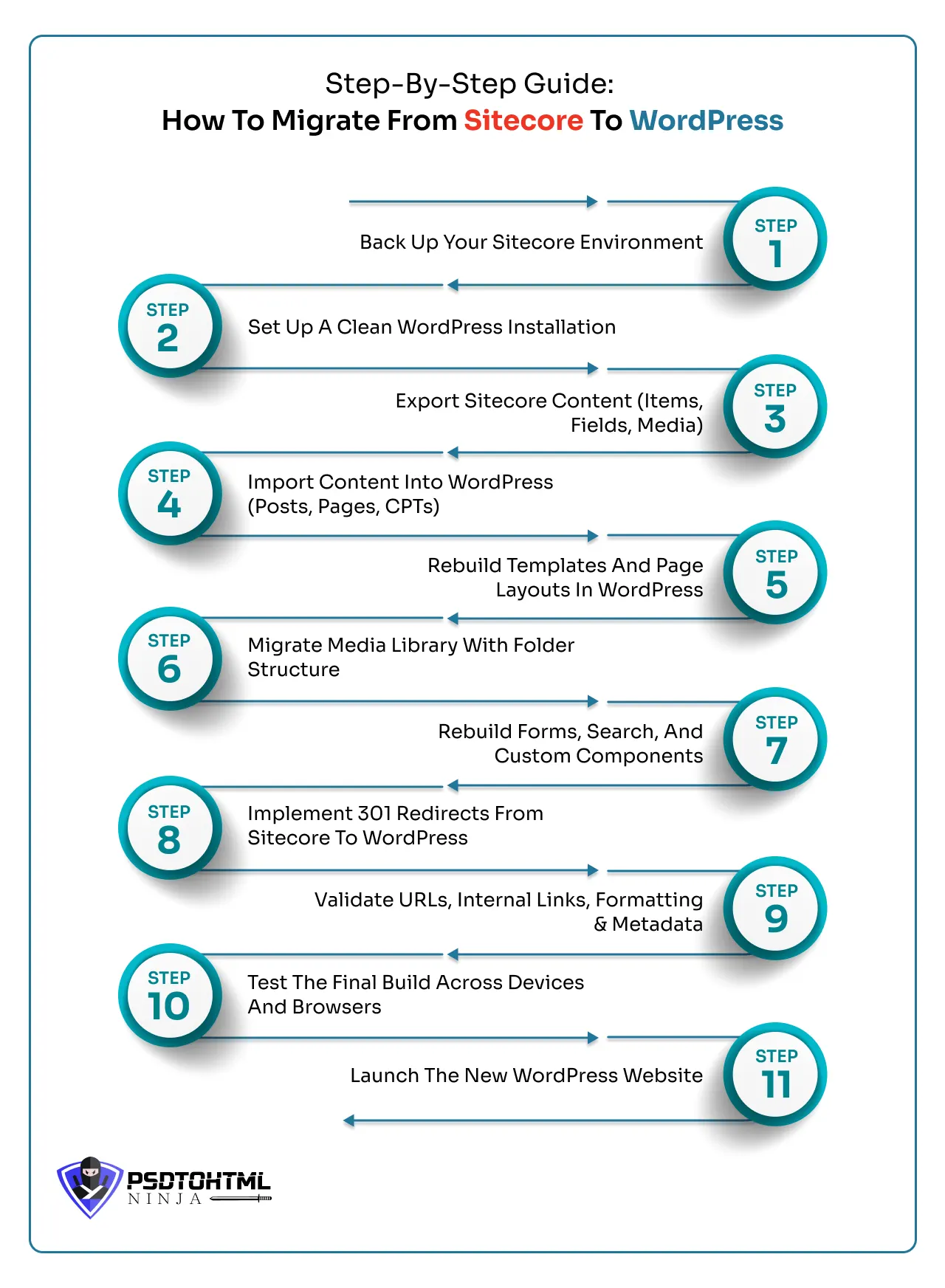
Step 1: Back Up Your Sitecore Environment
Creating a secure backup of your Sitecore website is necessary before moving anything. Here is what should be backed up:
- Pages, images, posts, blogs, and all other website content.
- Sitecore database and configuration settings.
- Custom code of premium features and third-party integrations.
Step 2: Set Up A Clean WordPress Installation
Let us set up your WordPress environment:
- Install and log in to the WordPress dashboard.
- Configure the workspace and set up general settings.
- Select a suitable theme from the WordPress theme and template library.
- Add the required plugins for quick migration and feature setup.
Step 3: Export Sitecore Content (Items, Fields, Media)
Once you have identified the content to migrate, it is time to start exporting it. Download all the items, files, media, and other related content. Databases containing other essential details should also be exported before moving to the next step.
Step 4: Import Content Into WordPress (Posts, Pages, CPTs)
During this step, the exported content is imported into WordPress. Now you can either do this manually or use an automated tool to quickly import poets, pages, media files, custom post types, etc.
Make sure your SEO assets, like meta title, slug, description, etc., are also imported to WordPress.
Step 5: Rebuild Templates And Page Layouts In WordPress
Open the theme or template you selected in WordPress. Now check your requirements and edit the opened template to adjust it according to your needs.
Change the layout and give your new website the right appearance, matching your expectations.
Step 6: Migrate Media Library With Folder Structure
- All the downloaded images, videos, graphics, icons, and documents you exported from Sitecore’s media library should now be moved to the WordPress media library.
- At this point, check the relevant links so the pages do not appear broken.
Step 7: Rebuild Forms, Search, And Custom Components
- In this stage, recreate all the interactive features from your Sitecore site within WordPress. This means rebuilding contact forms, lead-generation forms, and the internal search functionality, either by using plugins or through custom development.
- If your Sitecore website included personalized widgets or custom modules, make sure to replicate those in WordPress to keep the same functionality and user experience.
Step 8: Implement 301 Redirects From Sitecore To WordPress
You would not want to lose your online traffic. Follow the steps to preserve SEO rankings during migration:
- Set up 301 redirects so that any old Sitecore URLs point to the right new pages on WordPress. This step is key to avoiding broken links, keeping your SEO rankings intact, and ensuring that users have a seamless experience.
- Create a thorough redirect mapping plan and put it into action using plugins, server rules, or the .htaccess file, depending on your hosting setup.
Step 9: Validate URLs, Internal Links, Formatting & Metadata
- Make sure to check all the links on your webpage to confirm they lead to the right pages and that none are broken after the migration.
- Review the URL structure to ensure it aligns with SEO best practices, validate the internal linking paths, and check that everything is formatted correctly.
- Verify the meta titles, descriptions, alt texts, and schema to keep your search performance strong.
- Finally, run a last crawl with an SEO auditing tool to catch and fix any lingering issues.
Step 10: Test The Final Build Across Devices And Browsers
The majority of users access websites on their mobile phones. Checking whether your new WordPress website is compatible across different devices and screen sizes is vital so it loads with maximum speed.
Run the following tests before launching your website:
- Check broken links.
- Verify the migrated content twice.
- Test forms, functionality, website speed, heavy load testing, etc.
- End user and navigation testing.
Step 11: Launch The New WordPress Website
After running different tests, fixing the bugs, and making performance enhancements, it is time to launch your WordPress CMS on the servers.
SEO Considerations During Sitecore to WordPress Migration
When migrating from Sitecore to WordPress, one of the major concerns is the potential drop in SEO rankings. This often occurs because of broken links, missing metadata, duplicate content, or changes in the URL structure.
If these issues are not addressed properly, search engines might have a tough time understanding the new site, which can lead to a decline in organic visibility, a drop in traffic, and a negative user experience.
- 301 Redirects: Set up 301 redirects from the old Sitecore URLs to the new WordPress URLs to maintain domain authority and link equity.
- Preserve Metadata: Make sure to transfer all title tags, meta descriptions, tags, and schema elements to keep the existing SEO signals intact.
- Test SEO Settings: Use SEO plugins to fine-tune on-page elements and effectively manage sitemaps. Or hire a migration expert to handle the end-to-end process.
- Check for Indexing Issues: Ensure that the new WordPress site is properly indexed in Google Search Console and keep an eye on ranking performance throughout the transition.
Taking this proactive SEO approach will help ensure a smooth migration that remains friendly to search engines, allowing you to keep those valuable rankings intact.
Common Challenges in Sitecore to WordPress Migration & How to Solve Them
Using the right tools and resources is a major part of transferring to WordPress. But things may still go south because of unexpected issues.
Here is a list of the top 3 common challenges you might face and their solutions:
1. Content Loss
Problem: Migration involves exporting and importing large data sets and databases. Losing this critical information would mean a huge loss, both financial and emotional. This problem often occurs with manual migration.
Solution: However, you can avoid losing important data by creating at least two secure backups. This ensures all the vital information and website content remains safe during migration.
2. Lower Online Engagement
Problem: SEO loss is one of the major challenges associated with the Sitecore to WordPress migration. Imagine spending so much time and money on your website SEO and losing it all.
Broken links, incorrect meta tags, lost meta title, etc., heavily impact your search engine rankings.
Solution:
- Preserve all the metadata and make sure it reflects correctly on the new WordPress website.
- Double-check all the SEO settings, and run a complete SEO audit of your WordPress webpages.
- Map the WordPress URL structure and ensure everything looks good and functional.
3. Lengthy Migration
Problem: Migrations done at a large scale are difficult to manage. They consume a lot of time and usually lead to data loss.
Solution: Hiring a professional WordPress developer can save you a lot of time. Their trained migration team gives your website a smooth transition to WordPress without losing the content while maintaining the website's performance.
Post-Migration Optimization After Moving from Sitecore to WordPress
Migrating a website leaves some areas for improvement. If you want your site’s performance to stay top-notch, here is a Sitecore to WordPress post-launch checklist to follow:
1. Check and Update Internal Links
Apart from the main links (webpage links), your website contains numerous internal links and hyperlinks.
You should mandatorily test them to see if they are leading to the correct source. Update the links accordingly to keep the traffic flowing smoothly.
2. SEO Optimization and Content Fixing
While the SEO part is thoroughly tested during the migration stage, it is imperative to improve SEO after migrating to WordPress. Check the URLs, metadata, and overall content for any discrepancies.
3. Data Analytics Setup
Set up all the data analytics tools, including marketing tools, that you need to monitor the website performance.
In case you already added them during migration, run a final analysis to check if they are properly integrated into your new WordPress website.
4. Create a Backup of the WordPress Site
Now that you have your final WordPress site all clean and running, it is safe to create its backup. In case the site crashes or other technical glitches happen, your data and content will be safeguarded.
This step also includes setting up regular WordPress backups for ongoing protection.
Conclusion
Sitecore to WordPress migration is a highly technical process. It needs to be done right so your business grows at the desired speed.
Transferring to WordPress not only makes content management a flawless task but also gives you countless customization options.
You should hire a trusted partner to manage this essential process of setting up your WordPress site. PSDtoHTMLNinja is a reliable WordPress migration agency that ensures your website runs smoothly, securely, and in line with your long-term business goals.
With a strong team of migration specialists and over 13 years of experience, we handle your project with professionalism and integrity. Feel free to contact us for more information, and our team will handle the rest.

FAQs
Why should I migrate my Sitecore site to WordPress?
WordPress is a top choice when it comes to choosing an affordable and easy-to-use platform. It offers a wide range of plugins, themes, and templates that you can choose from. Overall, WordPress outshines Sitecore in terms of performance, website appearance, and usability.
Can I migrate Sitecore content to WordPress without losing SEO rankings?
Yes, by trusting an expert migration company like PSDtoHTMLNinja, you can preserve the SEO rankings.
How long does the migration take?
The actual migration process takes from a few weeks to even months. This depends on your website size, migration complexity, extra media files, etc.
What is the cost of migrating?
The migration cost is determined after the website audit. The factors playing a key role in establishing the migration price include the number of pages or website, customization, additional services like SEO preservation, performance enhancement, etc.
Does Sitecore to WordPress migration help reduce website development costs?
Yes, because WordPress is more affordable to maintain, customize, and scale, making it an excellent choice for reducing long-term website development costs.

Prince Jadiya holds the position of Chief Marketing Officer at Psdtohtmlninja.com, where he assists organizations in overcoming web development obstacles. He is also known for him informative and engaging blog posts.
Couldn't find what you were looking for?
Let us know how we can help!

Related Blog Posts