Table of Content
WordPress empowers about 43.4% of the websites on the internet. It also holds a whopping 61.4% share of the entire Content Management System market. With this massive popularity and density, WordPress websites are often at risk of security breaches and cyber attacks.
Your website needs monthly WordPress maintenance to stay secure and running. Site downtime and server failures are the common problems you face with an ill-maintained website.

This is where a WordPress care plan can be your savior. It offers a bunch of benefits like regular updates, security monitoring, quick technical support, and database backup. Having a strong plan saves time and gives you peace of mind.
In this guide, we have covered the essential aspects of a WordPress care plan to make your website super safe and highly functional.
What Is a WordPress Care Plan?
A WordPress Care Plan is a subscription service package offered by website developers, web development agencies, and service providers. These include a comprehensive set of services like regular updates and upgrades, technical support, performance optimization, and security enhancement.
You get the following in a WordPress Care Plan:
- Expert Support
- Complete website maintenance
- Timely updates
Why Your Business Needs a WordPress Website Care Plan
As a business owner, you can not handle the various technical intricacies of a website. Subscribing to a WordPress Care Plan means you hire a professional WordPress development company for website maintenance.
A care plan ensures your website runs smoothly without security risks. You get live support sessions, uptime monitoring, a complete website audit, backup storage, and bug fixes.
The plan also includes ongoing WordPress maintenance, SEO analysis, and optimization to match the requirements when the search engine algorithms change. Overall, a WordPress care package keeps you free from the worry of technical maintenance while the experts handle everything.
What is Included In a WordPress Care Plan?
WordPress websites are designed and developed differently based on the company's requirements. A WordPress care service plan can be tailored to align with your preferences.
Here is a list of detailed services offered in a WordPress Care Package:
WordPress Software and Theme Updates
With a WordPress Care Plan, your site remains up to date with the latest updates and security patches. It receives regular updates, and all new features are instantly installed to keep the website running smoothly. This helps in safeguarding the website from online threats.
Site Backup
Even with high security, website data needs to be protected. The Care Plan schedules backups of your website files and database to the Cloud and off-site servers. This proves highly beneficial in times of data loss and server issues.
Uptime Monitoring
A WordPress care plan is all about keeping your website running smoothly. With round-the-clock monitoring of its performance, it quickly spots any downtime, server hiccups, or strange activity, and notifies experts who can jump in and fix things right away.
This proactive strategy helps reduce interruptions, ensures your site is always available for users, and plays a big role in maintaining trust, boosting traffic, and enhancing your overall business reputation.
Technical Support
Not all business owners have solid technical knowledge, which makes it challenging to maintain a WordPress website. With the Care Plan, all the technical aspects of your website are handled by trained and certified experts.
Professional WordPress maintenance services ensure all your issues are resolved in the minimum time, and the website performance improves with the right technical support.
Performance Optimization
A website needs timely upgrades to deliver the expected results. Over time, certain adjustments are needed so the site's performance is not affected.
A WordPress Care Plan enhances the operational efficiency of your website by using techniques like cache clearing, image and graphic optimization, code improvement, etc.
Security Monitoring & Threat Scan
Constantly checking the site for online threats, malware, and other cyber attacks keeps a website safe. Your service provider offering the WordPress Care Plan scans your website and runs regular audits to detect malware and cyber attack risks.
All the security systems are thoroughly checked at regular intervals to detect security gaps, thereby enhancing the overall security of the website.
Database Maintenance
Your website stays in the healthiest condition with a regular database maintenance service. This includes checking databases and eliminating unnecessary data for improved functionality.
This increases the website loading speed, along with optimizing the overall functionality, like smooth navigation.
WordPress Consultation Sessions
Whether you need help with the website performance or want to train your team on the best WordPress practices, you can avail consultation sessions with WordPress development experts.
They provide suggestions on WordPress plugin usage, new themes and templates, CMS handling, and other site-related improvements.
Types of WordPress Care Plans by PSDtoHTMLNinja
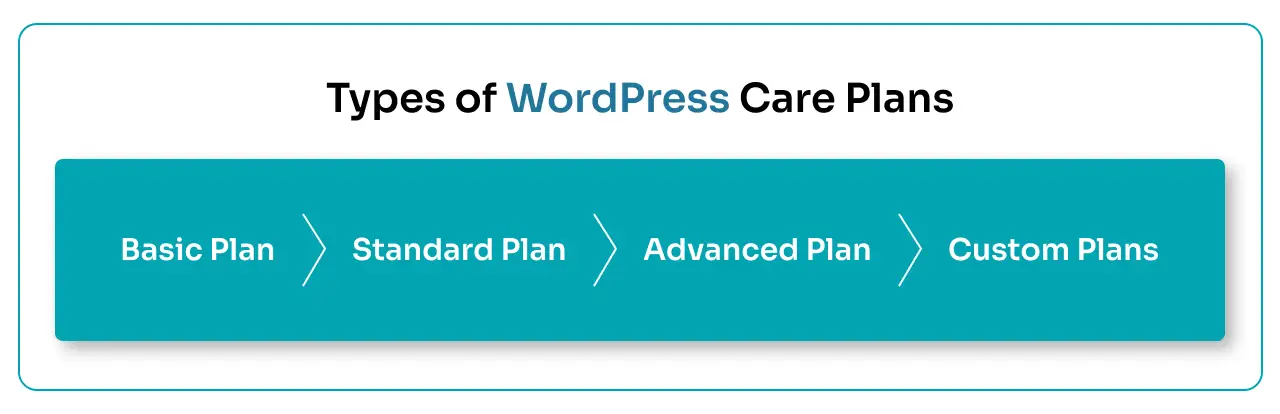
We at PSDtoHTMLNinja offer four different WordPress Care Plans tailored to meet the varying requirements of different businesses.
1. Basic Plan
Costs $98. Basic hosting, software updates, 24/7 security monitoring, regular backups, and 1 hour Consultation time.
2. Standard Plan
Costs $198/month. Premium hosting, SSL certificate, 3-hour Consultation time.
3. Advanced Plan
Costs $348/month. Premium development and hosting, 7-hour Consultation time, instant support.
4. Custom Plans
Custom plans designed to suit your immediate needs. Cost is decided based on the level of customization required.
WordPress Care Plan Pricing: How Much Does It Cost?
The ideal method of maintaining your WordPress website is by hiring a trained and reliable WordPress development company like PSDtoHTMLNinja. Typically, maintaining a WP site can cost somewhere between $30 and $500+ per month.
Here is a breakdown of what factors cost how much:
Website Hosting
The cost of hosting your website really hinges on factors like how much traffic you expect, the storage you need, and the level of performance you are aiming for.
If you are just starting, shared hosting can be a budget-friendly option, but if you want faster speeds and more reliability, managed or cloud hosting will come with a higher price tag.
SSL Certificate Costs
SSL certificates are a must-have for keeping your website secure and building trust with your users. While basic SSL certificates are often bundled into care plans, more advanced options like wildcard SSLs can add a bit to your monthly expenses.
Performance Upgrade Cost
When it comes to performance optimization, think caching, image compression, database tweaks, and CDN integration. These enhancements can really boost your page load speed and overall user experience, which is why they often come with mid- to higher-tier pricing.
Security Monitoring & Malware Protection
Investing in continuous security monitoring, setting up firewalls, scanning for malware, and having quick threat resolution can raise your costs, but they play a crucial role in minimizing the risk of cyberattacks.
Updates & Backups
Keeping your core, theme, and plugins updated regularly, along with automated backups, is key to maintaining website stability and protecting your data. Typically, these services are included in all care plan tiers.
Technical Support & Fixes
If you opt for higher-priced plans, you will often get priority support, bug fixes, and assistance with small development tasks, making them perfect for growing websites or those that are critical to your business.
Read this: How Much Does WordPress Maintenance Cost?
WordPress Care Plan vs One-Time Maintenance Services
Businesses can choose between a WordPress Care Plan and a One-time maintenance service. Both are viable options for different scenarios. However, let us look at it in more detail:
WordPress Care Plan
It is a subscription service that keeps your WordPress website in tip-top shape. Think of it as a safety net that covers everything from regular updates and security checks to backups, performance tweaks, and tech support.
Since WordPress is always evolving with updates to its core files, plugins, and themes, having a care plan means your site remains secure and compatible. This proactive strategy helps you dodge downtime, fend off cyber threats, and tackle performance hiccups before they can affect your business.
One-time Maintenance Service
One-time maintenance services are used when you need to address a specific problem, like getting rid of malware, resolving plugin conflicts, fixing site crashes, or improving performance.
While these services can definitely help with immediate issues, they lack the ongoing monitoring and long-term protection that a care plan offers. So, if you skip regular maintenance, you might find yourself facing the same problems over and over again.
Which One Should You Choose?
If your website is essential for bringing in leads, driving sales, or boosting your brand's visibility, then opting for a professional WordPress care plan is definitely the way to go.
Sure, one-time maintenance might suffice for tiny or infrequently updated sites, but when it comes to ensuring long-term stability, security, and performance, ongoing WordPress maintenance services offer way more value.
How to Choose the Right WordPress Care Plan
Selecting the right WordPress care plan is crucial for your website to remain scalable, secure, and fast. It is necessary to give your website the care and maintenance it needs; hence, choosing an appropriate care plan is non-negotiable.
Here is a checklist to follow while finalizing a WP Care Plan for your website:
Website Size
Analyze your website to determine the amount of work required for its maintenance. The number of web pages and coding complexity not only help you find the right plan but also allow you to create a solid budget.
Online Traffic Volume
Websites with a large traffic volume need continuous monitoring. Large website owners should select a plan designed specifically to handle a heavy website load.
Required Updates
Regular WordPress core, plugin, and theme updates are vital for a top-level website performance. Choose a plan that offers regular updates covering all essential aspects.
Support Expectations
Audit your website and check its condition. This helps in determining if you will need frequent technical support, and then finalizing the plan accordingly.
Site Functionality Optimization
Assess the core performance of your website. Based on the findings, select a plan that includes improving the loading speed, caching implementation, server optimization, and front-end optimization.
Backup Frequency
Backup frequency is determined by the number of times your website and its content are updated. It is safe to buy a care plan that covers large and regular backups so that all the website data remains saved on the servers.
Security Levels
Some websites require a higher security level, while others can do well with moderate protection. Businesses handling sensitive information should always go for plans that prioritize website security and conduct regular malware scans.
Common WordPress Care Plan Mistakes to Avoid
Since you are choosing a WordPress care plan for the first time, you may encounter some challenges. Let us have a look:
Ignoring Update Frequency
How many updates are too many updates? The answer is as many as possible. Never buy a plan with 1 or 2 updates. This might save you money, but the website maintenance will become limited, affecting the overall performance.
Recovery and Backup
Many clients forget to include recovery and off-site backups. To ensure you don’t make that mistake, always invest in a plan that covers backups at least every week.
Security Monitoring
Ignoring security monitoring is the biggest mistake you can make. Ensure your package includes the security monitoring service to detect malware and data threats.
Conclusion
Choosing the best WordPress care plan is ideal if you want your website to stay secure and functional. From small and mid-sized businesses to large-scale eCommerce enterprises or simple publishing websites, maintenance remains crucial.
If you’re looking for a reliable WordPress website care plan, PSDtoHTMLNinja offers scalable solutions backed by experienced developers. Get in touch to choose the right care plan for your business.

Frequently Asked Questions About WordPress Care Plans
What services are included in a WordPress Care Plan?
A WordPress care plan typically includes regular WordPress core, theme, and plugin updates, website backups, security monitoring, performance optimization, uptime monitoring, and technical support. Most providers also offer customization options based on your business requirements.
How much does a WordPress Care Plan cost?
The cost of a WordPress care plan depends on your website’s size, complexity, traffic, and support needs. Basic plans usually start at a lower monthly cost, while advanced or custom WordPress care packages are priced higher based on the level of service required.
Is a WordPress Care Plan suitable for small businesses?
Yes. A WordPress care plan is ideal for small businesses that don’t have an in-house technical team. It ensures ongoing website maintenance, security, and performance optimization while allowing business owners to focus on growth.
How many backups are included in a WordPress Care Package?
Backup frequency varies by plan. Basic WordPress care plans usually include scheduled backups, while advanced plans offer daily backups and faster restore options for mission-critical websites.
Can a WordPress Care Plan improve website performance and SEO rankings?
Yes. Regular updates, performance optimization, database cleanup, and uptime monitoring help improve page load speed, user experience, and website stability—factors that contribute positively to SEO performance.

Jayveer Ker serves as the Business Development Manager at PSDtoHTMLNinja.com, specializing in assisting organizations with overcoming web development hurdles. His insightful and informative posts deliver practical solutions and valuable insights.
Couldn't find what you were looking for?
Let us know how we can help!

Related Blog Posts