Table of Content
Web developers require the assistance of interactive UI designs to create a solid website or application. Figma to react conversion is a renowned method adopted by professional web developers. It helps in turning the design into reality with the precision and power of React.
Developers have to spend several days developing a responsive and highly efficient web solution. However, proper investment in Figma to react service gives a high-end and fast loading solution in a limited time. Figma and React both are premium pioneers in their specific industries. From creating progressive web applications to E-commerce websites and social media applications, React framework creates user-centric platforms based on your Figma design.
Interested in knowing more about the marvel of Figma to React? Keep reading this Figma to React guide for valuable information.
Brief introduction of Figma and React
Figma to React helps in a faster launch of the web solution. This is the reason developers preferably use Figma and React in completing their web development projects. Before we move forward, let us better understand what Figma and React are.
What is Figma?
Figma is a design tool that helps in creating interactive user interfaces, wireframes, and prototypes. It offers a real-time collaboration feature where multiple designers can simultaneously view and work on the same design. This saves time and reduces continuous back and forth. Here are some additional features of Figma:
- Cloud-based work space
- UI/UX designing tools
- Vector graphics editor
What is React?
React is a web development framework that helps in developing attractive user interfaces. It creates reusable UI components, which make the development process quick and easy for developers. React is part of the JavaScript library and it uses Virtual DOM that helps in creating web applications faster. Here are the top attributes of React:
- Web and mobile app development
- Debugging tools
- Unidirectional flow of data
Why prefer React for web development?
You must be wondering why React should be preferred over its other counterparts like Vue.js and Angular. The biggest reason is React's ability of unidirectional data flow. This makes debugging the errors a simple task by helping the developers nest child components within parent components. Since the data flows in a single direction, it becomes easier to find where a problem occurs in an application whenever an error or bug arises. Other aspects that make React the top choice of web developers include:
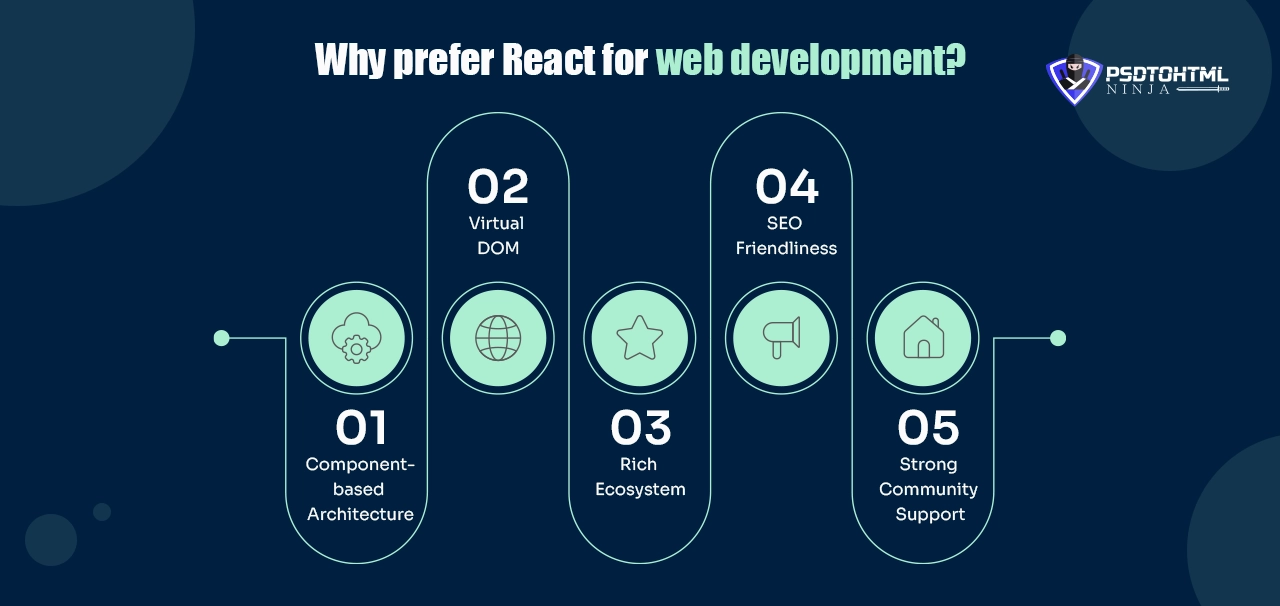
Component-based Architecture
The component-based architecture of React enables developers to develop reusable components and this reduces the effort required to create an application as well as making sure that applications developed are always consistent.
Virtual DOM
Virtual DOM implemented in React updates only the necessary parts of the interface that contributes to the improvement of app performance. Developers can make changes to specific segments without changing the overall interface.
Rich Ecosystem
Rich in libraries and tools, React makes development as smooth as possible while still supporting the application with various features.
SEO Friendliness
React facilitates server side rendering which helps a website rank better in internet search engines by complying with SEO standards.
Strong Community Support
React offers a wide and active community with many different resources, plugins and solutions that can improve the work of developers.
Read this: Figma to WordPress: Top 3 Ways to Convert Your Figma Design into a WordPress Website
Setting up the environment for Figma to React
Before beginning the conversion process, certain resources are required. Web developers should first set up the environment to initiate the conversion of Figma to react. You would need the following resources:
Fully completed and consistent design in Figma.
A code editor for editing the HTML, JavaScript, and CSS code.
Step-by-Step Method of converting Figma to React code
Expert web developers follow the following steps to convert their Figma designs to responsive React code:

Step 1: Create a Figma Design
The initial step is to create an intuitive design in the Figma app. This is where the designers use their creativity and expertise to produce a user-friendly web design. Figma provides multiple tools to help designers get their desired products.
Step 2: Design Analysis
Since we are focusing on the manual conversion method, the developer should carefully assess the figma design to create a roadmap for the conversion process. Project timeline, client expectations, and design components like images, graphics, etc. are considered at this stage.
Step 3: Setting Up The React Project
For this you would need a JavaScript build tool that will help in creating the React project for your design. The developer will then get a well-established environment for routing and styling. You can also delete the unnecessary files from the template that are not required for your project.
Step 4: File Structure For The Project
The project files would need to be organized in a proper format so the resources can be used instantly whenever the need arises. Separate folders should be created for components, assets, and other required utilities.
Step 5: Installing The Required Libraries
The developer then needs to install all the libraries necessary for the conversion process. Having the libraries at your disposal ensures the project is completed on time.
Step 6: Create React Components
During this step, the Figma design is then divided into various, independent React components. Any icon, headers or body is transformed into an individualistic functional or class based component of the design. This gives scalability and ease of updating when the need arises because the application is divided into several small parts. With help of state and props, React provides an effective way to deal with dynamic functions while reusing the components, instead of copying their codes all over the application.
Step 7: Work On Stylesheets
After the components have been made, it becomes very important to style them so that they match the design from Figma. This adds additional visual appeal and functionality to the code. After this media queries are used to make the application look responsive by balancing between handheld and high-resolution devices. This stage guarantees the accurate conversion of all the layout designs leading to a web project that is the exact replica of the figma file.
Step 8: Testing
In testing, thorough analysis is done to identify faults and inconsistencies. There is unit testing, which aims at checking each component separately and integration testing, which checks how the components combine. This process is facilitated with various high-level tools. Conducting resiliency-checking, functionality, and cross-browser compatibility are other important tests that are done to ensure a smooth user interface.
Step 9: Deployment
The last step involves deploying the React application or web solution on platforms or servers. This is done after it passes all the functionality tests. The deployed project is thoroughly checked and analyzed for a specific time to fix any issues that may arise after deployment.
Benefits of Figma to React conversion
There are numerous reasons that compel web developers across the world to adopt Figma to React conversion method. Have a look at the top benefits of converting Figma designs to React:
High-speed Web Solutions
Whether you are creating a PWA or a simple mobile app, React maintains a fast loading speed. By converting your Figma design to a React code, you ensure a highly responsive web solution that loads with a thunderbolt speed.
Pixel-Perfect Conversion
React makes developers able to code as per the designs provided in Figma so that the actual render of an application looks like the given design illustration. This delivers an improved overall user experience and ensures adherence to brand identity.
How long does it take to convert Figma to React code?
The timeline of completing a Figma to React project varies differently. It depends on multiple factors:
File Size
The size of your Figma design largely determines the total time it will take to convert that design into a fully responsive React code.
Team Size
Another factor to consider here is the size of the development team that will work on your project. This is why you should always hire a service provider who has a team of skilled experts.
Conversion Method
The conversion method adopted by the developer is yet another factor that affects the project delivery timeline. A conversion process completed using a Figma plugin will be completed faster than the manual method.
How to create responsive web solutions with Figma to React?
Though Figma to React is a professional method of attaining guaranteed pixel-perfect conversion, service providers have to be mindful of certain things to create responsive web solutions:
#1. Prioritize Responsiveness
The process starts in Figma, where designers export designs that are responsive to the different devices. One of the beneficial features of Figma is a responsive grid and auto-layout; these options allow developers to see how accomplished designs will look and behave across different screen sizes. Using this feature helps in creating responsive solutions using the conversion process.
#2. Make The Best Use Of React Components
React components are highly flexible. They can be easily adjusted to different resolutions, screen sizes, and devices. Web developers should leverage this aspect of Figma to React service for developing responsive web solutions.
#3. Use Different Libraries
Figma offers numerous libraries that developers and designers can use to add layers and consistency to their project. Using these libraries not only expedites the conversion process but also gives a direction to your web solution.
Manual vs Plugin-Based Conversion
Manual Process:
- Designers export assets
- Developers recreate layout with JSX + CSS
- Precise but time-consuming
Plugin-Based Automation:
- Tools like Visual Copilot auto-generate React code
- Useful for rapid prototyping
- Requires clean design hierarchy in Figma
Cons:
- Messy and deeply nested code
- Inline styles (bad for scaling)
- Limited support for props/state management
- No API integration or logic handling
Why Manual Coding Wins:
While Figma plugins like Visual Copilot and Anima can generate React code quickly, the results are rarely optimized for production. Auto-generated code often includes:
- Deeply nested divs
- Inline styles instead of reusable classes
- Lack of semantic structure
By contrast, manual React coding ensures:
- Clean architecture (functional components)
- Reusability and modularity
- Custom integrations (Redux, APIs, Tailwind, etc.)
- Long-term maintainability
Also read: How to Convert Adobe XD Design to WordPress Website?
How PSDtoHTMLNinja Helps You Convert Figma to React Code
PSDtoHTMLNinja is a leading Figma to React conversion company that has been serving the clients of different industries for over a decade. We not only deliver timely web solutions but also ensure interactive UI designs that keep your audience hooked. Here is what makes us your go-to conversion service provider:

1. Skilled React Developers
Our web development team consists of highly skilled React developers who have spent years working on multiple complex projects. They understand the various intricacies associated with the conversion process and promise to deliver the project before time.
2. Adequate Resources
We have access to advanced technologies and premium resources that assist our conversion team throughout. Our team employs these resources to deliver quality solutions that meet your expectations.
3. Kick off Call
Being an industry pioneer, we take our work very seriously. We align a separate call with you and our web development team to clearly reiterate your expectations and set a bar for them.
4. Simple Booking Process
We offer a seamless process of placing your order. All you need to do is visit our order placement page, fill out some basic details, and our team gets in touch with you for further assistance.

FAQs
What is Figma to React?
It’s the process of turning a UI design created in Figma into functional React components. This includes exporting assets, creating reusable JSX components, applying styles, and making the layout responsive.
Can I use Figma plugins to convert to React automatically?
Yes, some plugins generate React code from Figma designs. However, they often produce unoptimized, non-semantic code that’s hard to maintain. For scalable applications, manual coding by experienced developers is recommended.
Why should I convert Figma designs to React manually?
Manual conversion ensures clean architecture, accessibility, responsiveness, and integration readiness. It also gives developers full control over performance and scalability.
How long does it take to convert a Figma design to React?
On average, a 5–10 page UI takes 3–5 days to convert manually, depending on complexity, responsiveness, and logic requirements.
What technologies do you use alongside React?
We commonly use Tailwind CSS, Bootstrap, Next.js, Redux, and REST/GraphQL APIs — depending on the project’s goals.
Do I need to provide a fully structured Figma file?
While a well-organized Figma file speeds up development, our team can work with various file conditions. We’ll review, suggest improvements, and structure components efficiently as part of our custom React development services.
Key Takeaways
Figma to React code is one of the efficient and highly beneficial methods of getting functional web solutions from Figma designs. The process ensures pixel-perfect conversion of interactive UI designs in an accelerated manner. Experts are always experimenting with different methods of getting the work done on time, but it is always wise to rely on the manual method.

As a seasoned techno-management professional with extensive experience across diverse industry verticals and geographies, I have primarily excelled in a sales capacity, guiding large enterprises through their technology adoption and digital transformation journeys.
Couldn't find what you were looking for?
Let us know how we can help!

Related Blog Posts
How to Convert Your Figma Design into Pixel-Perfect HTML Code – The Ultimate Guide