Table of Content
PrestaShop to Shopify migration means moving your products, customers, orders, content, and SEO URLs from PrestaShop to Shopify without losing data or rankings. This guide covers the full step-by-step process, SEO-safe migration, cost, timeline, common challenges, and a checklist to help you migrate smoothly.
Are you planning to migrate your store from PrestaShop to Shopify in 2026?
Moving to a more advanced ecommerce platform is a smart move for businesses looking to improve scalability, security, performance, and day-to-day store management. This comprehensive guide walks you through every stage of the migration process, plus the practical details that make the transition to Shopify smooth and low-risk.
In this guide, you will gain deep insights into:
- Pre-migration planning
- PrestaShop and Shopify platform comparison
- Creating data backups
- SEO maintenance
- Common challenges throughout the migration process
- Checklist to follow for a smooth Shopify migration
- PrestaShop to Shopify migration cost & timeline
What Is PrestaShop to Shopify Migration?
PrestaShop to Shopify migration is the process of transferring your online store from PrestaShop to Shopify. The process involves securely moving all the website data, forms, product details, and other information to the Shopify platform while ensuring minimum downtime and zero data loss.
Below are the key elements of this migration process. We will discuss these in detail later in the blog:
- Product Data Transfer: Migrating product titles, descriptions, images, variants, and pricing.
- Customer & Order Data Migration: Preserving customer accounts, order history, and transactional records.
- Theme & Design Setup: Rebuilding or customizing a Shopify theme to match brand identity.
- Payment & Shipping Configuration: Reconfiguring gateways, tax rules, and shipping settings.
- App & Integration Setup: Replacing PrestaShop modules with equivalent Shopify apps.
Why Businesses Migrate from PrestaShop to Shopify
PrestaShop is a flexible and open-source platform, but it has its own complexities and drawbacks, such as frequent maintenance and excessive technical work.
Shopify, on the other hand, is a better option for brands looking for a scalable platform that grows with their business. It offers:
- Complete hosting
- Easy navigation for users
- Fast loading speed
- 24/7 support
- Quick and easy integration of marketing tools
Businesses migrate from PrestaShop to Shopify for:
- Fast loading web pages and product details
- Easy maintenance with automated updates
- Streamlined and flawless integration with email and other tools
- Very easy to use for non-technical teams

PrestaShop vs Shopify: Platform Comparison
What Data Can Be Migrated from PrestaShop to Shopify?
PrestaShop to Shopify migration is a thorough process that allows you to transfer pretty much everything. We have compiled a detailed list of data, information, and entities that can be moved during the e-commerce platform migration.
- Product details, images, graphics, etc.
- Customer details, payment details, and account information
- Order history, shipping details, order status, transaction details
- Reviews and ratings of products
- Meta titles, meta descriptions, and the SEO data
- Blog posts, categories, and other media files
Also Read: How to Migrate Your WordPress Website to Shopify
How to Migrate PrestaShop to Shopify: Step-by-Step (2026)
Migrating from PrestaShop to Shopify is straightforward, but it requires precision to ensure complete and accurate data transfer. All essential files, SEO data, and order details should be successfully migrated to the Shopify platform for a smooth transition.
Even a minor miss can affect the functioning of your website. Issues like broken links and wrong backlinks can affect the online traffic. Hence, following a professional step-by-step PrestaShop to Shopify migration process is recommended.
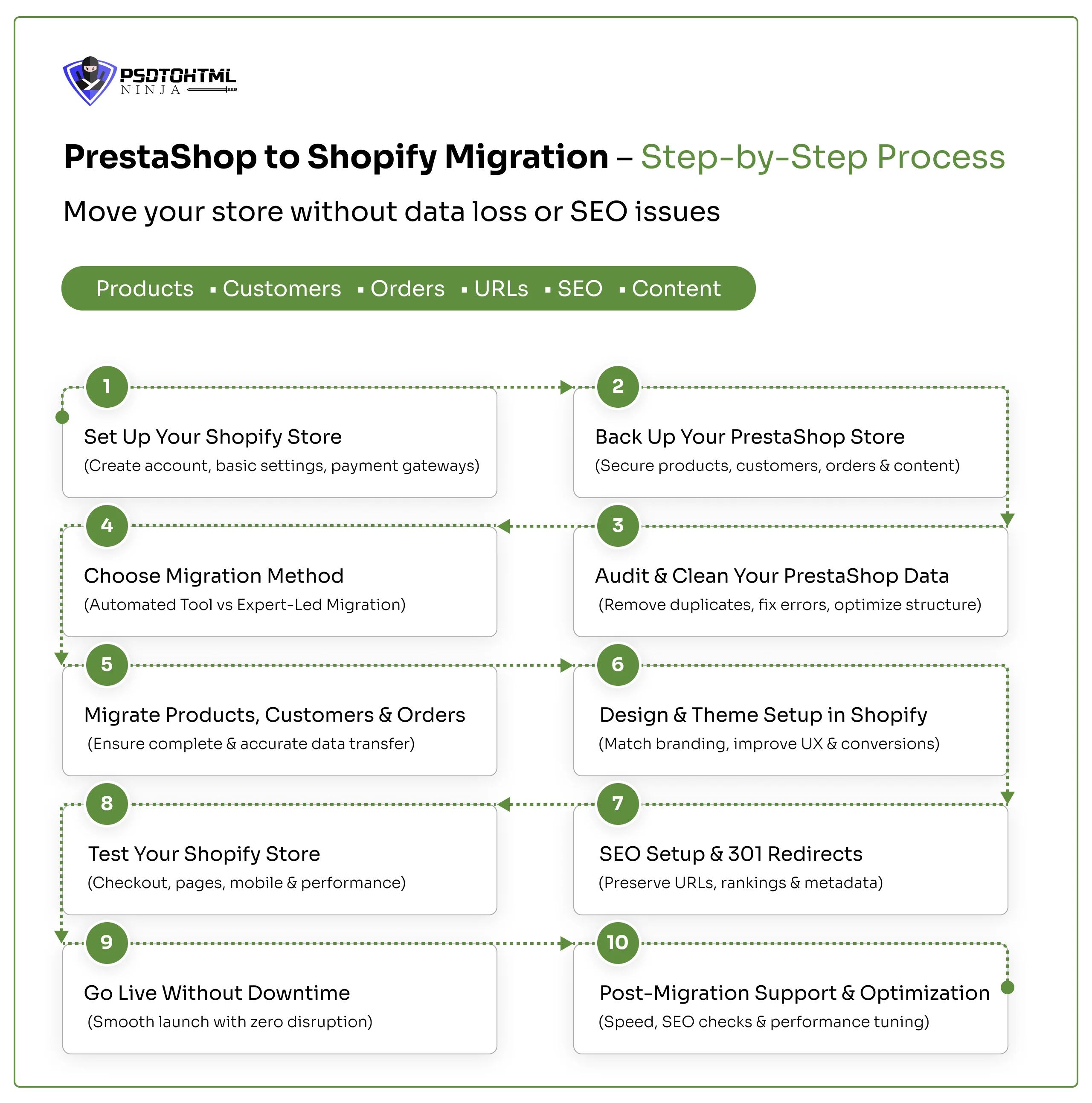
Step 1: Set Up Your Shopify Store
- Go to ‘Shopify.com’ and set up your account
- Set all the details like Store name, industry, and preferences
- Click on Settings > Configure:
→ Business information
→ Store location, currency, and language
→ Shipping zones
→ Payment gateways
Step 2: Back Up Your PrestaShop Store
Before you begin the Shopify store migration, it is crucial to create a secure backup of all the PrestaShop data. This includes:
- Export the complete database from PrestaShop.
- Download all the media files, including images, graphics, documents, etc.
- Export all orders and products as CSV and XML files for local backup.
Step 3: Audit & Clean Your PrestaShop Data
Once your backup is created, it is time to eliminate all the unnecessary data from your existing website. Conduct a detailed audit of the data and identify all the redundant information. Clean the backup files and identify the essential information that needs to be transferred.
Step 4: Choose Migration Method (Automated vs Expert-Led)
This step can be divided into two parts, based on the method you decide to choose for migration.
Automated method (using plugins):
- Download the plugin of your choice
- Configure the plugin
- Choose the source site (PrestaShop) and target site (Shopify)
- Enter all the required URLs
- Select all the entities and data you want to migrate
- Run a quick check
- Preview your migrated website
Expert-led Manual Method:
- Set up your Shopify store by going to ‘Shopify.com’ > Create Account > Select Plan
- Create a complete backup of your store.
- Import the data to Shopify.
→ Either use Shopify’s built-in tool or install third-party apps.
→ You can upload everything manually. - Set up collections and recreate the store structure
Whether you use the plugin method or hire a professional Shopify migration expert, the following steps should be followed for seamless migration results.
Step 5: Migrate Products, Customers & Orders
The next step is to migrate the products, customer details, and orders to the Shopify store.
Export data from PrestaShop (Though we covered this earlier, here is a step-by-step technical explanation for each category)
1. For Products
- Go to PrestaShop Back Office > Advanced Parameters > Database backup
- Click on Catalog > Products > Export data in CSV
- Check everything for accuracy
2. For Customers
- From the same dashboard, go to Customers
- Export Customer data in CSV
- Check all entries like first name, last name, address, email, etc.
3. For Orders
- From the same dashboard, go to Orders
- Export Order data in CSV
- Check all entries like Customer IDs, customer details, billing, purchased amount, etc.
Once all the data is backed up, check it thoroughly for any discrepancies.
Now migrate the data to Shopify.
1. For Products
- Go to Shopify Admin > Products > Import
- Upload the downloaded CSV file
- Review everything and confirm Import
2. For Customers
- Shopify Admin > Customers > Import
- Upload the final CSV file
- Confirm Import
3. Now follow the same steps for Orders
Step 6: Design & Theme Setup in Shopify
The next step in your Shopify store migration process is setting up the store design. Select a responsive theme from a design you like. You can choose anything from a Free theme or a premium one from the Shopify Theme Store.
Once the theme is installed:
- Customize the homepage layout, typography, and brand colors.
- Recreate essential pages such as About Us, Contact, FAQs, and Policy pages.
- Configure navigation menus and footer links.
- Set up collections to match your previous category structure.
- Optimize mobile responsiveness.
Step 7: SEO Setup & 301 Redirects
Keeping your SEO intact is of utmost importance. Since the URL structures are different on each platform, not setting up redirects can really hurt your traffic and rankings.
Here are some key steps to take:
- Revise your meta titles and descriptions if necessary.
- Set up 301 redirects from your old PrestaShop URLs to the new Shopify ones.
- Submit an updated XML sitemap to Google Search Console.
- Check your robots.txt settings to ensure they're correct.
- Keep your heading hierarchy in order (H1, H2, H3).
To manually add those 301 redirects, head over to Shopify Admin > Content > Menus > URL Redirects.
If you have a large store, consider using bulk redirect apps to make things easier. Getting your redirects right is crucial for maintaining your organic traffic and preventing any broken links.
Step 8: Test Your Shopify Store
We need to check and test every aspect of the migrated Shopify store before launching it on the servers. Here is what should be checked:
- Product pages and variant selection
- Add-to-cart and checkout process
- Payment gateway functionality (test mode)
- Shipping calculations
- Tax configuration
- Email notifications
- Mobile responsiveness
- Page speed performance
You can place dummy orders to check that the process moves smoothly.
Step 9: Go Live Without Downtime
- Connect the custom domain to Shopify
- Update DNS settings
- Schedule the domain switch during low-traffic hours
- Monitor traffic and website performance closely right after migration and launch
Step 10: Post-Migration Support & Optimization
Here are a few things to keep in check after migrating your PrestaShop store to Shopify:
- Monitor online traffic through Google Analytics
- Use Google Search Console for crawling errors
- Optimizing page speed
- Closely monitor cart performance
Must Read: How to Migrate from PrestaShop to WooCommerce: A Step-by-Step Guide
Additional PrestaShop to Shopify Migration Checklist
Apart from the core step-by-step methods, various technical aspects need to be considered to avoid last-minute errors.
This additional PrestaShop to Shopify migration checklist focuses on compliance and performance to prevent post-migration and post-launch issues.
Technical and functional checklist
- Check the details of product variants
- Confirm inventory tracking settings
- Add correct tax calculations for different tax regions
- Reinstall third-party integration tools post-migration
Compliance Setup
- Update Privacy Policy, Terms & Conditions, and Refund Policy pages.
- Ensure GDPR or regional compliance settings are configured.
- Enable cookie consent banners if required.
Performance Checks
- Images should be resized and compressed to avoid slowing down the website
- Test website loading speed
- Shopify’s built-in performance and caching features should be enabled
Common Challenges in PrestaShop to Shopify Store Migration
Migrating from PrestaShop to Shopify optimizes performance, leading to higher online traffic. But you should be aware of the common challenges that might occur during the process.
Having this information will keep you prepared, ensuring the process goes smoothly.
1. Incorrect URL Format
While moving from PrestaShop to Shopify, the URL format changes because both platforms follow different structures. Make sure that the new URLs are functional and lead to the right page.
2. Data Mapping
Essential data like product variants, category hierarchy, etc., should be checked because both platforms store information differently, and variations in data structure can cause errors.
3. Theme Limitations
The design of your Shopify store would be rebuilt because a PrestaShop design cannot be directly replicated in Shopify.
Automated vs Manual PrestaShop to Shopify Migration
PrestaShop to Shopify Migration Cost & Timeline
Why Choose PSDtoHTMLNinja for PrestaShop to Shopify Migration Service
Are you looking for a reliable partner to help you switch from PrestaShop to Shopify? We at PSDtoHTMLNinja have 14+ years of experience in Shopify migration. Our team focuses on developing a user-friendly, growth-focused, and SEO-driven Shopify store.
We offer specialized services for the custom Shopify development needs of businesses of different sizes.
Whether you want complete data preservation or wish to elevate your store’s functionality with advanced technologies, we are here to help.
Contact our support team for a free consultation call.
Final Words
Migrating from PrestaShop to Shopify gives your business an edge over the competitors. Shopify not only makes your store more functional and optimal but also ensures a smooth workflow that allows your team to easily navigate the different features.
Whether you own a small business or a large enterprise, Shopify stores meet all your requirements.
Hire a professional PrestaShop to Shopify migration agency for an error-free migration process with zero data loss.
FAQs
1. How long will it take to migrate from PrestaShop to Shopify?
The actual timeline will depend on your PrestaShop store, data size, backup requirements, and customization.
2. What is the cost of migrating PrestaShop to Shopify?
Costs for migrating from PrestaShop to Shopify vary depending on the project specifications and requirements. A service executive provides a fair quote after analyzing your migration needs.
3. What is the best way to move from PrestaShop to Shopify?
The ideal method is manual migration by a migration company. Their team of experts handles everything from scratch, enabling flawless migration.
4. How do you limit site downtime during migration?
We migrate your site during low-traffic hours to ensure the online traffic is not affected. Our team conducts multiple checks to ensure the site performance remains optimum post-migration.

Prince Jadiya holds the position of Chief Marketing Officer at Psdtohtmlninja.com, where he assists organizations in overcoming web development obstacles. He is also known for him informative and engaging blog posts.
Couldn't find what you were looking for?
Let us know how we can help!